Create New Business Email Address: Complete Guide 2026
May 22, 2026
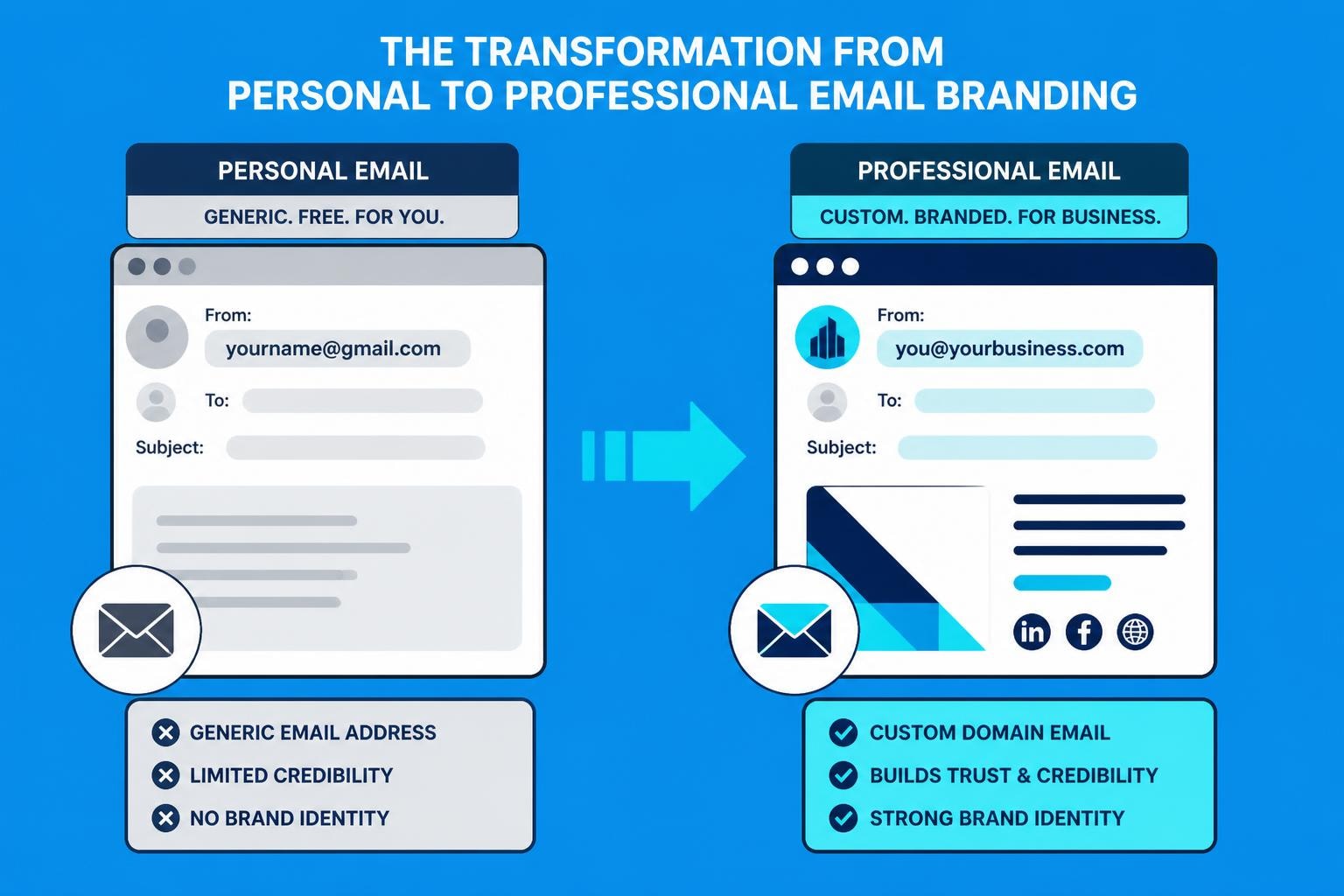
A professional email address represents the digital front door to your business. When potential customers, partners, or investors receive an email from your company, that address creates an immediate impression about your credibility and professionalism. Understanding how to create new business email address correctly ensures you establish trust from the very first interaction whilst supporting your marketing efforts and operational communication needs.
Why Your Business Needs a Professional Email Address
First impressions matter tremendously in business communications. A custom domain email address instantly elevates your brand perception compared to free consumer email services. When recipients see [email protected] rather than [email protected], they immediately recognise they're dealing with a legitimate organisation.
Beyond perception, professional email addresses offer practical advantages:
- Brand reinforcement with every message sent
- Enhanced security features including advanced spam filtering
- Better deliverability rates for marketing campaigns
- Centralised administration for team management
- Compliance capabilities for data protection regulations
Research from privacy-focused email studies demonstrates that consumers increasingly scrutinise email sender credentials before engaging with messages. Small businesses leveraging professional email infrastructure experience higher open rates and improved customer trust metrics.
Building Customer Confidence Through Email Professionalism
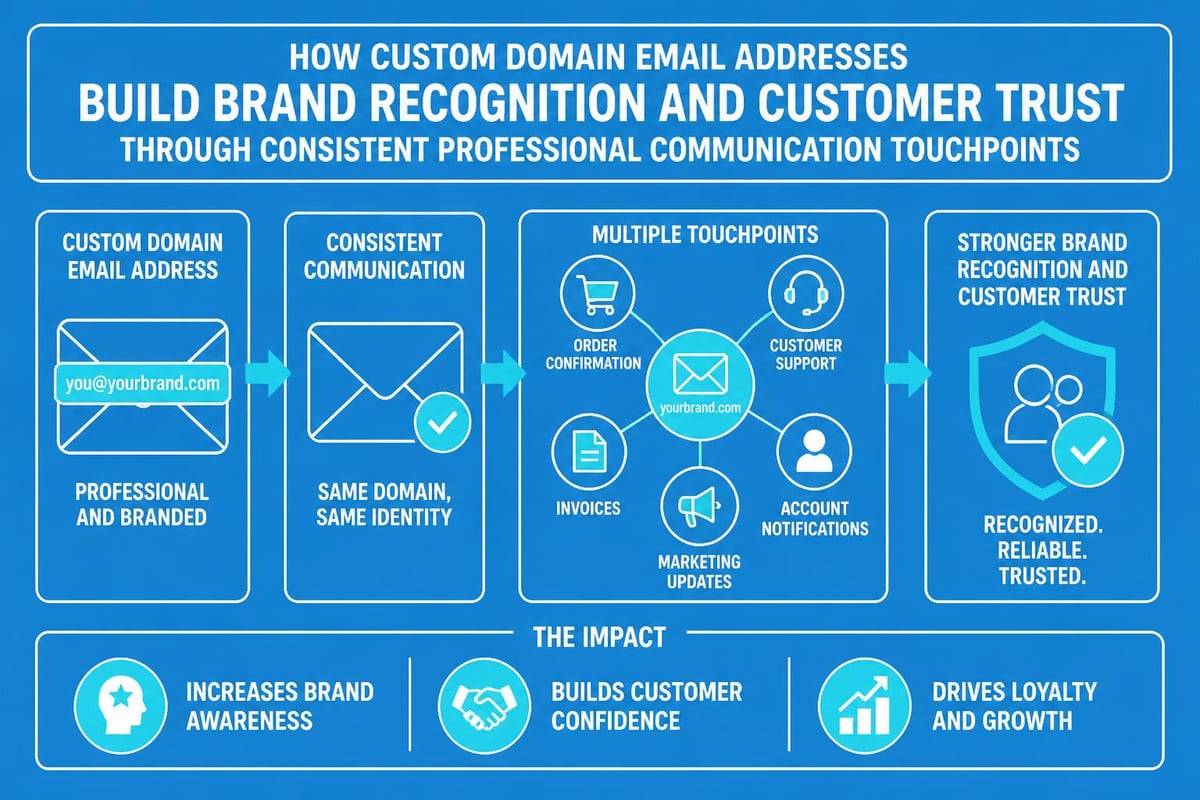
Your email domain serves as a constant reminder of your brand identity. Each correspondence reinforces your company name, making it easier for customers to remember and recommend your services. When you create new business email address using your domain, you're investing in marketing infrastructure that works continuously across every interaction.
Choosing the Right Email Platform for Small Businesses
The foundation of any business email system starts with selecting an appropriate platform. Different providers cater to varying business needs, budgets, and technical capabilities. Your choice impacts not only immediate functionality but also long-term scalability and integration possibilities.
| Platform Type | Best For | Starting Price | Key Features |
|---|---|---|---|
| Google Workspace | Collaboration-focused teams | £4.14/user/month | Gmail interface, Google Drive, Meet |
| Microsoft 365 | Existing Microsoft users | £3.80/user/month | Outlook, Teams, Office apps |
| Zoho Mail | Budget-conscious businesses | Free-£0.90/user/month | Clean interface, good storage |
| Custom Hosting | Technical control seekers | £2-10/month | Full customisation, cPanel access |
Google Workspace remains particularly popular amongst small businesses because creating a professional business email address integrates seamlessly with collaborative tools many teams already use. The familiar Gmail interface reduces training time whilst providing enterprise-grade security.
Evaluating Platform Features Against Business Requirements
Consider these critical factors when selecting your email platform:
- Storage capacity for current and projected email volumes
- Mobile accessibility for teams working remotely
- Integration capabilities with your CRM and marketing tools
- Support quality and response times
- Migration assistance from existing systems
For small businesses focused on email marketing, integration with platforms like Astonish Email ensures your transactional and marketing messages maintain consistent branding and deliverability standards. When you get a business email address, compatibility with your marketing stack should influence your decision.
Domain Registration and Email Configuration
Before you create new business email address, you need a registered domain name that represents your business identity. This domain becomes the foundation for all your professional email addresses and often matches your website URL.
Securing Your Business Domain Name
Domain registration typically costs £8-15 annually through registrars like Namecheap, GoDaddy, or Google Domains. Choose a name that's memorable, spell-able, and relevant to your business. Avoid hyphens, numbers, or unusual spellings that complicate verbal communication.
Domain extensions (.com, .co.uk, .net) carry different connotations. For UK-based businesses, a UK business email address using .co.uk demonstrates local presence whilst .com suggests international operations. Consider registering multiple extensions to protect your brand.
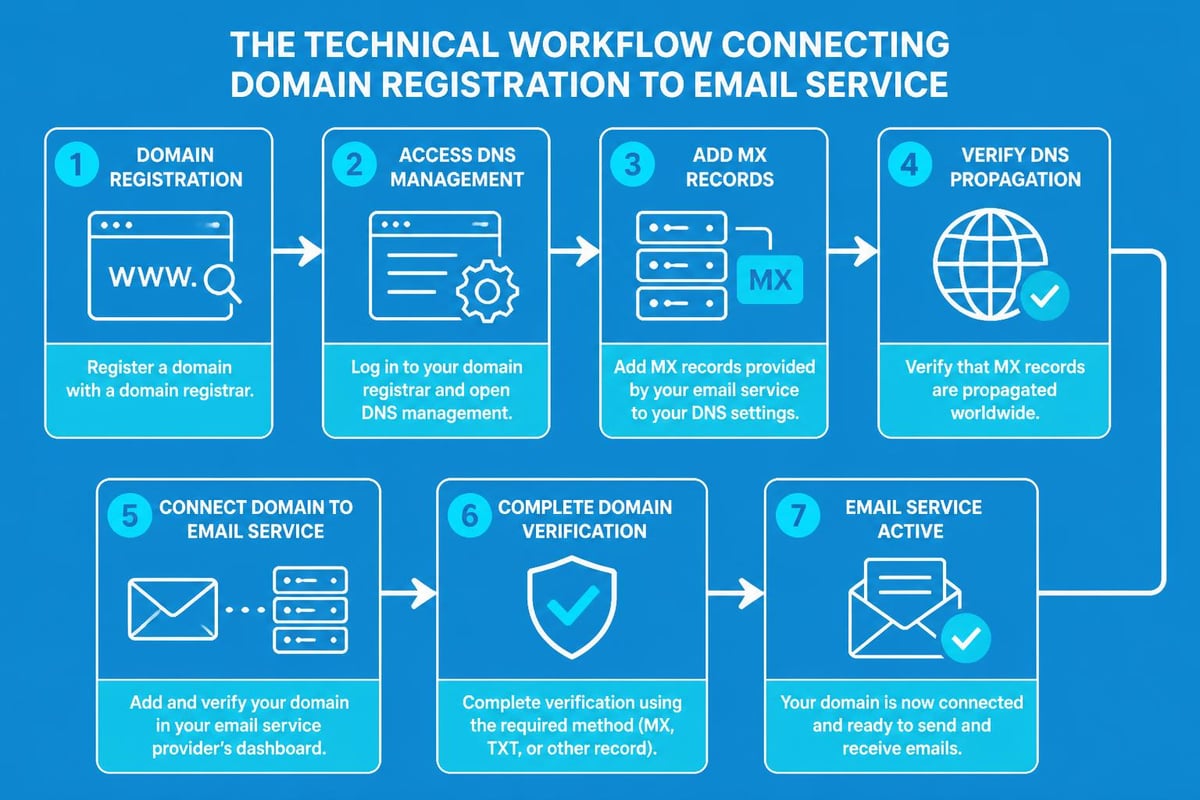
The technical process involves:
- Searching available domain names through a registrar
- Purchasing your chosen domain with contact details
- Configuring name servers to point to your email provider
- Verifying domain ownership through DNS records
- Setting up MX records for email routing
Connecting Your Domain to Email Services
MX (Mail Exchange) records tell the internet where to deliver emails sent to your domain. Each email provider supplies specific MX record values you must add through your domain registrar's DNS management interface. This technical step ensures messages reach your inbox rather than bouncing back to senders.
The configuration process typically takes 24-48 hours to propagate globally, though changes often become active within a few hours. During this period, test your setup by sending messages between your new business email and personal accounts.
Step-by-Step Process to Create New Business Email Address
Once your domain and platform are ready, the actual creation of email addresses follows a straightforward process. Most modern platforms provide intuitive interfaces that simplify what once required technical expertise.
Creating Your First Business Email Account
Following comprehensive setup guides ensures you don't miss critical configuration steps:
- Log into your email platform's admin console using credentials provided during signup
- Navigate to the users or accounts section where email creation occurs
- Click the add user or create account button to begin the process
- Enter the desired email prefix (the part before @yourdomain.com)
- Set a strong initial password meeting security requirements
- Configure user permissions and access levels based on role
- Add recovery contact information for account security
- Enable two-factor authentication to protect against unauthorised access
Google Workspace users create accounts through the Admin console, whilst Microsoft 365 uses the Microsoft 365 admin centre. The interface varies, but fundamental steps remain consistent across platforms.
Establishing Email Naming Conventions
Consistency in email address structure prevents confusion as your team grows. Common formats include:
- [email protected] (best for larger teams)
- [email protected] (suitable for smaller businesses)
- [email protected] (sales@, support@, info@)
- [email protected] (marketing.sarah@)
Role-based addresses like support@ or sales@ allow multiple team members to monitor a shared inbox, ensuring customer enquiries receive timely responses regardless of individual availability. When you send an email message from role-based addresses, recipients understand they're contacting a department rather than an individual.
Setting Up Email Aliases and Forwarding
Email aliases expand functionality without creating entirely separate accounts. An alias allows multiple email addresses to deliver messages to a single inbox, streamlining communication whilst maintaining professional appearances.
Strategic Uses for Email Aliases
Create aliases for:
- Department functions (billing@, enquiries@, careers@)
- Product-specific contacts (productname-support@)
- Event campaigns (webinar2026@, conference@)
- Alternative name spellings for team members
- Professional nicknames versus formal names
A single team member might monitor firstname.lastname@, nickname@, and department@ through one inbox. This approach reduces the number of accounts requiring management whilst ensuring all relevant messages reach the appropriate person.
Configuring Email Forwarding Rules
Forwarding automatically redirects messages from one address to another. This proves valuable when:
- Transitioning between team members handling specific roles
- Ensuring redundancy for critical customer-facing addresses
- Consolidating multiple legacy email addresses
- Routing specific types of enquiries to specialists
Most platforms allow conditional forwarding based on sender, subject line, or content. Advanced filtering ensures only relevant messages forward whilst others remain in the original inbox.
Security Configuration and Best Practices
Email security protects your business from phishing attacks, data breaches, and unauthorised access. When you create new business email address, implementing robust security measures should occur immediately rather than as an afterthought.
| Security Feature | Purpose | Implementation Difficulty |
|---|---|---|
| Two-Factor Authentication | Prevents unauthorised logins | Easy |
| SPF Records | Validates email sending sources | Moderate |
| DKIM Signatures | Authenticates message integrity | Moderate |
| DMARC Policies | Prevents domain spoofing | Advanced |
| Email Encryption | Protects message content | Easy-Moderate |
Essential Security Protocols
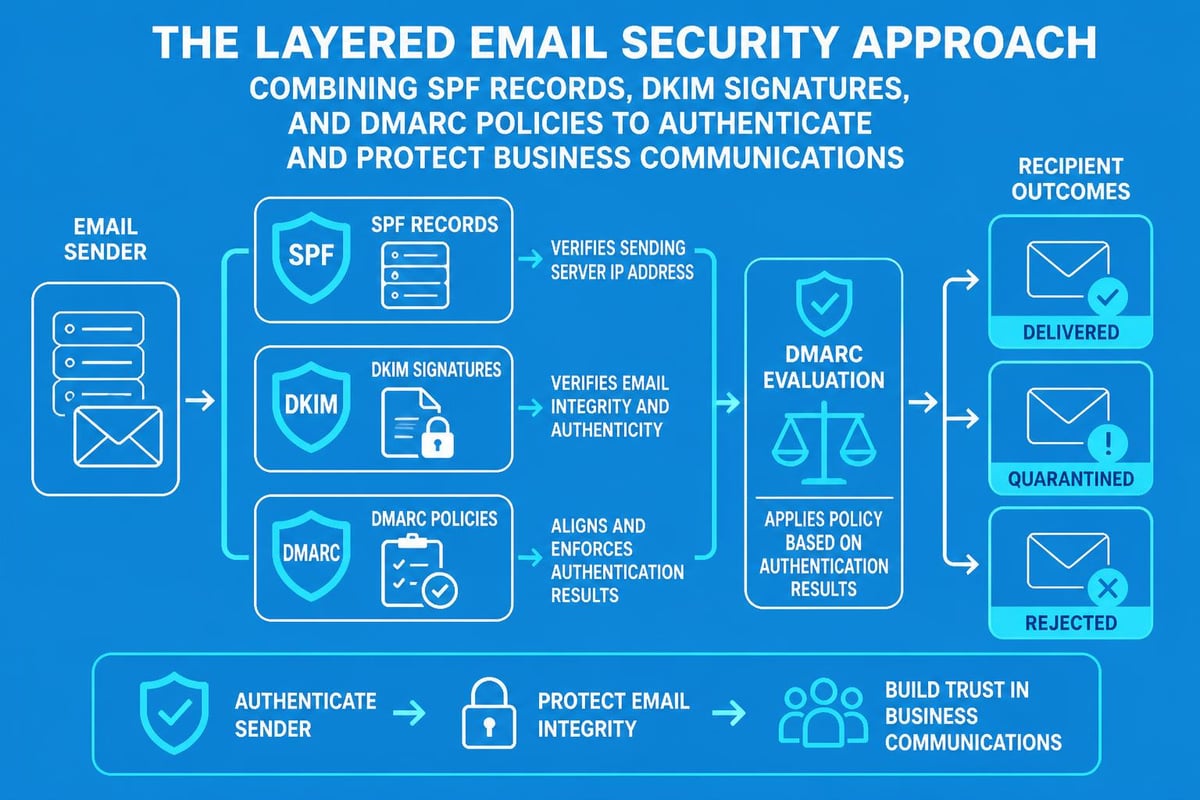
SPF (Sender Policy Framework) records specify which mail servers can send emails from your domain. This DNS entry prevents spammers from forging messages that appear to originate from your business. Creating SPF records involves adding a TXT record to your domain's DNS settings with authorised server information.
DKIM (DomainKeys Identified Mail) adds digital signatures to outgoing messages, allowing recipients to verify messages genuinely came from your domain. Combined with SPF, DKIM significantly improves deliverability rates whilst protecting your reputation.
DMARC (Domain-based Message Authentication, Reporting, and Conformance) builds upon SPF and DKIM by specifying how receiving servers should handle messages that fail authentication. Setting DMARC policies to "quarantine" or "reject" prevents fraudulent emails from reaching recipients.
Password Policies and Access Management
Implement organisation-wide password requirements:
- Minimum 12 characters combining letters, numbers, symbols
- No dictionary words or predictable patterns
- Unique passwords not reused across services
- Regular password rotation every 90 days
- Password manager usage encouraged
Two-factor authentication adds a crucial second verification step. Even if passwords become compromised, unauthorised users cannot access accounts without the second factor (typically a code from an authentication app or SMS message).
Mobile Configuration and Cross-Device Access
Modern business communication demands seamless access across devices. Team members need to check emails from office computers, personal laptops, tablets, and smartphones without compromising security or functionality.
Configuring Business Email on Mobile Devices
Most email platforms provide dedicated mobile apps offering superior functionality compared to generic mail clients:
- Google Workspace users install Gmail app for Android/iOS
- Microsoft 365 subscribers use Outlook mobile app
- Third-party platforms often provide branded mobile applications
Native apps automatically configure connection settings, sync contacts and calendars, and enable push notifications. Manual configuration through IMAP/SMTP settings offers flexibility but requires technical knowledge of server addresses and port numbers.
Maintaining Security on Mobile Devices
Mobile access introduces additional security considerations:
- Require device passwords or biometric authentication before accessing email apps
- Enable remote wipe capabilities for lost or stolen devices
- Restrict data synchronisation to company-approved applications
- Use containerisation separating business and personal data
- Implement mobile device management (MDM) for larger teams
When configuring how to send email message functionality on mobile devices, balance convenience with security requirements appropriate for your business's data sensitivity.
Email Signature and Branding Standards
Professional email signatures reinforce brand identity whilst providing recipients with essential contact information. When you create new business email address, establishing signature standards ensures consistency across all team communications.
Components of Effective Email Signatures
A well-structured signature includes:
- Full name and job title
- Company name with logo (optimised for email)
- Direct phone number and extension
- Company website URL
- Professional social media profiles (LinkedIn primarily)
- Optional: Company tagline or latest promotion
Avoid cluttering signatures with excessive images, animated GIFs, or lengthy legal disclaimers. Mobile users particularly appreciate concise signatures that don't dominate small screens. Most platforms provide signature templates supporting HTML formatting for professional presentation.
Legal and Compliance Considerations
UK businesses must consider email signature compliance requirements:
- Company registration details for limited companies (optional but recommended)
- VAT registration number if applicable
- Data protection notices referencing privacy policies
- Unsubscribe options for marketing communications
Marketing emails sent through platforms like Astonish Email require clear sender identification and straightforward unsubscribe mechanisms under UK GDPR regulations. Even transactional emails benefit from professional signatures establishing credibility.
Integration with Marketing and CRM Systems
Email addresses serve as more than communication tools-they're critical identifiers within your broader business technology ecosystem. Proper integration maximises operational efficiency whilst maintaining data consistency.
Connecting Email to Customer Relationship Management
Modern CRM platforms like Salesforce, HubSpot, or Zoho CRM synchronise with business email systems to:
- Automatically log customer communications within contact records
- Track email open and click rates for sales follow-up prioritisation
- Trigger automated workflows based on email interactions
- Maintain unified customer communication history
This integration eliminates manual data entry whilst ensuring sales and support teams access complete customer interaction context. When evaluating business email sign up options, verify compatibility with your existing or planned CRM infrastructure.
Email Marketing Platform Integration
Transactional emails (order confirmations, password resets, account notifications) should originate from your business domain even when sent through marketing platforms. This consistency reinforces brand recognition whilst improving deliverability through proper authentication.
Quality email marketing services support:
- Custom sender domains matching your business email
- Dedicated IP addresses for larger senders
- Authentication record configuration (SPF, DKIM, DMARC)
- Deliverability monitoring and optimisation
- Compliance management for various regulations
Understanding methods to find business emails for prospecting whilst maintaining your own professional infrastructure creates a comprehensive communication strategy.
Managing Multiple Email Accounts and Delegation
Growing businesses require sophisticated email management beyond individual inboxes. Shared mailboxes, delegation permissions, and hierarchical access ensure efficient communication handling as teams expand.
Shared Mailbox Configuration
Shared mailboxes allow multiple team members to send and receive emails from a common address without sharing passwords. Typical applications include:
- Customer support queues (support@, help@)
- Sales enquiry management (sales@, info@)
- Department communications (hr@, finance@)
- Project-specific coordination (projectname@)
Team members access shared mailboxes through their own credentials whilst maintaining individual accountability for sent messages. Most platforms track which user sent each message from the shared address, supporting quality control and training purposes.
Delegation and Access Permissions
Email delegation grants one user permission to read, send, or manage another user's mailbox. This proves valuable for:
- Executive assistants managing director communications
- Team leaders monitoring departmental correspondence
- Cross-training during employee absences
- Supervisors reviewing customer-facing communications
Configure delegation permissions carefully, granting minimum necessary access to protect sensitive information. Regular audits ensure permissions remain appropriate as roles and responsibilities evolve.
Ongoing Maintenance and Performance Monitoring
Creating business email addresses represents the beginning rather than the conclusion of email infrastructure management. Ongoing attention ensures optimal performance, security, and user satisfaction.
Regular Security Audits
Quarterly security reviews should assess:
- Active user accounts versus current employees
- Permission levels appropriateness
- Password policy compliance
- Authentication record accuracy
- Suspicious login activity patterns
Promptly disable accounts for departed employees whilst archiving their communications according to retention policies. Former employee emails often contain valuable business information requiring preservation beyond employment tenure.
Deliverability Monitoring and Optimisation
Track key email performance metrics:
| Metric | Healthy Range | Concerns Indicated By |
|---|---|---|
| Delivery Rate | >95% | Technical configuration issues |
| Spam Complaint Rate | <0.1% | Content quality problems |
| Bounce Rate | <5% | List hygiene needs |
| Engagement Rate | Varies by industry | Relevance and targeting |
Poor deliverability damages business reputation and wastes marketing investments. Tools like Google Postmaster provide domain reputation insights whilst platform-specific analytics identify specific issues requiring attention. When learning to test email clients, include deliverability verification across major providers.
Training Team Members on Email Best Practices
Technical infrastructure alone doesn't guarantee effective business communication. Team training ensures everyone leverages email capabilities professionally whilst avoiding common pitfalls that damage reputation or productivity.
Professional Communication Standards
According to expert communication guidance, effective business emails share common characteristics:
- Clear, specific subject lines describing email content
- Professional greetings appropriate to relationship formality
- Concise body text focusing on single topics
- Explicit calls-to-action when responses are required
- Professional closings with complete signatures
Encourage team members to review emails before sending, particularly for important client communications or sensitive topics. The few seconds spent proofreading prevent misunderstandings requiring lengthy clarification exchanges.
Email Etiquette and Response Expectations
Establish organisation-wide standards for:
- Response timeframes for different email categories
- Out-of-office message requirements during absences
- CC and BCC usage protocols
- File attachment size limits and alternatives
- Internal versus external communication tone differences
Teams performing well with email business communications typically document these expectations in employee handbooks whilst providing periodic refresher training. Consistency in email handling contributes significantly to customer satisfaction and professional reputation.
Cost Considerations and Budget Planning
Understanding the total cost of business email infrastructure helps small businesses budget appropriately whilst avoiding unexpected expenses. Beyond obvious subscription fees, consider hidden costs affecting long-term ownership.
Direct Email Platform Costs
Monthly or annual subscription fees vary based on:
- Number of users requiring email addresses
- Storage capacity per user and organisation-wide
- Feature tier (basic, business, enterprise)
- Contract length (monthly flexibility versus annual discounts)
Most platforms offer volume discounts starting at 10-20 users. Annual prepayment typically provides 10-20% savings compared to monthly billing. When reviewing Astonish Email plans, compare total annual costs rather than monthly figures for accurate budgeting.
Hidden and Indirect Costs
Budget for these additional expenses:
- Domain registration and renewal fees
- SSL certificates for secure connections
- Advanced security add-ons (backup, archiving, encryption)
- Migration assistance from previous systems
- Training time for team members
- IT support for configuration and troubleshooting
Platform switching carries significant costs beyond new subscriptions. Migration complexity, potential data loss risks, and user retraining justify careful initial platform selection rather than frequent changes.
Scaling Email Infrastructure as Your Business Grows
Today's five-person startup may become next year's fifty-employee organisation. When you create new business email address systems, build foundations supporting growth without requiring complete infrastructure replacement.
Planning for User Growth
Consider these scalability factors:
- License management efficiency as user counts increase
- Administrative overhead for provisioning and deprovisioning
- Group and distribution list organisation
- Storage scaling options and costs
- Advanced features availability at higher tiers
Cloud-based email platforms excel at scalability, allowing instant user additions without hardware purchases or capacity concerns. This flexibility particularly benefits seasonal businesses or those experiencing rapid growth.
Advanced Features Worth Considering
As businesses mature, advanced email capabilities become valuable:
- Email archiving for compliance and e-discovery
- Data loss prevention scanning outbound messages
- Advanced threat protection beyond basic spam filtering
- Litigation hold capabilities for legal requirements
- Analytics and reporting for usage insights
These features often appear in higher-priced tiers but provide significant value for regulated industries or businesses handling sensitive information. Evaluate whether current needs justify premium features or whether basic tiers suffice initially.
Successfully establishing professional email infrastructure positions your small business for credible, effective communication with customers, partners, and prospects. The investment in creating properly configured business email addresses pays dividends through improved brand perception, enhanced security, and seamless integration with your marketing efforts. When you're ready to complement your professional email setup with powerful email marketing capabilities, Astonish Email provides the tools small businesses need to engage customers effectively whilst maintaining the professional standards your new business email infrastructure represents.