Email IT Support: Best Practices for Small Businesses
June 6, 2026
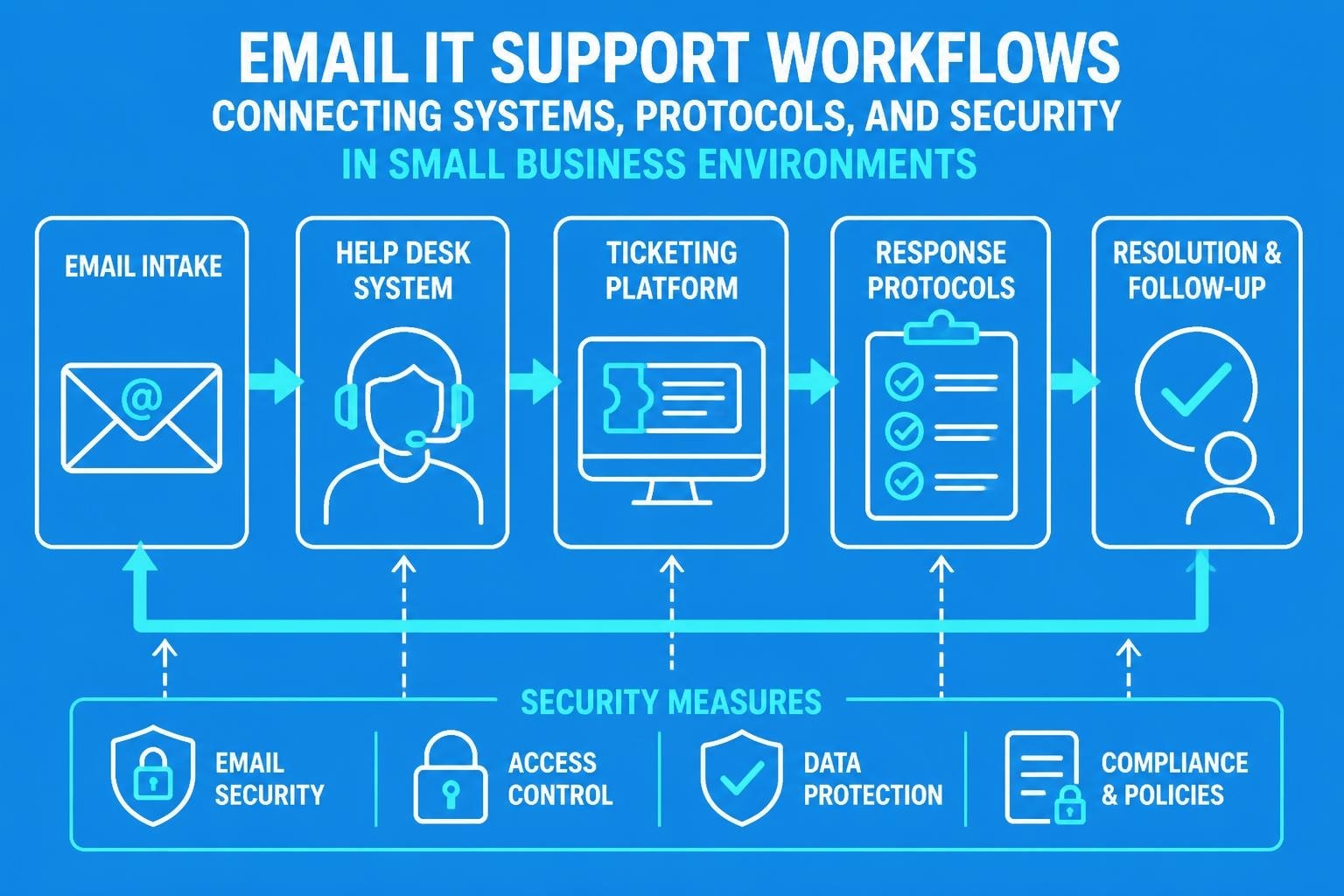
Managing technology infrastructure has become essential for small businesses navigating the digital landscape in 2026. Email IT support serves as the backbone for resolving technical issues, maintaining security protocols, and ensuring smooth operations across organisations of all sizes. Whether you're troubleshooting marketing platform challenges or addressing system-wide technical concerns, understanding effective email IT support practices can dramatically improve response times, customer satisfaction, and overall operational efficiency. For small businesses running email marketing campaigns, establishing robust support channels becomes even more critical as communication demands grow alongside your customer base.
Understanding Email IT Support in Modern Business
Email IT support encompasses the complete range of technical assistance delivered through electronic mail channels. This approach allows businesses to document issues, track resolution progress, and maintain comprehensive records of technical interactions.
Unlike phone support that disappears once the call ends, email creates an auditable trail of every technical conversation. Small businesses benefit tremendously from this structured approach, particularly when managing multiple team members or coordinating with external vendors. The format enables support staff to attach screenshots, error logs, and diagnostic information that would be difficult to communicate verbally.
Key Components of Effective Support Systems
Modern email IT support systems rely on several interconnected elements working together seamlessly:
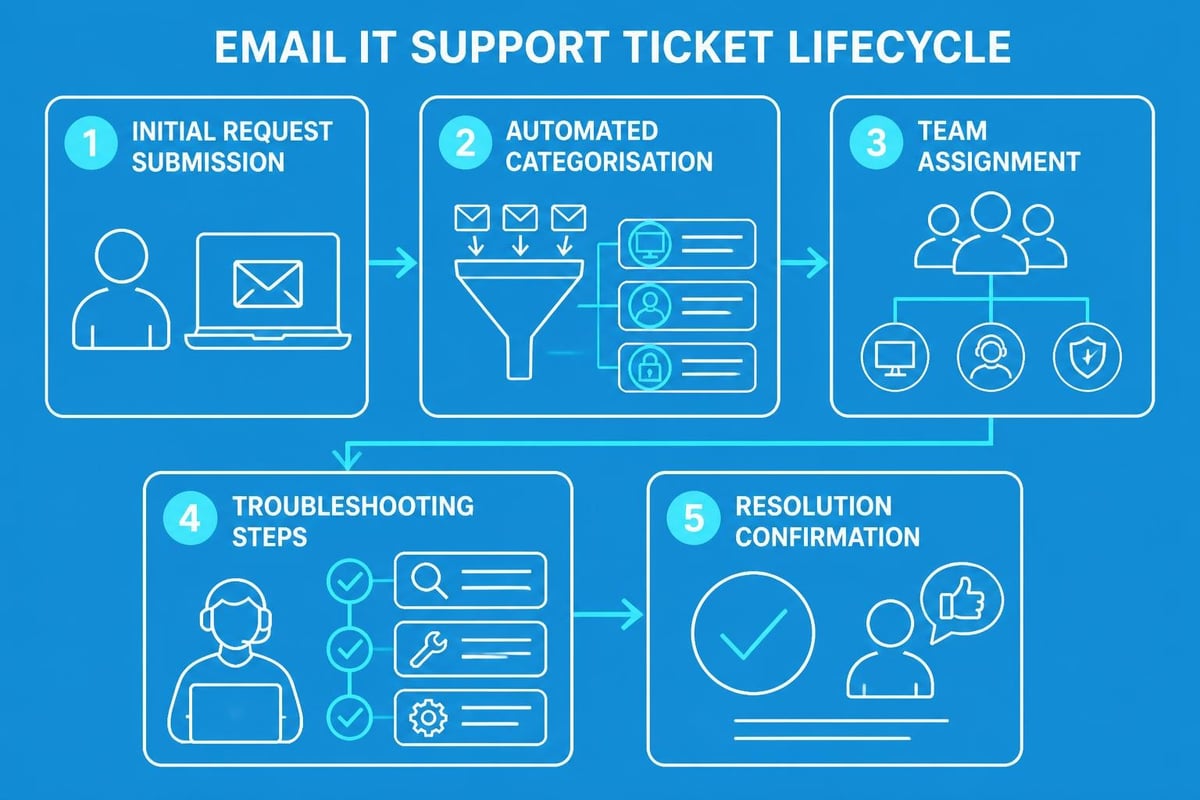
- Ticketing platforms that automatically categorise and prioritise incoming requests
- Knowledge base integration allowing support teams to reference solutions quickly
- Automated acknowledgement systems confirming receipt within minutes
- Escalation protocols routing complex issues to specialist teams
- Performance metrics tracking response times and resolution rates
These components transform basic email exchanges into sophisticated support ecosystems. Small business email systems must balance functionality with simplicity, ensuring teams can leverage advanced features without overwhelming technical knowledge.
Establishing Response Time Standards
Setting clear expectations for email IT support responses prevents frustration and builds trust with stakeholders. Research consistently shows that acknowledgement speed matters more than immediate resolution in customer satisfaction.
First Response Benchmarks:
| Issue Priority | Target Response Time | Maximum Response Time |
|---|---|---|
| Critical (system down) | 15 minutes | 1 hour |
| High (major function impaired) | 2 hours | 4 hours |
| Medium (minor inconvenience) | 4 hours | 8 hours |
| Low (general enquiry) | 8 hours | 24 hours |
These standards provide structure whilst remaining realistic for small teams. According to best practices for email customer support, acknowledging receipt quickly-even without an immediate solution-significantly improves perceived service quality.
Automated Acknowledgement Systems
Implementing automatic confirmation emails accomplishes multiple objectives simultaneously. Users receive instant reassurance that their request entered the system, whilst support teams gain valuable time to investigate complex issues properly.
The acknowledgement should include ticket reference numbers, estimated response timeframes, and links to relevant self-service resources. This proactive communication reduces follow-up enquiries and empowers users to potentially resolve simpler issues independently.
Security Considerations for Support Communications
Email IT support channels inherently involve sensitive information exchanges, making security protocols absolutely essential. Technical support requests often contain system details, access credentials, or confidential business data requiring protection.
The National Institute of Standards and Technology guidelines emphasise encryption standards and authentication mechanisms for email security. Small businesses must implement these protections even with limited IT resources.
Essential Security Measures
Protecting email IT support communications requires multiple defensive layers:
- End-to-end encryption for all support correspondence containing sensitive data
- Multi-factor authentication on support ticket systems and email platforms
- Regular security audits identifying vulnerabilities in communication workflows
- Staff training programmes teaching recognition of phishing attempts and social engineering
- Data retention policies specifying how long support communications remain stored
Email security best practices also recommend avoiding attachment-heavy communications in favour of secure file-sharing links. This approach reduces malware risks whilst maintaining efficient information exchange.
Additionally, establishing verification protocols ensures legitimate requests don't get confused with attempted security breaches. Support teams should confirm unusual requests through secondary channels before acting on password resets or access changes.
Crafting Effective Support Email Templates
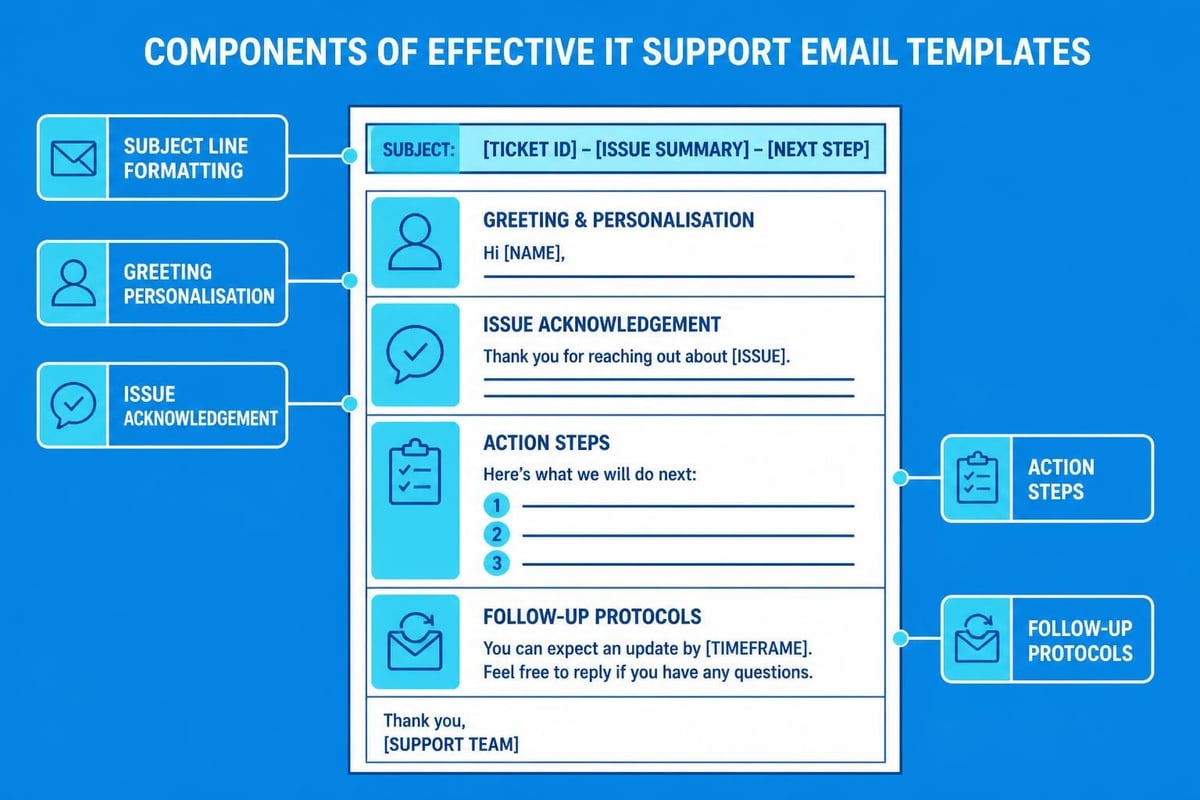
Standardised templates improve email IT support consistency whilst dramatically reducing response times. Well-designed templates guide support staff through necessary information gathering without sounding robotic or impersonal.
Critical Template Categories
Initial Acknowledgement Template: This confirms receipt and sets expectations. Include ticket numbers, estimated timelines, and immediate troubleshooting steps users can attempt independently.
Information Request Template: When insufficient details prevent resolution, this template politely requests specific information. Structure questions logically and explain why each detail matters for solving the problem.
Resolution Confirmation Template: After fixing issues, this template confirms completion, summarises actions taken, and requests feedback on the support experience.
| Template Type | Key Elements | Personalisation Opportunities |
|---|---|---|
| Acknowledgement | Ticket ID, timeline, self-help links | User name, specific issue reference |
| Information Request | Numbered questions, examples | Previous interaction history |
| Resolution | Summary, prevention tips, satisfaction survey | Specific solution details |
Templates should maintain professional email standards whilst allowing personalisation. Generic responses frustrate users, so balance efficiency with genuine engagement.
Managing High-Volume Support Queues
As small businesses grow, email IT support volumes increase proportionally. Managing this growth without compromising quality requires strategic approaches and sometimes automation.
Queue Management Strategies:
- Implement smart filtering that separates genuine support requests from automated notifications
- Use category tags enabling quick identification of issue types
- Establish service level agreements (SLAs) defining resolution timeframes per priority
- Create escalation pathways ensuring complex issues reach appropriate expertise levels
- Monitor queue metrics identifying bottlenecks before they impact service quality
The effective email guidelines from technology services emphasise clear communication structures that prevent misunderstandings requiring additional back-and-forth exchanges.
Prioritisation Frameworks
Not all support requests carry equal urgency. Developing transparent prioritisation criteria helps both support teams and users understand response sequences.
Critical issues affecting multiple users or core business functions naturally take precedence. However, maintaining some first-come-first-served elements for lower-priority issues prevents creating perpetual backlogs of "less important" requests that still matter to individual users.
Integrating Self-Service Resources
Email IT support effectiveness multiplies when paired with comprehensive self-service options. Many common technical issues follow predictable patterns with established solutions.
Creating searchable knowledge bases, FAQ sections, and troubleshooting guides empowers users to resolve issues immediately rather than waiting for email responses. This approach benefits everyone: users get instant solutions whilst support teams focus energy on genuinely complex problems.
Building Effective Knowledge Bases
Successful self-service resources share several characteristics:
- Search functionality allowing users to find relevant articles quickly using natural language
- Step-by-step instructions with screenshots illustrating each action clearly
- Regular updates reflecting software changes and newly discovered solutions
- User feedback mechanisms identifying articles needing improvement
- Mobile optimisation ensuring accessibility across all devices
When crafting support emails, include links to relevant knowledge base articles. This practice not only helps the current user but also trains them to check these resources first for future issues. The approach aligns with IT email communications best practices emphasising efficient information sharing.
Measuring Email IT Support Performance
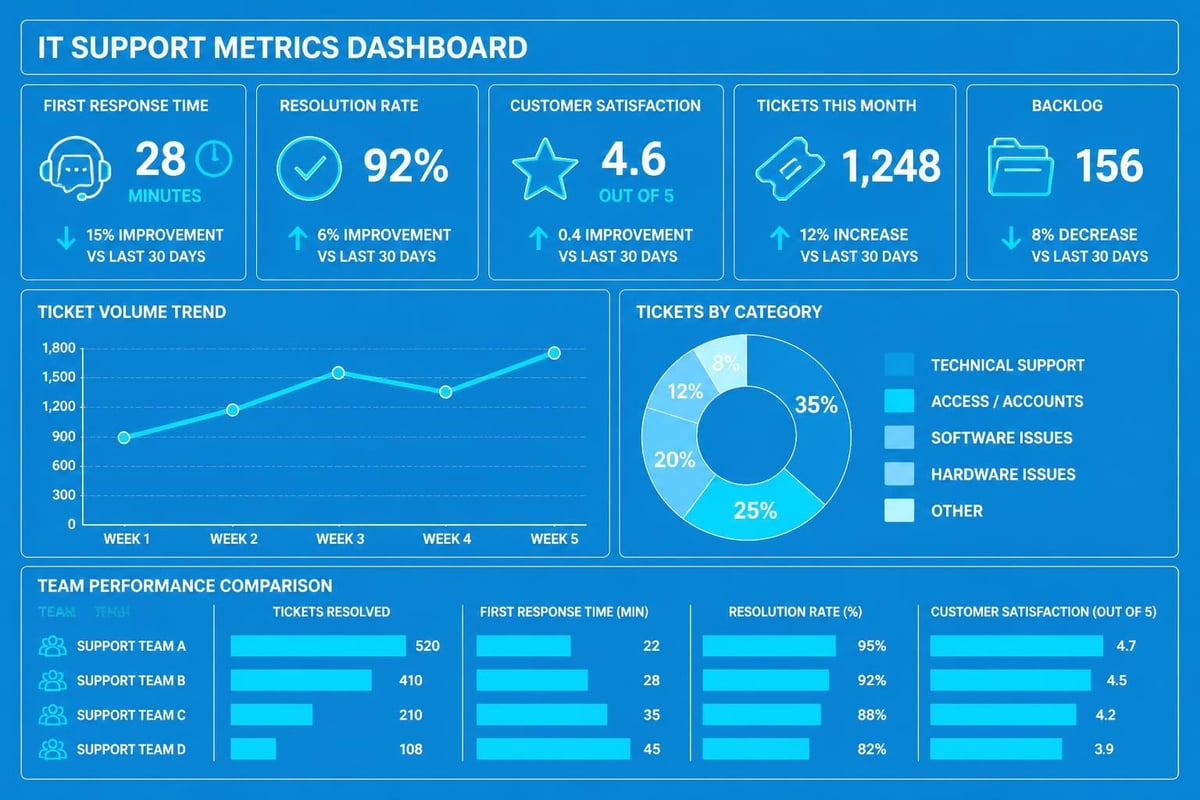
What gets measured gets improved. Tracking key performance indicators (KPIs) reveals strengths, weaknesses, and opportunities within email IT support operations.
Essential Support Metrics:
| Metric | Target Benchmark | Why It Matters |
|---|---|---|
| First Response Time | Under 2 hours | Indicates acknowledgement speed |
| Average Resolution Time | Under 24 hours | Shows overall efficiency |
| First Contact Resolution Rate | Above 70% | Reflects knowledge and resources |
| Customer Satisfaction Score | Above 4.5/5 | Measures service quality perception |
| Ticket Reopen Rate | Below 10% | Indicates solution effectiveness |
These metrics provide objective insights into support quality. However, numbers alone don't tell the complete story. Qualitative feedback through follow-up surveys reveals nuances that pure statistics miss.
Continuous Improvement Processes
Establishing regular review cycles ensures email IT support evolves alongside business needs. Monthly analysis sessions examining metric trends, common issue types, and user feedback create opportunities for meaningful refinement.
Best practices for responding to email enquiries emphasise learning from both successful resolutions and challenging interactions. Document what works exceptionally well alongside what proves frustrating, then systematically address improvement opportunities.
Training Support Teams for Email Excellence
Even the most sophisticated email IT support systems fail without skilled personnel operating them. Investing in comprehensive training programmes pays dividends through improved resolution rates and higher satisfaction scores.
Core Competency Development
Support staff require both technical knowledge and communication skills. Technical expertise solves problems, but communication skills ensure users understand solutions and feel valued throughout the process.
Training should cover:
- Product knowledge encompassing all systems and platforms the team supports
- Communication techniques including tone management, clarity, and empathy
- Problem-solving methodologies following structured troubleshooting approaches
- Security awareness recognising threats and protecting sensitive information
- Documentation standards creating clear records for future reference
Regular skill assessments identify knowledge gaps requiring additional training. As technology evolves, continuous learning becomes essential rather than optional.
Email Support Integration with Marketing Platforms
For businesses using email marketing platforms like Astonish Email, email IT support takes on additional dimensions. Support teams must understand both general technical issues and platform-specific challenges customers encounter.
Common marketing platform support scenarios include campaign setup assistance, deliverability troubleshooting, automation workflow debugging, and analytics interpretation. These requests require specialised knowledge beyond standard IT support expertise.
Platform-Specific Considerations
Marketing automation platforms introduce unique support requirements. Users might need help understanding segmentation logic, designing responsive email templates, or interpreting engagement metrics.
Effective email IT support for marketing platforms balances technical assistance with strategic guidance. Sometimes users face technical issues, whilst other times they need education about platform capabilities they haven't yet discovered.
Creating platform-specific documentation and video tutorials reduces basic support volume whilst enabling more sophisticated feature adoption. This educational approach transforms support from reactive problem-solving into proactive value delivery.
Communication Etiquette and Professionalism
The tone and structure of email IT support communications significantly impact user perception. Professional, courteous correspondence builds trust even when resolving frustrating technical problems.
Essential Etiquette Principles:
- Address users by name rather than generic greetings
- Acknowledge frustration without becoming defensive
- Explain technical concepts in accessible language
- Avoid jargon unless communicating with technical audiences
- Proofread responses for clarity and correctness
- Close with clear next steps and contact information
Email best practices from Carnegie Mellon emphasise accessibility and audience-appropriate communication. Support emails should accommodate varying technical literacy levels without appearing condescending.
Handling Difficult Interactions
Occasionally, email IT support involves frustrated users expressing dissatisfaction strongly. These situations require particular care and emotional intelligence.
Responding defensively escalates tensions, whilst acknowledging legitimate frustrations demonstrates empathy. Focus on solutions rather than blame, even when user error contributed to the problem. The goal remains restoring functionality and rebuilding confidence in the support relationship.
Compliance and Documentation Requirements
Email IT support generates substantial documentation requiring proper management. Many industries face regulatory requirements around data retention, privacy, and security that impact support communications.
Understanding applicable regulations ensures compliance whilst protecting both the business and users. Data retention policies should clearly specify how long support correspondence remains stored and when automatic deletion occurs.
Record-Keeping Best Practices
Comprehensive support records serve multiple purposes beyond compliance. They provide reference material for recurring issues, training resources for new staff members, and evidence for quality improvement initiatives.
Effective documentation captures:
- Complete issue descriptions including error messages and system states
- Troubleshooting steps attempted even unsuccessful approaches
- Final solutions implemented with sufficient detail for replication
- Time stamps tracking request receipt and resolution completion
- Follow-up status confirming user satisfaction with outcomes
These records transform individual support interactions into organisational knowledge assets. Over time, patterns emerge revealing systemic issues requiring broader solutions beyond individual ticket responses.
Balancing Automation with Human Touch
Technology enables incredible email IT support automation, but excessive automation creates impersonal experiences users find frustrating. Finding the optimal balance maximises efficiency without sacrificing relationship quality.
Automated systems excel at acknowledgements, routing, and handling frequently asked questions. However, complex troubleshooting, nuanced problem-solving, and empathetic communication still require human involvement.
Strategic Automation Opportunities
Identify support functions where automation adds genuine value without degrading service quality:
- Initial triage categorising requests by type and urgency
- Knowledge base suggestions recommending relevant articles based on issue descriptions
- Status updates informing users about progress on open tickets
- Satisfaction surveys gathering feedback after resolution
- Routine maintenance notifications alerting users to scheduled system work
Reserve human attention for situations demanding judgement, creativity, or emotional intelligence. This strategic division allows support teams to handle higher volumes whilst maintaining quality where it matters most.
Future Trends in Email IT Support
Email IT support continues evolving as technology advances and user expectations shift. Understanding emerging trends helps businesses prepare for tomorrow's support landscape.
Artificial intelligence increasingly augments human support teams, suggesting solutions based on historical ticket patterns and automatically resolving routine issues. However, the fundamentally personal nature of effective support ensures human expertise remains central.
Integration between support channels creates seamless experiences where email conversations flow naturally into chat, phone, or video interactions as situations require. Users expect support teams to maintain context across channels rather than repeatedly explaining issues.
The rise of conversational interfaces and chatbots handles initial enquiries before escalating to email IT support for complex matters. This multi-tiered approach optimises resource allocation whilst maintaining accessibility.
Implementing robust email IT support practices transforms how small businesses handle technical challenges, creating positive experiences that build lasting customer relationships. The strategies outlined here provide a comprehensive framework for developing support operations that balance efficiency with genuine care for user needs. Whether you're managing technical support for internal teams or customer-facing platforms, these principles elevate service quality whilst controlling operational costs. For small businesses navigating email marketing challenges, Astonish Email provides intuitive solutions backed by responsive support teams ready to help you succeed at every stage of your marketing journey.