Professional Email: Best Practices for Business Success
April 28, 2026
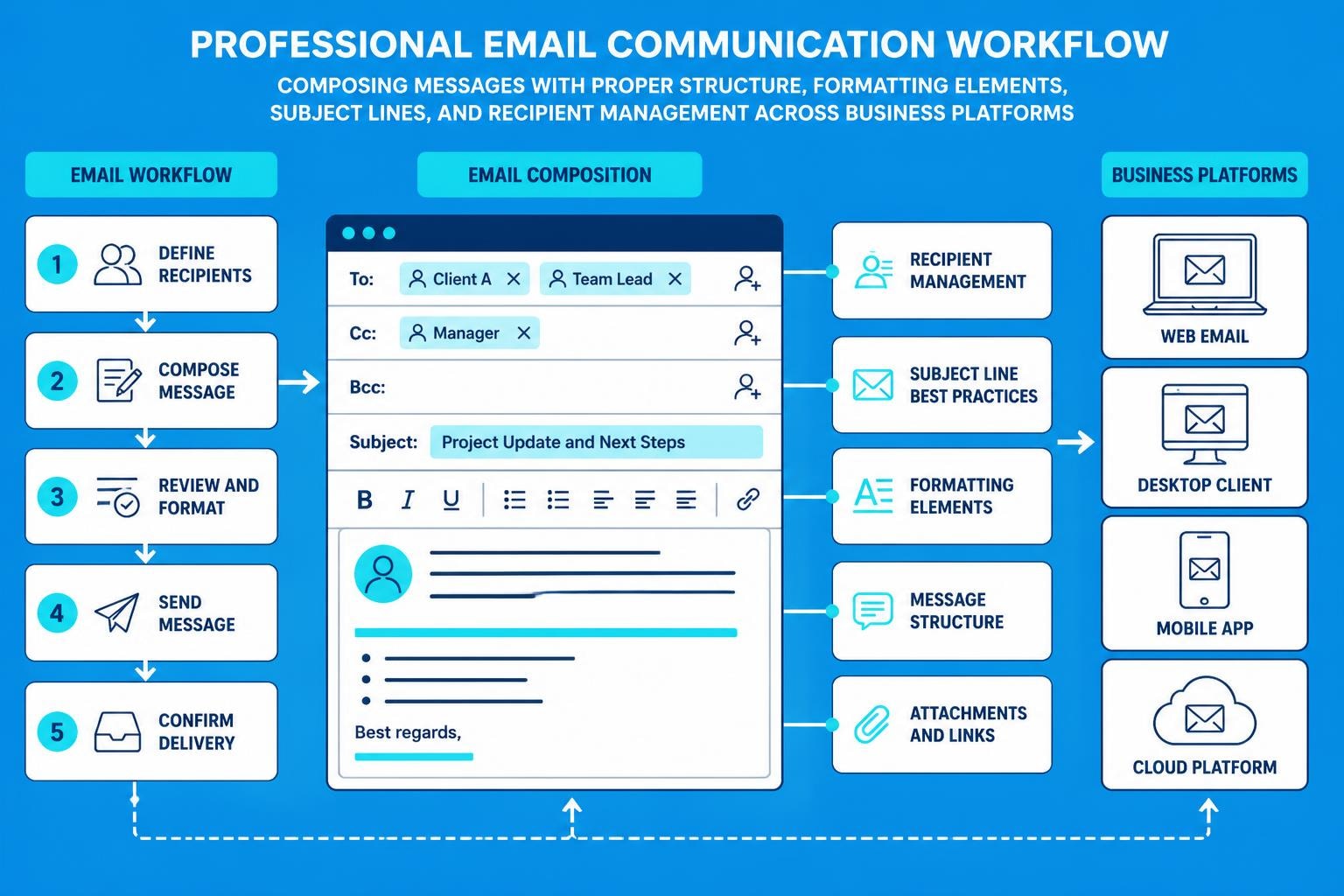
In today's digital business landscape, email remains the cornerstone of professional communication. Whether you're reaching out to potential clients, collaborating with team members, or nurturing customer relationships, the quality of your email correspondence directly impacts how others perceive your professionalism and credibility. A well-crafted professional email can open doors, build trust, and drive meaningful business outcomes, whilst poorly written messages can damage reputations and derail opportunities. Understanding the nuances of professional email communication is no longer optional-it's a fundamental skill every business professional must master.
Essential Components of Professional Email Structure
Every professional email follows a predictable yet crucial structure that ensures clarity and professionalism. The foundation begins with an appropriate email address that reflects your business identity rather than a casual personal handle.
Your email address should incorporate your name and company domain whenever possible. Creating a professional email address establishes immediate credibility and signals that you're operating within an established business framework. Avoid numbers, underscores, or unprofessional terms that might undermine your message before it's even opened.
Subject Line Fundamentals
The subject line serves as the gateway to your message. Effective subject lines are concise, specific, and action-oriented, giving recipients a clear understanding of the email's purpose. According to professional email etiquette rules outlined by TechTarget, subject lines should be between 5-7 words for optimal engagement.
Consider these subject line approaches:
- Action-oriented: "Q2 Budget Review - Response Needed by Friday"
- Question format: "Can we schedule a meeting next week?"
- Information-focused: "January Sales Report Attached"
- Event-specific: "Following up from Tuesday's Conference"
Vague subject lines like "Quick question" or "Important" fail to provide context and may be overlooked or filtered as spam. Specificity drives action.
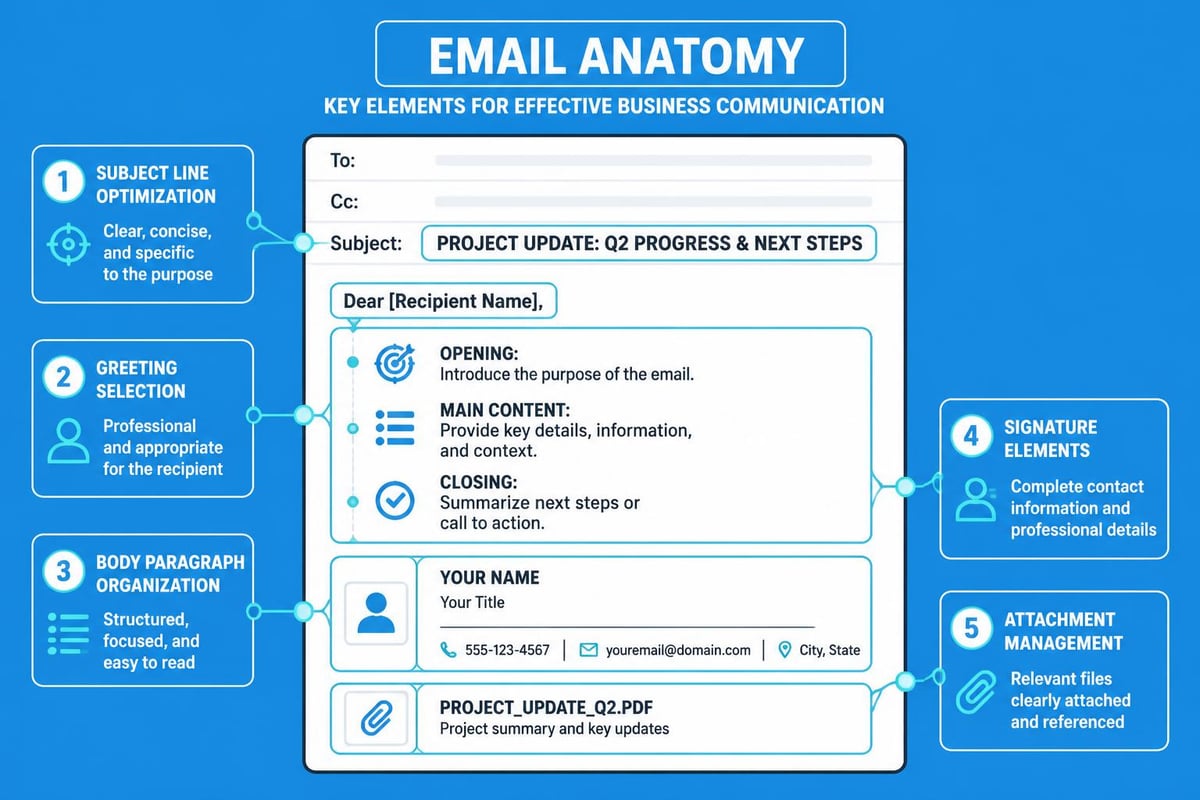
Greeting and Salutation Standards
Professional greetings set the tone for your entire message. The level of formality should match your relationship with the recipient and the context of your communication.
| Relationship Level | Appropriate Greeting | Example |
|---|---|---|
| Formal/First contact | Dear [Title] [Surname] | Dear Ms. Thompson |
| Professional/Established | Hello [First Name] | Hello Sarah |
| Team/Collaborative | Hi [First Name] | Hi James |
| Group emails | Hi Team / Hello Everyone | Hi Marketing Team |
Avoid overly casual greetings like "Hey" or "Yo" in business contexts. When unsure, err on the side of formality-you can always adjust to a more casual tone once the relationship develops.
Crafting Effective Email Body Content
The body of your professional email demands careful attention to both content and presentation. Readers scan rather than read, so structure matters as much as substance.
Keep your opening paragraph brief and purposeful. State your reason for writing within the first two sentences. Busy professionals appreciate directness over lengthy preambles. If you're responding to a previous conversation, reference it immediately to provide context.
Paragraph Structure and Readability
Break your content into digestible paragraphs, each focusing on a single idea or topic. Dense text blocks discourage reading and obscure your message. White space enhances comprehension and makes your email more inviting.
Use these formatting techniques to improve readability:
- Limit paragraphs to 3-4 sentences maximum
- Insert line breaks between distinct topics
- Use bullet points for lists or multiple items
- Bold key information that requires attention
- Number sequential steps or priorities
Professional email communication guidelines from the University of British Columbia emphasise the importance of clear formatting to ensure your message is understood quickly and accurately.
Tone and Language Considerations
Professional email tone strikes a balance between warmth and formality. Your language should convey competence whilst remaining approachable and respectful.
Avoid these common pitfalls:
- ALL CAPS (appears aggressive or shouty)
- Excessive exclamation marks (seems unprofessional)
- Slang or colloquialisms (may confuse or offend)
- Overly complex vocabulary (can appear pretentious)
- Emoticons in formal business contexts (unprofessional)
Instead, use clear, straightforward language that respects the recipient's time. If you're writing to someone for whom English is a second language, simplify your sentence structure and avoid idioms.
Closing Elements and Signature Best Practices
How you conclude your professional email matters just as much as how you begin it. Strong closings prompt action and leave positive impressions.
Call to Action Clarity
Every email should conclude with a clear next step or expectation. Vague endings like "Let me know what you think" fail to drive specific action. Instead, be explicit about what you need and when you need it.
Effective calls to action include:
- "Please confirm your attendance by Friday, 3 May"
- "Could you review the attached document and provide feedback by Thursday?"
- "Let's schedule a call-are you available Tuesday afternoon?"
- "I'll follow up next week if I haven't heard from you"
This clarity respects the recipient's time and increases the likelihood of a timely response. When managing your business email account, establishing consistent closing practices helps build predictable communication patterns.
Professional Signature Formatting
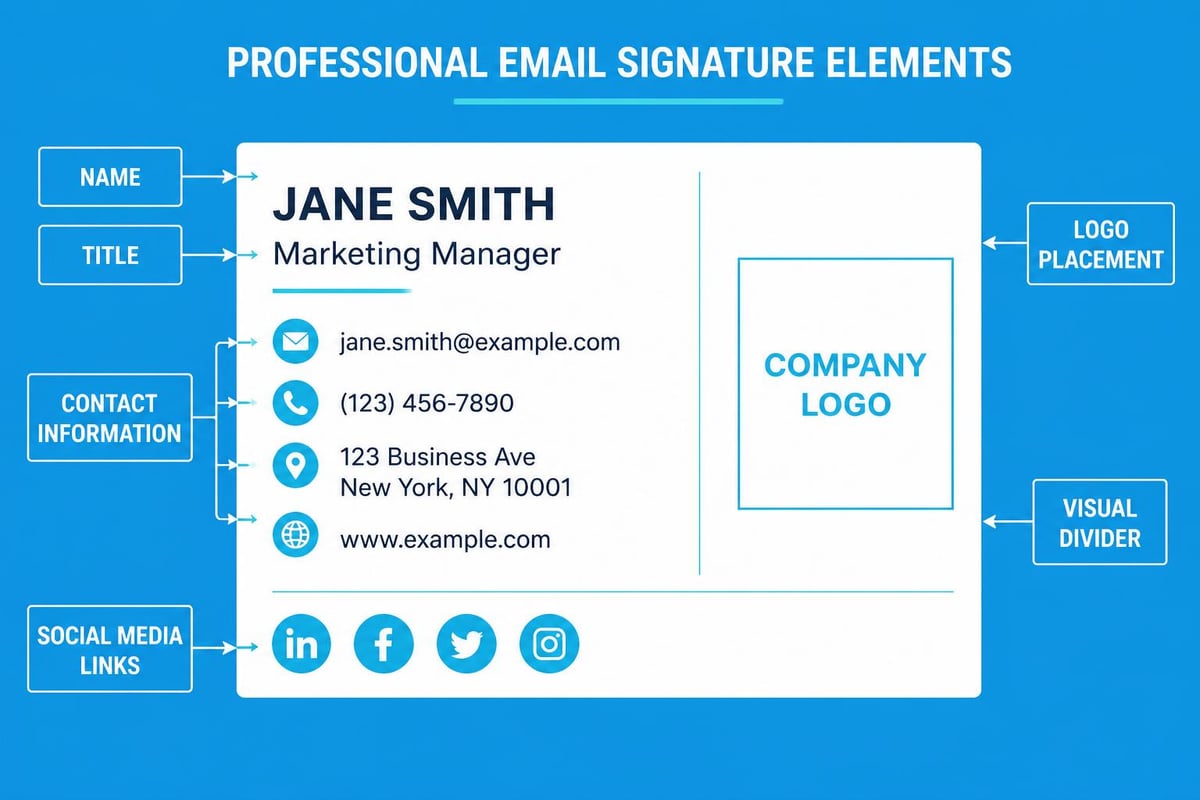
Your email signature serves as your digital business card. It should provide essential contact information without overwhelming the reader.
| Element | Recommendation | Example |
|---|---|---|
| Name | Full name in readable font | Jonathan Clarke |
| Title | Current position | Marketing Director |
| Company | Organisation name | Astonish Email |
| Phone | Direct number with country code | +44 20 7946 0958 |
| Professional address | [email protected] | |
| Website | Company URL (optional) | www.astonishemail.com |
Avoid cluttering signatures with inspirational quotes, multiple logos, or excessive social media icons. Simple, professional signatures enhance rather than distract from your message. For businesses exploring email marketing solutions, consistent signature formatting across team members strengthens brand identity.
Managing Recipients and Reply Protocols
Understanding when to use To, CC, and BCC fields demonstrates professional email competence and protects everyone's privacy and time.
To field recipients are your primary audience-those who need to take action or respond. CC (carbon copy) recipients should be kept informed but aren't expected to respond. BCC (blind carbon copy) protects recipient privacy when sending to multiple unrelated contacts.
Reply All Etiquette
The "Reply All" function is one of the most misused features in professional email. Before clicking this button, ask yourself whether everyone on the thread truly needs to see your response.
Use Reply All when:
- Your response adds value for all recipients
- You're confirming attendance or providing requested information
- The discussion requires group consensus
- You're continuing a collaborative conversation
Use individual Reply when:
- Your response is only relevant to the sender
- You're having a side conversation
- You're providing personal or sensitive information
Email etiquette best practices emphasise that thoughtful recipient management prevents inbox clutter and maintains professional boundaries.
Attachment and File Management
Attachments require careful handling to ensure professional email communication runs smoothly. Large files can bounce back, wrong attachments can embarrass, and missing attachments frustrate recipients.
Attachment Best Practices
Before sending any attachment, verify these elements:
- File size is manageable (under 10MB for most systems)
- File name is professional and descriptive (ProjectProposal_April2026.pdf)
- Format is widely accessible (PDF for documents, JPG for images)
- You've actually attached the file (mention it in the email body)
- Sensitive information is password-protected if necessary
When your attachment exceeds size limits, use cloud storage services and share a link instead. This approach also allows you to track who has accessed the document and update files after sending.
For multiple attachments, consider these strategies:
- Combine related documents into a single PDF when appropriate
- Create a compressed ZIP file for numerous smaller files
- Reference each attachment by name in your email body
- Number attachments if they should be reviewed in sequence
Time Management and Response Expectations
Professional email communication includes understanding when to send messages and how quickly to respond. Timing affects both effectiveness and perception.
Optimal Sending Times
Research consistently shows certain times yield better open and response rates:
| Day | Best Time | Avoid |
|---|---|---|
| Monday | Mid-morning (10-11am) | Early morning (inbox overload) |
| Tuesday-Thursday | Late morning or early afternoon | Lunch hour |
| Friday | Before noon | After 3pm |
| Weekend | Generally avoid | Emergencies only |
However, these guidelines shouldn't prevent you from drafting emails when convenient. Most email platforms allow you to schedule sends for optimal times. For businesses using email marketing platforms, scheduling features maximise engagement whilst respecting work-life boundaries.
Response Time Standards
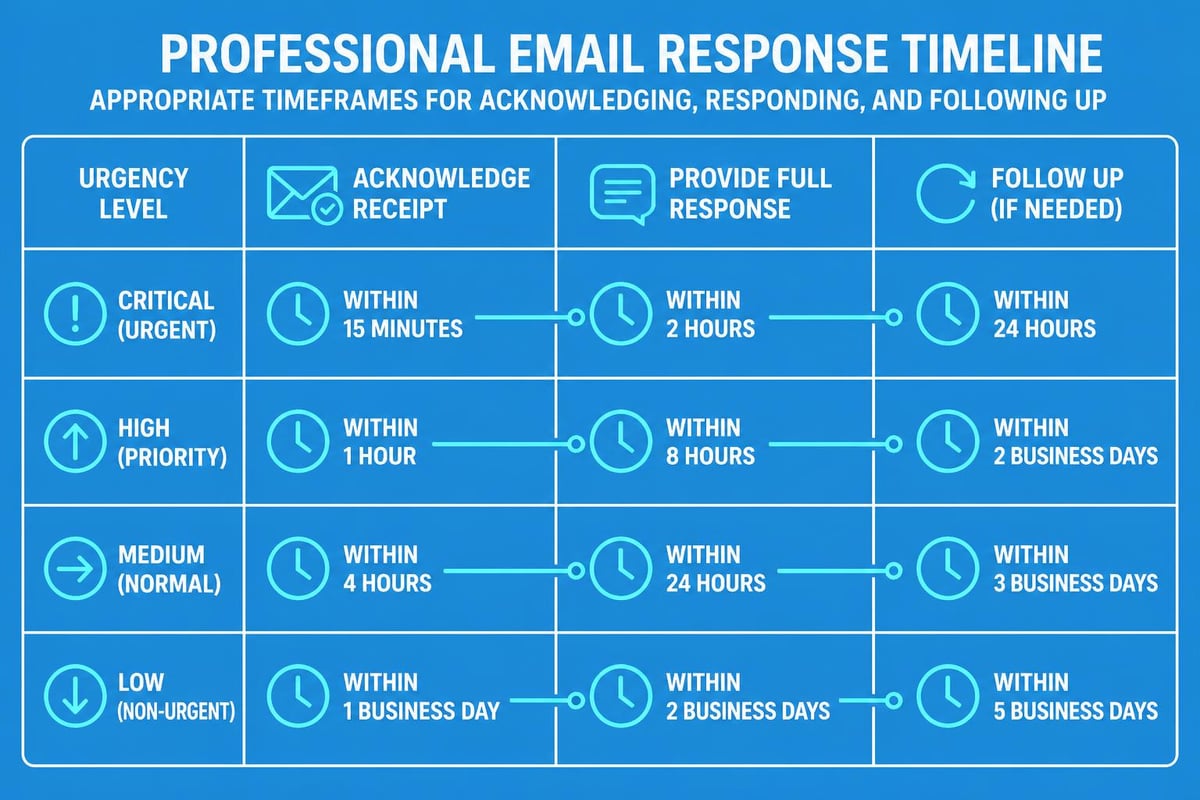
How quickly should you respond to professional email? The answer depends on the message's urgency and your role, but general guidelines help set expectations.
Within 24 hours is the standard for most business correspondence during working days. Even if you can't provide a complete answer, acknowledge receipt and indicate when you'll follow up fully. Within 2-4 hours for urgent matters flagged as such. Within 48 hours for less time-sensitive queries received late Friday or before holidays.
When you'll be unavailable, set an out-of-office auto-reply directing urgent matters to a colleague. This prevents anxiety and maintains professional communication flow.
Advanced Professional Email Techniques
Mastering basic professional email etiquette is essential, but advanced techniques separate competent communicators from exceptional ones.
Proofreading and Quality Control
Never send a professional email without reviewing it first. Typos, grammatical errors, and factual mistakes undermine your credibility instantly.
Implement this three-step review process:
- Content check: Does the email achieve its purpose? Is the tone appropriate?
- Technical review: Are names spelled correctly? Are dates and figures accurate?
- Format scan: Is the layout clean? Are attachments included?
Reading your email aloud helps catch awkward phrasing and run-on sentences. For critical messages, consider having a colleague review before sending.
Mobile Optimisation Awareness
Over 60% of emails are now opened on mobile devices. Professional email communication must account for smaller screens and touch interfaces.
Mobile-friendly practices include:
- Front-loading key information (first sentence is crucial)
- Keeping subject lines under 40 characters
- Using short paragraphs (2-3 sentences maximum)
- Avoiding complex formatting (tables may not render properly)
- Testing important emails on mobile before sending
For businesses leveraging platforms like CreateSell to build digital products, mobile-optimised email communication with customers is particularly crucial for conversion and engagement.
Privacy, Security, and Compliance
Professional email requires vigilance around data protection and security, particularly for small businesses handling customer information.
Sensitive information should never be sent via standard email without encryption. Financial data, passwords, personal identification numbers, and confidential business plans require secure transmission methods or password-protected attachments.
GDPR and Email Compliance
UK businesses must comply with GDPR regulations when sending professional email, particularly marketing communications. This includes:
- Obtaining explicit consent before adding contacts to marketing lists
- Providing clear unsubscribe options in every marketing email
- Protecting recipient data from unauthorised access
- Responding to data subject requests within required timeframes
Best practices for managing a professional email account include regular review of your contact lists and ensuring your email practices align with current data protection regulations.
Email Templates and Automation
Efficient professional email management leverages templates for common scenarios whilst maintaining personalisation. Templates save time without sacrificing quality when properly implemented.
Effective template categories include:
- Meeting requests and confirmations
- Introduction emails to new contacts
- Follow-up messages after events or meetings
- Project status updates
- Thank you notes
The key is customising each template before sending. Change names, reference specific details, and adjust tone based on the recipient and situation. Generic, obviously templated emails appear impersonal and lazy.
Modern email marketing platforms enable sophisticated automation whilst preserving the personal touch essential to professional communication. When exploring options for setting up business email systems, prioritise platforms that balance efficiency with customisation capabilities.
Building Long-term Email Relationships
Professional email communication extends beyond individual messages to building sustained relationships over time. Consistency, reliability, and thoughtfulness create lasting positive impressions.
Follow-up Strategies
Strategic follow-up demonstrates professionalism and persistence without appearing pushy. After initial contact, wait 3-5 business days before following up if you haven't received a response.
Your follow-up should:
- Reference the original email with specific details
- Acknowledge the recipient may be busy
- Restate your key request or question concisely
- Suggest an alternative if your original proposal doesn't work
- Maintain a positive, patient tone
After a second follow-up with no response, consider whether continuing is appropriate. Some non-responses are intentional, and excessive persistence damages rather than builds relationships.
Maintaining Professional Boundaries
Email can blur work-life boundaries, particularly when communicating across time zones. Professional email habits include respecting others' time and availability.
Avoid sending non-urgent emails outside standard business hours unless you're using scheduling features. Even if you're working evenings or weekends, delay sending until the next business day to avoid creating pressure for immediate responses.
For content creators and entrepreneurs using platforms like RankPill to grow their businesses through content marketing, maintaining professional email boundaries with clients and partners protects both productivity and relationships.
Cultural Considerations in Global Communication
Professional email takes on additional complexity when communicating across cultures. What's considered direct and efficient in one culture may seem rude in another.
British business email typically includes more pleasantries and indirect language than American counterparts. Asian cultures often prefer more formal, hierarchical communication. Understanding these nuances prevents misunderstandings and strengthens international relationships.
When emailing internationally:
- Research basic cultural email norms for key markets
- Avoid idioms and culturally specific references
- Be explicit about dates (5 April 2026, not 4/5/26)
- Specify time zones when scheduling calls or meetings
- Consider that humour often doesn't translate well
As highlighted in professional email etiquette guidance from Ask.com, cultural awareness demonstrates respect and enhances cross-border business relationships.
Mastering professional email communication transforms how you connect with clients, colleagues, and partners whilst building the credibility essential for business growth. By implementing these best practices-from structuring clear messages to respecting cultural differences-you'll enhance every aspect of your digital communication. Astonish Email provides the tools and features small businesses need to maintain professional email standards whilst maximising marketing effectiveness. Start elevating your email communication today with a platform designed specifically for growing businesses.