Good Email for Business: Essential Practices for 2026
May 2, 2026
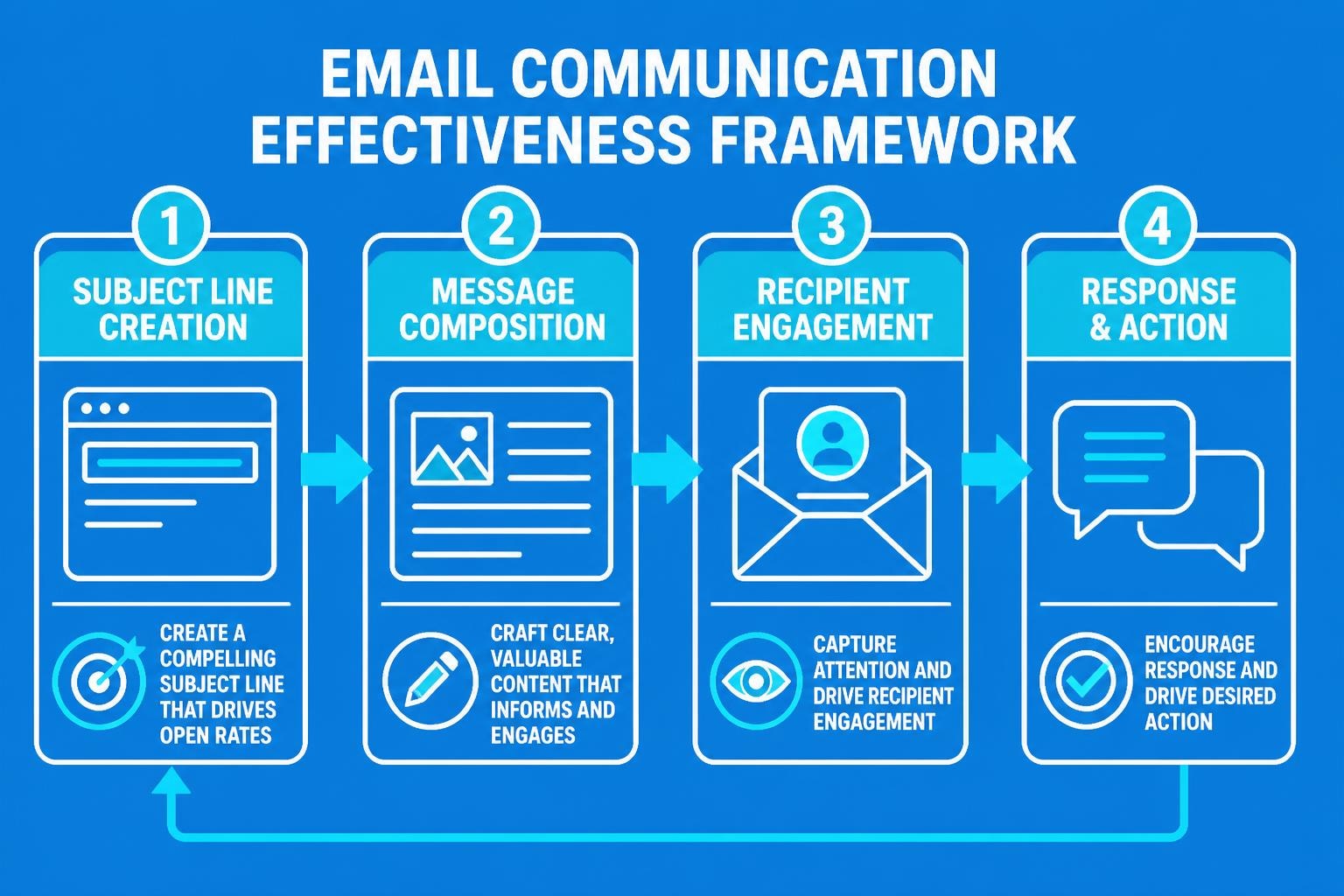
Email remains the backbone of professional communication in 2026, serving as the primary channel through which small businesses build relationships, close deals, and maintain customer loyalty. Crafting a good email for business requires more than simply typing a message and hitting send. It demands attention to structure, tone, etiquette, and strategic thinking. For small business owners who often wear multiple hats, mastering email communication can directly impact revenue, customer satisfaction, and brand perception. Understanding the fundamentals of what constitutes effective business email enables entrepreneurs to compete with larger organizations whilst maintaining authentic, professional connections.
The Core Elements of Effective Business Email
A good email for business starts with fundamental structural components that establish credibility before the recipient even reads your message. These elements work together to create an immediate impression of professionalism and respect for the recipient's time.
Subject Lines That Drive Opens and Action
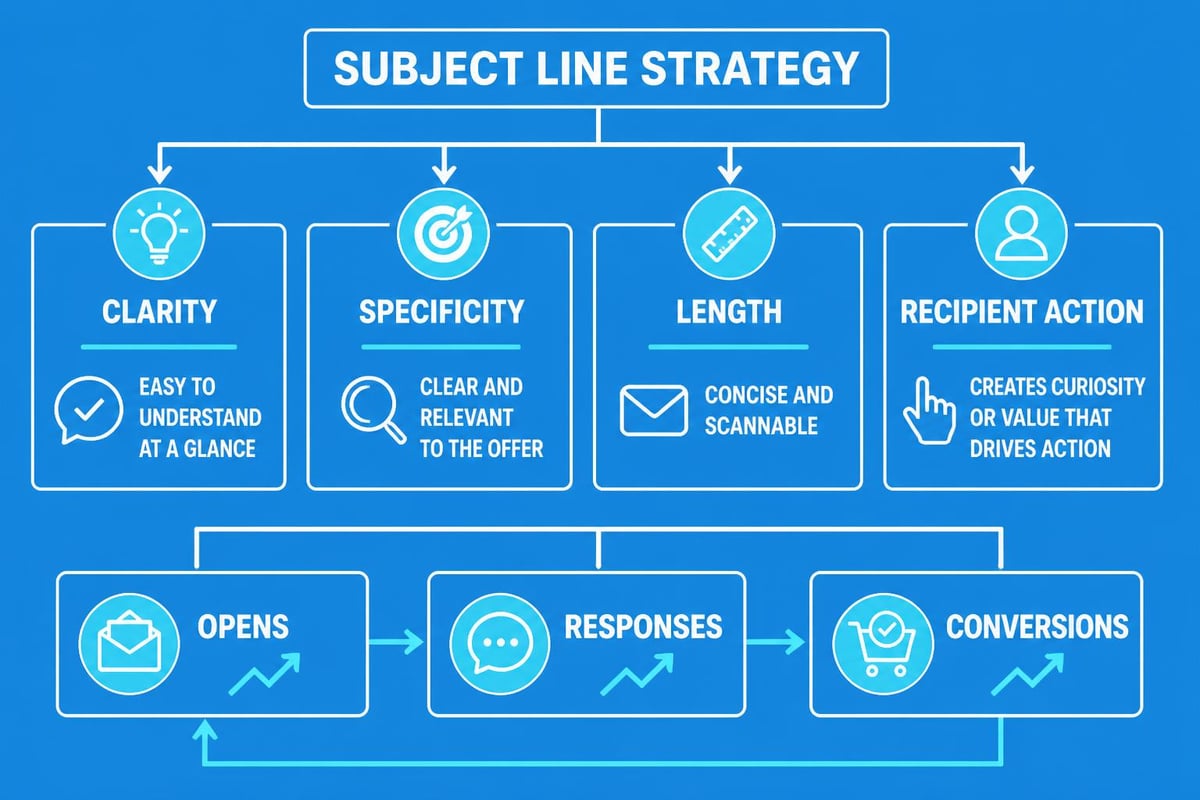
The subject line functions as your email's first impression, determining whether your message gets opened, ignored, or deleted. Research consistently shows that subject lines between 40-60 characters achieve the highest open rates, as they display completely on both desktop and mobile devices.
Essential subject line principles include:
- Specificity over vagueness: "Q2 Budget Review Meeting - Thursday 3pm" outperforms "Meeting"
- Action-oriented language when appropriate: "Please Confirm Your Attendance by Friday"
- Personalization where relevant: Including project names, companies, or relevant context
- Avoiding spam triggers: ALL CAPS, excessive punctuation, or misleading claims
The subject line should align perfectly with your email content. Misleading subject lines damage trust and harm long-term business relationships, even if they temporarily boost open rates.
Professional Greetings and Sign-Offs
The opening and closing of your email frame your message and establish the appropriate level of formality. According to professional email etiquette guidelines, the greeting should match your relationship with the recipient whilst maintaining professional standards.
First-time communications typically warrant formal salutations such as "Dear Mr. Smith" or "Dear Sarah Thompson". Established relationships may accommodate "Hello Sarah" or simply "Sarah" depending on company culture and prior interactions. However, overly casual greetings like "Hey" or "Hiya" remain inappropriate for most business contexts.
| Situation | Appropriate Greeting | Sign-Off |
|---|---|---|
| First contact, formal | Dear Ms. Thompson | Yours sincerely |
| Established professional | Hello James | Best regards |
| Collaborative team | Hi Team | Thanks |
| Senior executive | Dear Director Chen | Respectfully |
Message Body Structure and Clarity
The body of a good email for business follows a clear structure that respects the reader's time whilst conveying necessary information. Begin with context or a brief reference to previous communication, proceed to the main message, and conclude with specific next steps or calls to action.
Effective body structure includes:
- Opening context: "Following our conversation on Monday regarding the marketing campaign..."
- Core message: State your purpose clearly in the first paragraph
- Supporting details: Provide necessary information using bullet points or numbered lists
- Clear call to action: "Please review the attached proposal and confirm your approval by Friday"
- Closing courtesies: Thank the recipient or express appreciation as appropriate
Paragraphs should rarely exceed four sentences in business email. When you're explaining how to create professional email, structure becomes critical because walls of text discourage reading and reduce response rates significantly.
Email Etiquette for Modern Business Communication
Professional email etiquette extends beyond basic politeness into strategic communication that builds relationships and drives business outcomes. In 2026, with remote work remaining prevalent, email often serves as the primary representation of your business personality.
Tone and Professional Language
Striking the appropriate tone represents one of the most challenging aspects of email communication. Written messages lack vocal inflection, facial expressions, and body language, making them susceptible to misinterpretation. Research on professional email etiquette emphasizes maintaining a courteous, respectful tone regardless of the message content.
A good email for business avoids humour unless you have an established relationship with the recipient, as jokes frequently fail in written format or offend unintentionally. Similarly, sarcasm should be completely avoided in business communications, as it almost invariably reads as rudeness or condescension.
When delivering difficult messages, positive framing improves outcomes. Rather than writing "You failed to submit the report on time", consider "I haven't yet received the report due yesterday. Could you please provide an update on its status?" This approach maintains professionalism whilst addressing the issue directly.
Response Time Expectations
Timely responses demonstrate respect, reliability, and professionalism. Whilst immediate responses aren't always possible, acknowledging receipt of important emails within 24 hours has become the standard expectation in most industries.
When you cannot provide a complete response immediately, a brief acknowledgement maintains communication flow: "Thank you for your email. I'm reviewing the details and will provide a comprehensive response by Wednesday." This simple courtesy prevents the sender from wondering whether their message was received or ignored.
For small businesses managing email contacts across multiple clients and projects, establishing internal response protocols ensures consistency. Consider implementing service level agreements (SLAs) for different email types, ensuring customer enquiries receive priority attention.
Technical Considerations for Business Email
Beyond etiquette and structure, technical aspects of email significantly impact deliverability, security, and professional perception. Small businesses must address these elements to ensure their communications reach recipients and maintain data security.
Choosing the Right Email Platform
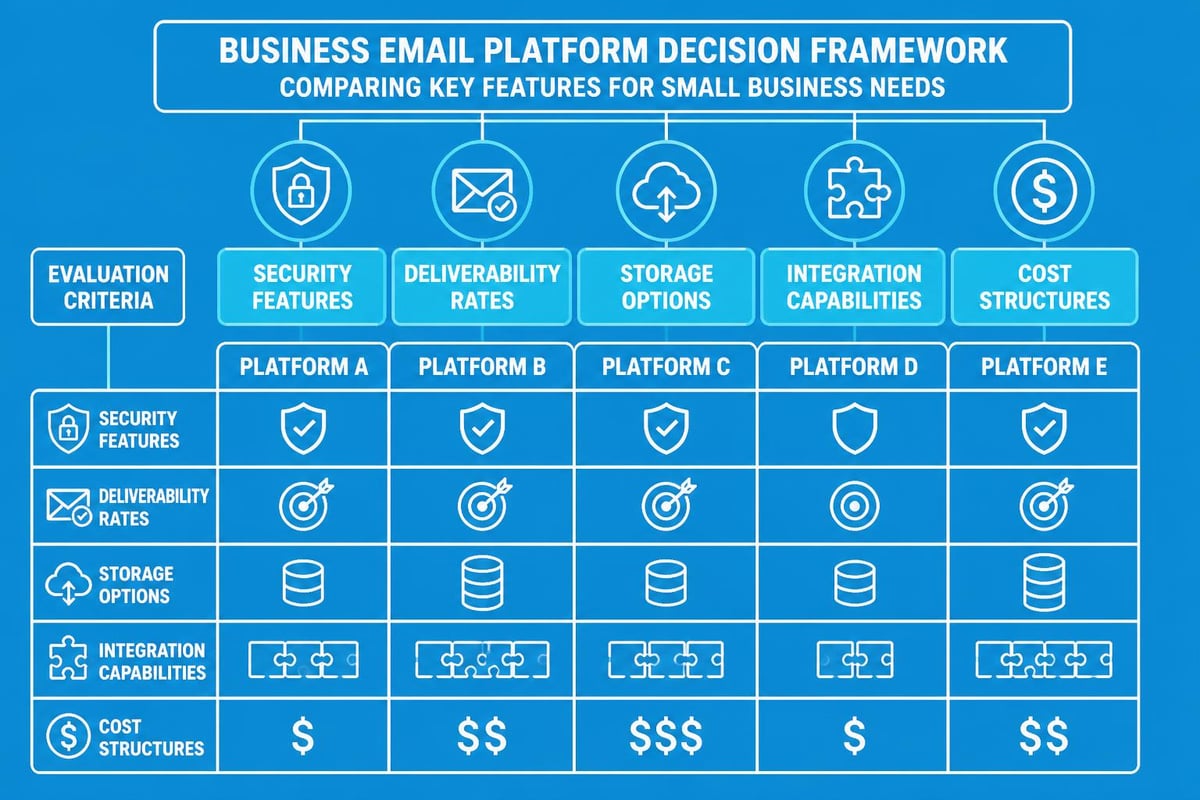
Selecting an appropriate email service provider affects everything from deliverability rates to security features. Evaluating email providers requires assessing factors including storage capacity, spam filtering, mobile accessibility, integration capabilities, and security protocols.
For small businesses, specialized platforms designed for business communications offer advantages over consumer email services. Professional email platforms typically provide:
- Custom domain addresses ([email protected] rather than generic providers)
- Enhanced security features including two-factor authentication
- Integration with customer relationship management (CRM) systems
- Advanced filtering and organizational tools
- Professional support and service level guarantees
When you're looking to get a business email address, prioritize providers that understand small business requirements and offer scalable solutions as your organization grows.
Email Security and Anti-Spam Measures
Security represents a critical concern in 2026, as email remains the primary vector for phishing attacks, malware distribution, and business email compromise. Academic research on email security frameworks demonstrates the importance of comprehensive protection measures including sender authentication, encryption, and anti-phishing protocols.
A good email for business incorporates security awareness throughout the communication process:
- Verify sender addresses before responding to sensitive requests
- Never include passwords, credit card details, or highly sensitive data in email body text
- Use encryption for confidential communications
- Be cautious with attachments, especially from unknown senders
- Implement multi-factor authentication on email accounts
- Regularly update passwords and security settings
Small businesses should also establish clear antispam policies that protect both their outgoing communications and internal systems from malicious activities.
Formatting and Accessibility
Professional email formatting extends beyond aesthetics into accessibility and readability across devices. In 2026, recipients access email on smartphones, tablets, laptops, and desktop computers, requiring responsive formatting that maintains clarity regardless of screen size.
Key formatting principles include:
- Using standard, readable fonts (Arial, Calibri, Times New Roman)
- Maintaining font sizes between 10-12 points for body text
- Employing bullet points and numbered lists for scannable content
- Including sufficient white space between paragraphs
- Avoiding excessive formatting, colors, or backgrounds
- Testing how emails display on mobile devices before sending important communications
Tables can effectively present comparative information or data, but should be simple enough to display clearly on mobile screens.
Crafting Emails for Specific Business Purposes
Different business scenarios require tailored approaches to email composition. Understanding how to adapt your message for specific purposes increases effectiveness and response rates.
Sales and Prospecting Emails
Sales emails represent perhaps the most challenging business communications, as recipients often view them with skepticism. A good email for business in the sales context focuses on value delivery rather than aggressive promotion.
Successful sales emails typically:
- Demonstrate understanding of the recipient's business or challenges
- Offer specific value rather than generic product descriptions
- Include social proof such as case studies or testimonials
- Respect the recipient's time with concise messaging
- Provide clear, low-pressure next steps
Personalization significantly impacts sales email performance. Generic templates addressed to "Dear Sir/Madam" achieve drastically lower response rates than messages demonstrating genuine research into the recipient's company and needs.
For businesses exploring simple business email approaches, combining video content with traditional text can boost engagement. Platforms like AdsRaw enable creation of professional video content that can complement email campaigns, helping messages stand out whilst maintaining professionalism.
Customer Service and Support Communications
Customer service emails require particular attention to tone, as they often address problems or complaints. These communications significantly impact customer retention and brand perception.
| Customer Service Email Element | Best Practice | Common Mistake |
|---|---|---|
| Response time | Within 4-8 hours | Waiting days to respond |
| Opening | Acknowledge specific concern | Generic "We received your email" |
| Explanation | Clear, jargon-free language | Technical explanations customers don't understand |
| Solution | Specific action steps | Vague promises |
| Follow-up | Confirm resolution | Assuming issue is closed |
Best practices for business email emphasize the importance of empathy in customer service communications. Phrases like "I understand your frustration" or "I apologize for the inconvenience" demonstrate emotional intelligence and commitment to resolution.
Internal Team Communications
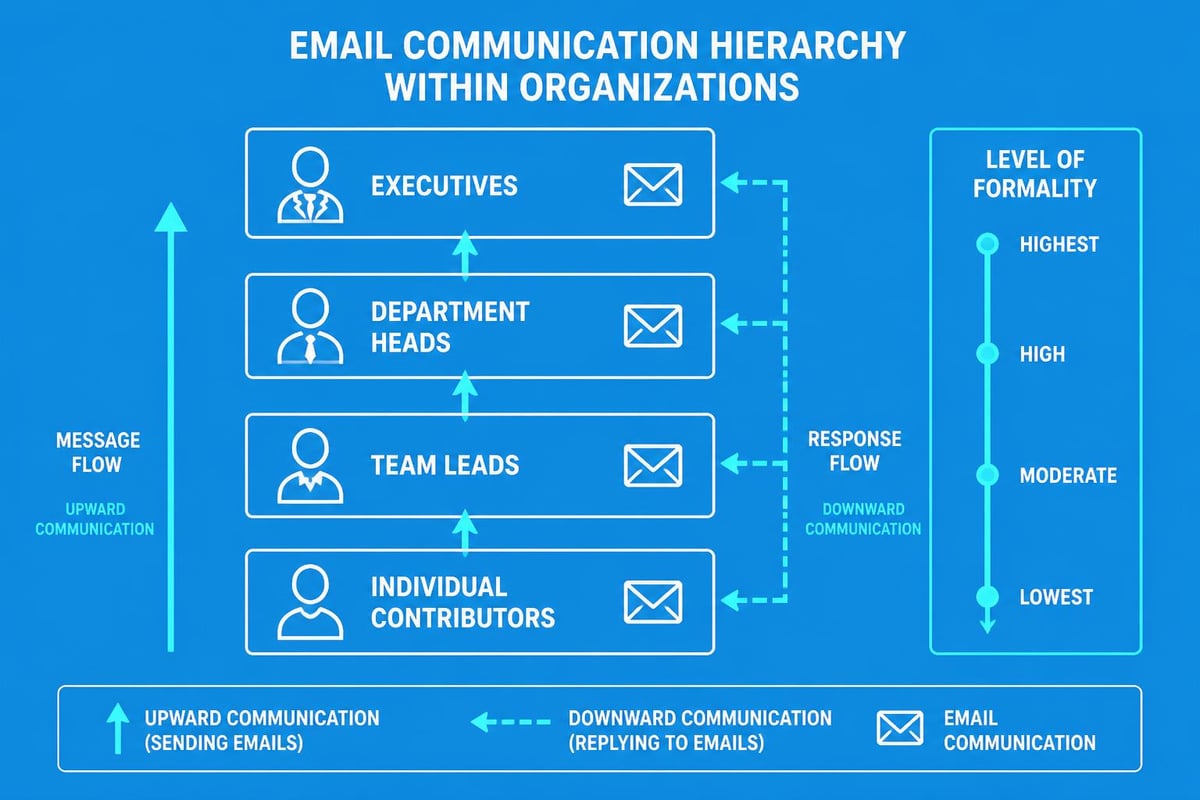
Internal emails require balancing efficiency with professionalism. Whilst these communications may adopt a slightly more casual tone than external emails, maintaining professional standards prevents confusion and supports positive workplace culture.
For project updates, status reports, or team announcements, clarity and organization remain paramount. Use descriptive subject lines that enable future searching, and consider using consistent prefixes such as "[Project Alpha]" or "[Team Update]" to facilitate filtering and organization.
When communicating across departments or with senior leadership, maintain higher formality levels. An email to colleagues in your immediate team might begin "Hi everyone", whilst communication to executive leadership warrants "Dear Executive Team" or similar formal greetings.
Email Marketing Best Practices for Small Businesses
Email marketing represents one of the highest return-on-investment channels available to small businesses. However, marketing emails must balance promotional content with value delivery to avoid spam folder relegation and unsubscribes.
Permission-Based Marketing
A good email for business marketing begins with proper permission. The era of purchasing email lists and sending unsolicited promotions has ended, replaced by permission-based marketing that respects recipient preferences and complies with regulations like GDPR and CAN-SPAM.
Building an email list organically through website opt-ins, content downloads, or purchase confirmations creates engaged audiences more likely to convert. These subscribers actively chose to hear from your business, making them significantly more valuable than purchased contacts.
When you're working to get started with email marketing, focus on quality over quantity. A list of 500 engaged subscribers delivers better results than 5,000 uninterested contacts who never open your messages.
Segmentation and Personalization
Segmenting your email list enables targeted communications that resonate with specific audience groups. Rather than sending identical messages to all contacts, segmentation allows customization based on:
- Purchase history or customer lifecycle stage
- Geographic location or time zone
- Industry or business type
- Engagement level with previous communications
- Specific interests or preferences indicated during sign-up
Personalization extends beyond inserting the recipient's name into the greeting. Effective personalization references specific behaviors, preferences, or interactions: "Based on your recent purchase of Product A, you might be interested in Product B."
Compliance and Consent Management
Email marketing compliance protects both your business and your recipients. All marketing emails must include:
- Clear sender identification
- Accurate subject lines that reflect content
- Physical mailing address
- Visible, functional unsubscribe mechanism
- Prompt processing of unsubscribe requests (within 10 business days maximum)
Maintaining detailed records of consent demonstrates compliance and protects against accusations of spam. Document when, where, and how each subscriber joined your list, retaining this information according to your data retention policy.
Measuring Email Effectiveness
A good email for business delivers measurable results. Small businesses must track performance metrics to understand what resonates with their audience and continuously improve communications.
Key Performance Indicators
Different email types warrant different success metrics:
For marketing campaigns:
- Open rate (industry benchmark typically 15-25%)
- Click-through rate (2-5% average)
- Conversion rate (varies by industry and goal)
- Unsubscribe rate (should remain below 0.5%)
For transactional and customer service emails:
- Response time
- Resolution rate
- Customer satisfaction scores
- Follow-up requirements
For sales prospecting:
- Reply rate
- Meeting booking rate
- Pipeline contribution
- Revenue attribution
Tracking these metrics over time reveals trends and opportunities for optimization. Expert advice on crafting effective emails emphasizes the importance of testing different approaches and learning from performance data.
A/B Testing and Optimization
Systematic testing improves email performance by identifying what resonates with your specific audience. Rather than relying on general best practices, A/B testing reveals preferences unique to your contacts.
Test variables individually to understand their impact:
- Subject lines (length, personalization, questions versus statements)
- Send times (day of week, time of day)
- Email length (brief versus comprehensive)
- Call-to-action wording and placement
- Personalization elements
- Content format (text-heavy versus visual)
When conducting tests, ensure statistical significance by using sufficiently large sample sizes and running tests long enough to account for variations. Testing on 50 people won't provide reliable insights, whilst 1,000+ contacts can reveal meaningful preferences.
Email Automation and Efficiency
Small business owners face constant time pressures, making email efficiency critical. Automation tools and strategic approaches reduce time investment whilst maintaining personalization and effectiveness.
Template Systems and Standardization
Creating templates for common email types accelerates composition without sacrificing quality. Develop templates for:
- Initial outreach to new prospects
- Meeting confirmations and follow-ups
- Quote or proposal transmissions
- Customer onboarding sequences
- Support ticket acknowledgments
- Invoice and payment communications
Templates should include variable fields for personalization (name, company, specific details) whilst maintaining consistent structure and professionalism. Research on organizational email systems demonstrates that standardized templates improve both communication effectiveness and employee efficiency.
However, templates must be starting points rather than rigid scripts. Customization based on specific context remains essential for maintaining authenticity and addressing individual circumstances.
Automated Sequences and Drip Campaigns
Email automation enables small businesses to maintain consistent communication without manual intervention for every message. Welcome sequences for new subscribers, abandoned cart reminders for e-commerce, or post-purchase follow-ups can all operate automatically whilst feeling personal and timely.
Effective automation requires:
- Clear trigger points (sign-up, purchase, website behavior)
- Appropriate timing and spacing between messages
- Relevant, valuable content at each touchpoint
- Exit conditions to prevent indefinite messaging
- Regular review and optimization based on performance data
When implementing automation through professional email platforms, ensure messages maintain the quality and personalization standards of manually composed emails. Automated doesn't mean generic or robotic.
Email Management Strategies
Managing incoming email effectively prevents overwhelm and ensures timely responses. Small business owners receiving dozens or hundreds of daily emails require systematic approaches to prioritization and processing.
Effective management strategies include:
- Designated email processing times rather than constant monitoring
- Folder and label systems for categorization and follow-up
- Templates for frequent response types
- Delegation protocols for team-managed addresses
- Unsubscribing from non-essential communications
- Using separate addresses for different business functions
The "inbox zero" philosophy, whilst not mandatory, provides a useful framework for maintaining control of email volume. Process messages decisively: respond immediately if possible, schedule for later action, delegate to appropriate team members, or delete if not actionable.
Mastering email communication directly impacts small business success, influencing customer relationships, sales outcomes, and operational efficiency. Implementing the strategies outlined above transforms email from a time-consuming burden into a powerful business tool. Whether you're composing your first sales prospecting message or refining customer service protocols, focusing on clarity, professionalism, and recipient value ensures your communications achieve intended outcomes. Astonish Email provides the tools and support small businesses need to execute these email best practices effectively, enabling professional communication that drives growth without overwhelming limited resources.