Businesses Email Address: Complete Setup Guide 2026
May 16, 2026
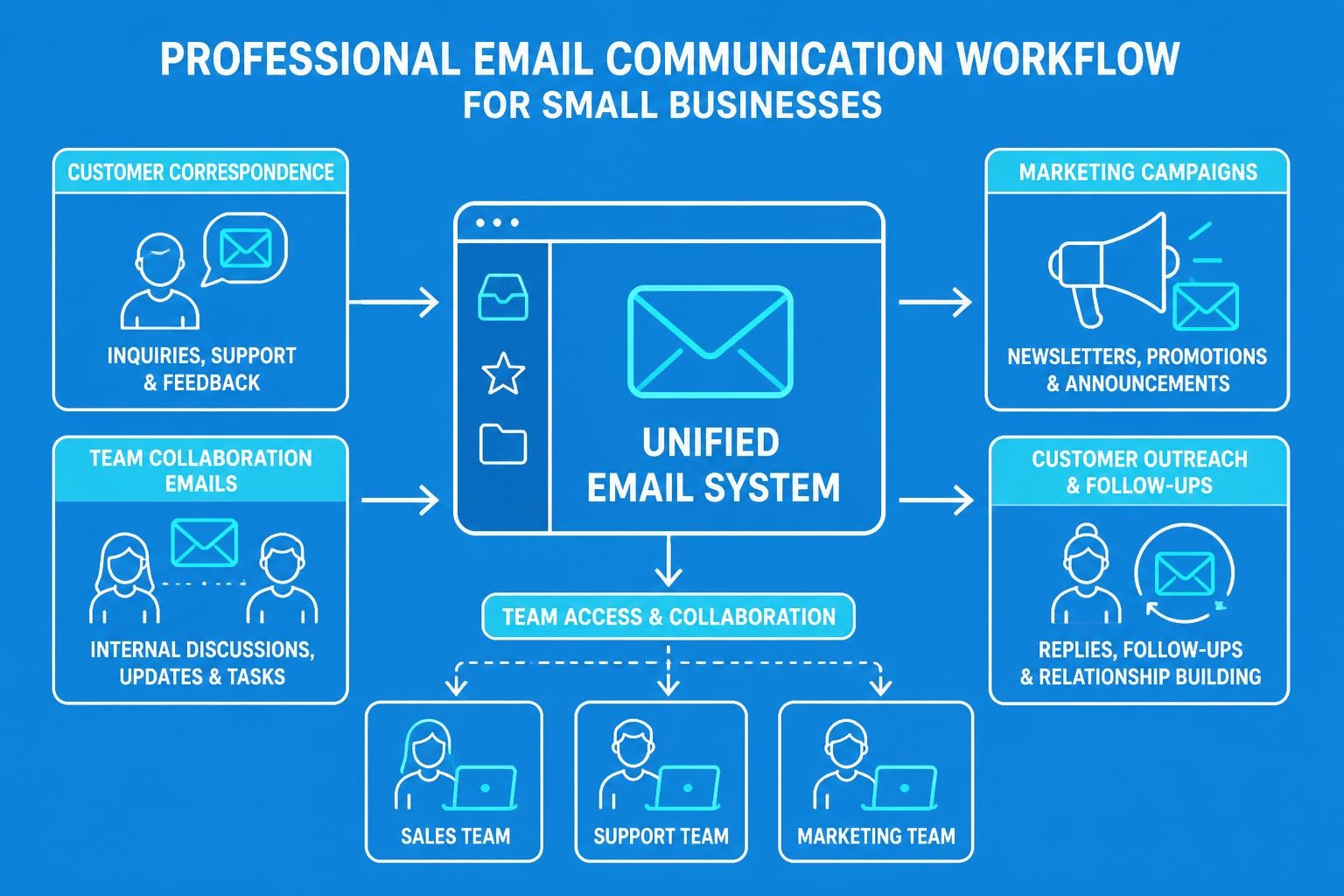
A businesses email address serves as the digital cornerstone of professional communication in 2026. Whether you're launching a startup or managing an established enterprise, the way you structure and manage your email infrastructure directly impacts your brand perception, customer trust, and operational efficiency. Small businesses particularly benefit from establishing professional email protocols early, as it sets the foundation for scalable growth and credible customer relationships. This comprehensive guide explores everything you need to know about creating, managing, and optimising your businesses email address system.
Understanding the Importance of Professional Email Addresses
Your businesses email address represents far more than a communication tool. It embodies your brand identity in every interaction, from client proposals to customer support enquiries. Research consistently shows that consumers trust businesses with domain-based email addresses significantly more than those using generic providers.
Professional credibility matters immensely in today's competitive marketplace. When prospects receive correspondence from [email protected] versus [email protected], the perception gap is substantial. A proper businesses email address immediately signals legitimacy, investment in your brand, and commitment to professional standards.
Key Benefits of Professional Email Infrastructure
- Enhanced brand recognition through consistent domain presence
- Improved deliverability rates compared to free email services
- Better security features and data protection compliance
- Scalable team collaboration with shared inboxes and aliases
- Professional appearance in all external communications
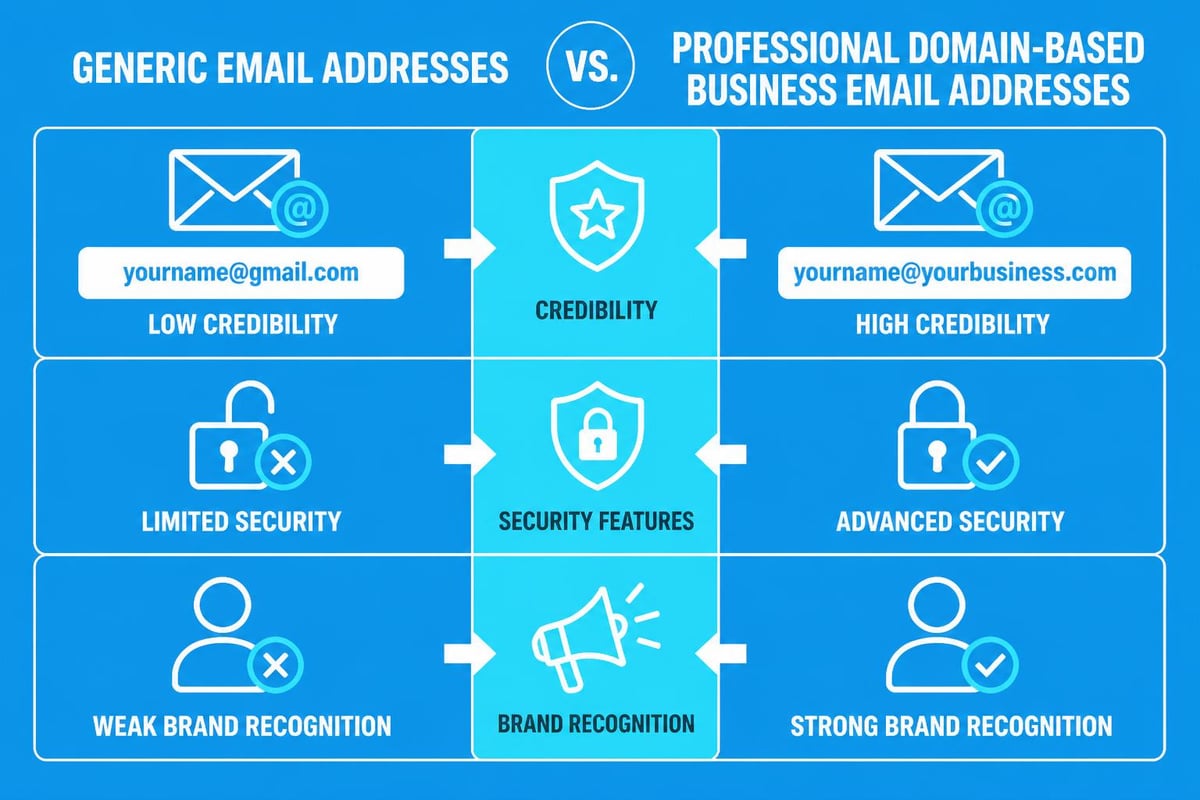
The investment in a professional email address pays dividends through increased response rates and stronger client relationships. Small businesses that prioritise email professionalism report higher conversion rates and improved customer retention metrics.
Choosing the Right Email Provider for Your Business
Selecting an appropriate email provider requires careful consideration of features, scalability, and integration capabilities. The market offers numerous options, each with distinct advantages for different business models and sizes.
| Provider Type | Best For | Key Features | Price Range |
|---|---|---|---|
| Google Workspace | Growing teams | Collaboration tools, storage | £4-15/user/month |
| Microsoft 365 | Enterprise needs | Office suite integration | £5-18/user/month |
| Custom hosting | Small businesses | Domain control, flexibility | £2-10/month |
| Specialized platforms | Marketing focus | Campaign tools, automation | £8-50/month |
When evaluating providers, consider your businesses email address requirements alongside broader operational needs. TechRadar's comprehensive review of email providers can help you compare current options based on security, storage, and integration capabilities.
Essential Features to Prioritise
Modern businesses require more than basic send-and-receive functionality. Your email infrastructure should support advanced features that streamline operations and enhance productivity.
Security measures have become non-negotiable. Look for providers offering two-factor authentication, encryption protocols, and advanced spam filtering. Data breaches can devastate small businesses, making robust security features worth premium pricing.
Integration capabilities determine how well your email system works with existing tools. Your businesses email address platform should connect seamlessly with customer relationship management systems, project management software, and marketing automation tools.
Storage capacity matters more as your business grows. Starting with adequate space prevents disruption when transitioning to higher-tier plans. Most small businesses find 30GB per user sufficient initially, though requirements vary by industry.
Structuring Your Business Email Naming Conventions
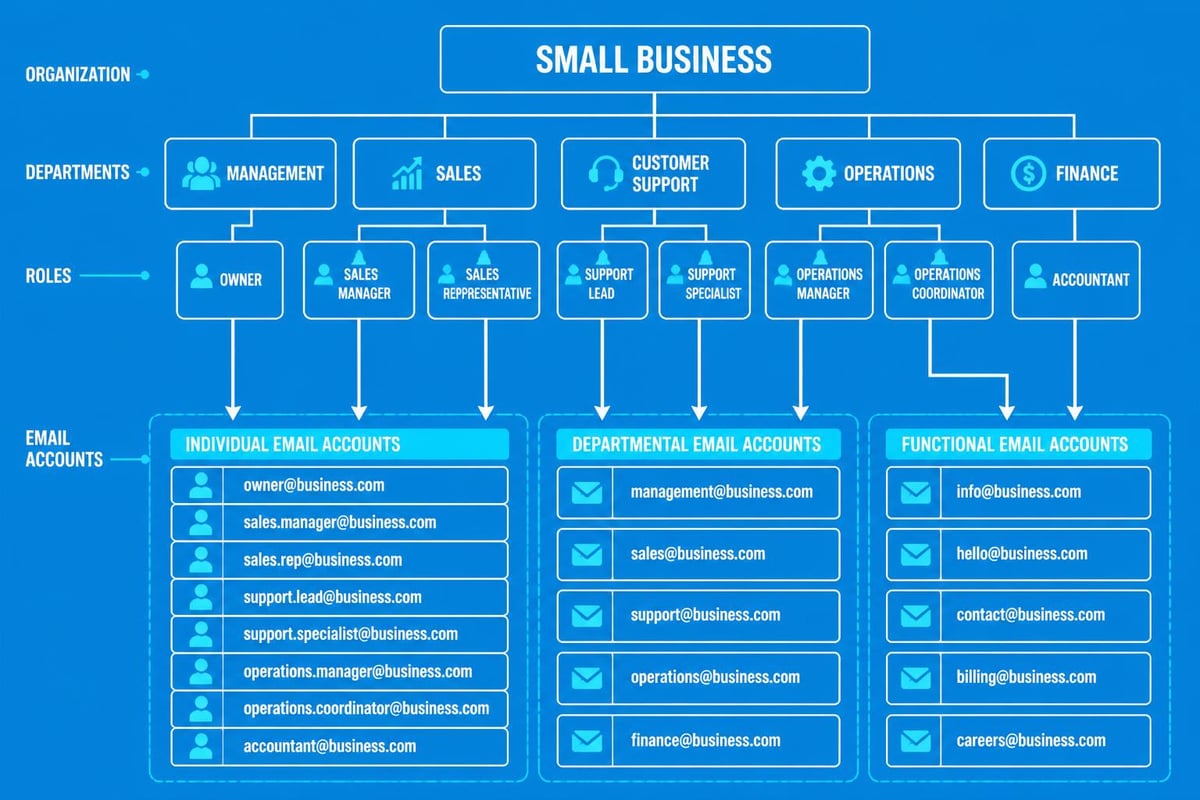
Consistency in email address formatting creates professional cohesion and simplifies communication management. Establishing clear naming conventions before creating your businesses email address infrastructure prevents confusion and ensures scalability.
Standard formats include:
The first option provides clarity for larger teams whilst maintaining professionalism. Indeed's guide on setting up business email emphasises the importance of choosing a format that accommodates future growth whilst remaining user-friendly for customers.
Departmental and Functional Addresses
Beyond individual accounts, creating role-based addresses enhances operational efficiency. These shared inboxes serve specific functions regardless of staff changes.
- [email protected] for general enquiries
- [email protected] for customer service
- [email protected] for sales team
- [email protected] for welcoming new contacts
- [email protected] for financial communications
Avoid common pitfalls when selecting your businesses email address format. Mailchimp's guidance on business email names recommends avoiding numbers, special characters, and overly long addresses that complicate verbal communication and professional presentation.
Setting Up Your Businesses Email Address Infrastructure
Technical setup requires careful planning to ensure smooth implementation and minimal disruption. Whether starting fresh or migrating from existing systems, following structured processes prevents data loss and communication gaps.
Domain Configuration Steps
- Purchase your domain name through reputable registrars
- Configure DNS records including MX, SPF, and DKIM
- Verify domain ownership through provider-specific methods
- Create initial email accounts following naming conventions
- Test deliverability before full deployment
DNS configuration particularly impacts email deliverability. Proper SPF (Sender Policy Framework) and DKIM (DomainKeys Identified Mail) records authenticate your businesses email address, reducing the likelihood of messages landing in spam folders.
Migration considerations become crucial when transitioning from free email services. Plan the transition during low-activity periods, maintain dual access temporarily, and communicate changes to key contacts well in advance.
Setting up email forwarding helps during transition phases. Forward old addresses to new ones whilst gradually phasing out legacy systems. This approach minimises missed communications whilst establishing your professional businesses email address presence.
Email Management Best Practices for Small Businesses
Effective email management separates thriving businesses from overwhelmed ones. Implementing systems and protocols early establishes productive habits that scale with growth.
Organisational Strategies
Folder structures should reflect your workflow rather than generic categories. Create hierarchies that support quick retrieval and logical filing. Common frameworks include:
- Client-based organisation
- Project-based filing
- Date-based archiving
- Priority-level categorisation
Filtering rules automate routine sorting, directing emails to appropriate folders based on sender, subject, or content. Your businesses email address system should leverage automation to reduce manual processing time.
Response time expectations require clear communication. Establishing and publicising response windows manages client expectations whilst preventing burnout. Many successful small businesses commit to 24-hour responses for general enquiries and four-hour responses for urgent matters.
| Email Type | Response Time | Priority Level |
|---|---|---|
| Customer support | 4 hours | High |
| Sales enquiries | 2 hours | Critical |
| General information | 24 hours | Medium |
| Marketing responses | 48 hours | Low |
When sending email messages, maintaining professionalism while being personable creates positive impressions. Templates for common scenarios ensure consistency whilst saving time.
Professional Email Etiquette Standards
Proper email communication reflects organisational values and professionalism. Your businesses email address represents your brand in every message, making etiquette adherence essential for maintaining positive relationships.
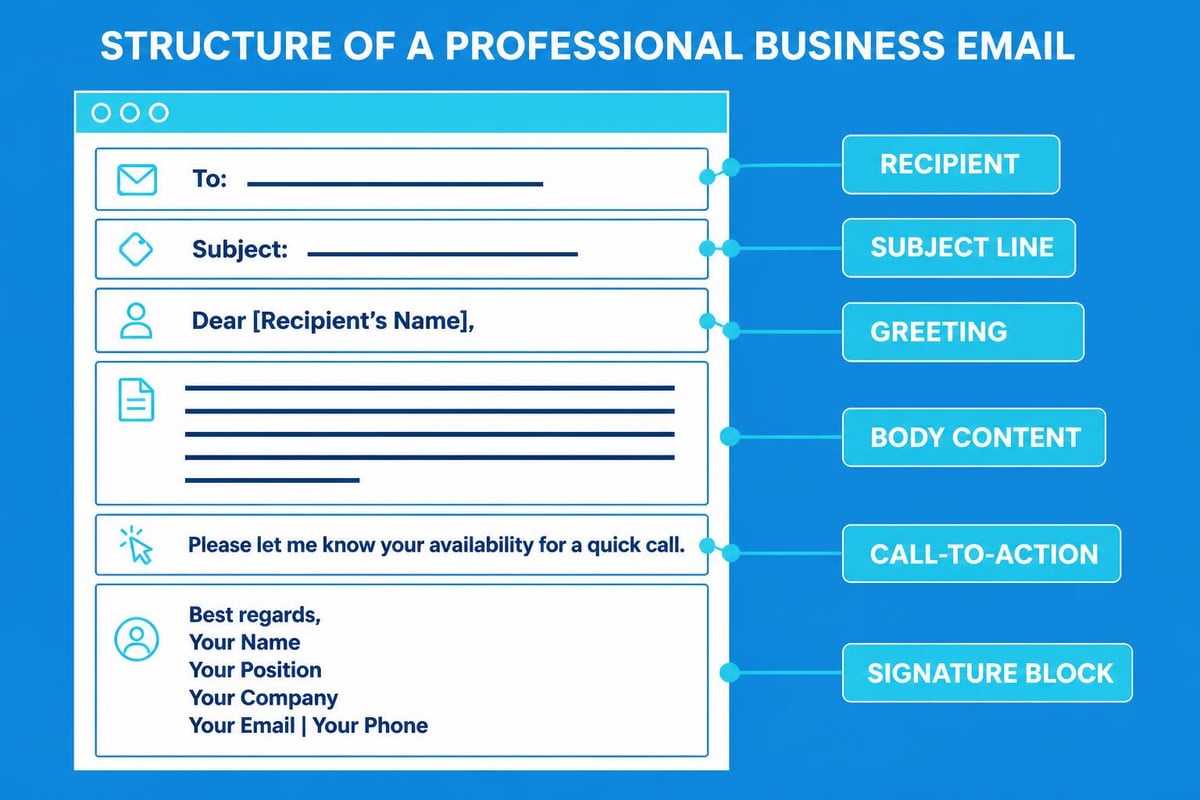
Subject lines should clearly convey message content whilst remaining concise. Specific subjects improve open rates and help recipients prioritise responses. Compare "Question" versus "Proposal deadline clarification for Project Phoenix" - the latter provides context and urgency.
Professional email etiquette rules emphasise proper greetings, clear structure, and appropriate closing remarks. These elements combine to create polished, effective communication.
Essential Etiquette Components
- Appropriate greetings matching relationship formality
- Clear, concise body text focused on single topics
- Professional signatures with complete contact information
- Proofreading before sending to eliminate errors
- Timely responses respecting sender's time
Tone management proves particularly challenging in written communication. Without vocal inflection or body language, messages can appear colder than intended. Active voice, positive phrasing, and judicious emoji use (in appropriate contexts) can warm professional correspondence.
Following proper email etiquette guidelines demonstrates respect for recipients whilst enhancing your professional reputation. Small businesses particularly benefit from consistent etiquette standards across all team members.
Leveraging Email Addresses for Marketing Growth
Your businesses email address infrastructure extends beyond operational communication into powerful marketing capabilities. Small businesses can compete effectively with larger competitors through strategic email marketing approaches.
List building forms the foundation of successful email marketing. Collect addresses ethically through website opt-ins, event registrations, and purchase confirmations. Quality matters more than quantity - engaged subscribers deliver better returns than large, disinterested lists.
Segmentation transforms generic broadcasts into targeted, relevant communications. Divide your list based on:
- Purchase history
- Engagement levels
- Geographic location
- Industry or business type
- Lifecycle stage
Understanding how to find business email addresses ethically supports B2B prospecting efforts whilst maintaining compliance with data protection regulations. Verification tools ensure accuracy whilst protecting sender reputation.
Campaign Optimisation Strategies
Successful email campaigns balance promotional content with value delivery. The 80/20 rule suggests 80% educational or entertaining content versus 20% promotional messaging. This approach builds trust whilst maintaining commercial objectives.
Testing protocols improve performance over time. A/B testing subject lines, send times, and content formats reveals audience preferences. Small businesses benefit from systematic testing despite limited resources - even simple tests yield valuable insights.
Automation capabilities transform businesses email address platforms into revenue-generating systems. Welcome sequences, abandoned cart reminders, and re-engagement campaigns run automatically, nurturing relationships without constant manual effort.
For small businesses focusing on growth, understanding the benefits of email marketing helps justify investment in professional infrastructure and strategic campaigns. Email consistently delivers the highest ROI among digital marketing channels.
Security and Compliance Considerations
Protecting your businesses email address infrastructure safeguards sensitive information whilst maintaining regulatory compliance. Security breaches damage reputations and customer trust, making prevention critical for long-term success.
Authentication protocols verify sender identity and prevent spoofing. Implementing SPF, DKIM, and DMARC records protects your domain reputation whilst ensuring legitimate messages reach recipients. These technical measures work invisibly but provide essential protection.
Essential Security Measures
- Strong password policies with regular updates
- Two-factor authentication for all accounts
- Encryption for sensitive communications
- Regular security audits identifying vulnerabilities
- Employee training on phishing recognition
Compliance requirements vary by jurisdiction and industry. GDPR affects European operations, whilst sector-specific regulations impose additional obligations. Your businesses email address system must support compliance through features like data retention controls and deletion capabilities.
Backup procedures prevent catastrophic data loss. Regular, automated backups to secure locations ensure business continuity even during system failures or security incidents. Test restoration processes periodically to verify backup integrity.
When getting a business email address, prioritise providers offering robust security features and compliance support. The marginal cost difference proves negligible compared to breach-related damages.
Scaling Email Infrastructure with Business Growth
Your businesses email address needs evolve as your organisation expands. Planning for growth prevents disruptive transitions whilst supporting increasing communication volumes and complexity.
User management becomes complex with team expansion. Centralised administration tools streamline account creation, permission management, and offboarding processes. Role-based access controls ensure employees access only necessary information.
| Growth Stage | Typical Needs | Recommended Solutions |
|---|---|---|
| 1-5 employees | Basic email, shared calendar | Simple hosted solution |
| 6-20 employees | Departmental addresses, collaboration | Workspace platform |
| 21-50 employees | Advanced automation, CRM integration | Enterprise email suite |
| 50+ employees | Custom workflows, dedicated support | Premium enterprise plans |
Integration requirements expand alongside operations. Your businesses email address platform should connect with evolving technology stacks including CRM systems, project management tools, and marketing automation platforms. API availability and native integrations reduce implementation complexity.
Migration planning prevents growth-related disruptions. Upgrading to enterprise plans or switching providers requires careful coordination. Maintain parallel systems during transitions, thoroughly test new configurations, and communicate changes to all stakeholders.
Monitoring email metrics provides growth insights beyond basic communication tracking. Analyse response times, resolution rates, and customer satisfaction scores to identify improvement opportunities. Data-driven decisions optimise email operations as complexity increases.
Advanced Email Features for Competitive Advantage
Sophisticated businesses email address capabilities separate industry leaders from followers. Modern platforms offer advanced features that enhance productivity, improve customer experiences, and drive revenue growth.
Artificial intelligence now powers smart composition, automated responses, and priority sorting. AI assistants suggest reply content, schedule optimal send times, and flag urgent messages requiring immediate attention. These capabilities multiply team effectiveness without additional headcount.
Collaborative features transform email from individual communication into team-based workflows. Shared inboxes, internal notes, and assignment capabilities ensure nothing falls through cracks whilst maintaining accountability.
- Smart categorisation automatically sorting incoming messages
- Automated workflows triggering actions based on email content
- Analytics dashboards tracking team performance metrics
- Template libraries ensuring consistent, professional communication
- Integration ecosystems connecting email with business tools
Personalisation at scale becomes achievable through merge fields, dynamic content, and behavioural triggers. Your businesses email address platform should support sophisticated personalisation that resonates with individual recipients whilst remaining manageable for small teams.
Understanding how to effectively send emails using advanced features maximises return on email infrastructure investment. Small businesses implementing advanced capabilities often outperform larger competitors lacking strategic email approaches.
Establishing a robust businesses email address infrastructure provides the foundation for professional communication, effective marketing, and sustainable growth. From selecting appropriate providers and establishing naming conventions to implementing security measures and leveraging advanced features, every decision shapes your business trajectory. Whether you're just starting or optimising existing systems, the strategies outlined here support improved credibility, enhanced productivity, and stronger customer relationships. Astonish Email helps small businesses maximise their email marketing potential with intuitive tools designed specifically for growing companies. Start building your professional email presence today and transform how you connect with customers.