Free Business Email Account: Complete Guide for 2026
May 8, 2026
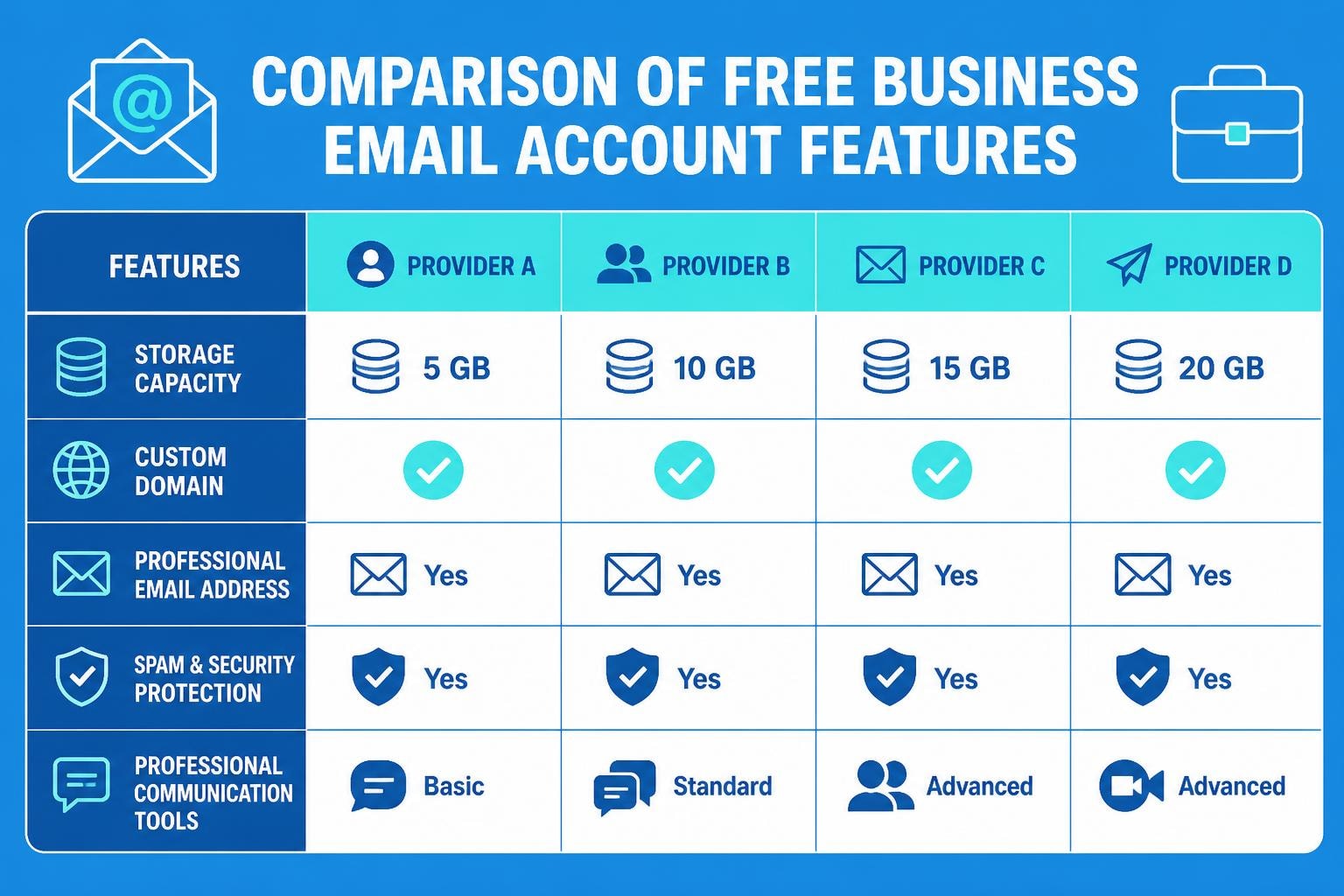
Establishing a professional online presence begins with choosing the right email solution for your business. A free business email account offers small businesses and startups an opportunity to create a credible communication channel without the immediate financial burden. As we navigate 2026, the landscape of email services has evolved dramatically, with numerous providers offering robust features that previously required paid subscriptions. Understanding which options align with your business needs can save time, enhance productivity, and establish trust with clients from the very first interaction.
Understanding Free Business Email Account Options
The term "free business email account" encompasses various service models, each designed to meet different organisational requirements. Unlike personal email addresses that use generic domains like Gmail or Yahoo, business email accounts typically allow you to use your company's domain name, creating a more professional impression.
Many providers offer tiered services where basic features remain free whilst premium capabilities require payment. This freemium model allows small businesses to establish their email infrastructure without upfront costs, then scale as their needs grow. The key is identifying which features matter most for your operations.
Core Features to Consider
When evaluating a free business email account, several essential features determine whether the service will support your business effectively:
- Custom domain support for professional branding
- Storage capacity sufficient for your communication volume
- Security features including spam filtering and encryption
- Mobile accessibility for on-the-go management
- Integration capabilities with productivity tools
- User limit flexibility for growing teams
Storage considerations vary significantly across providers. Some offer 5GB whilst others provide 15GB or more on free plans. For businesses handling large attachments or maintaining extensive archives, this becomes a critical differentiator.
Top Free Business Email Account Providers
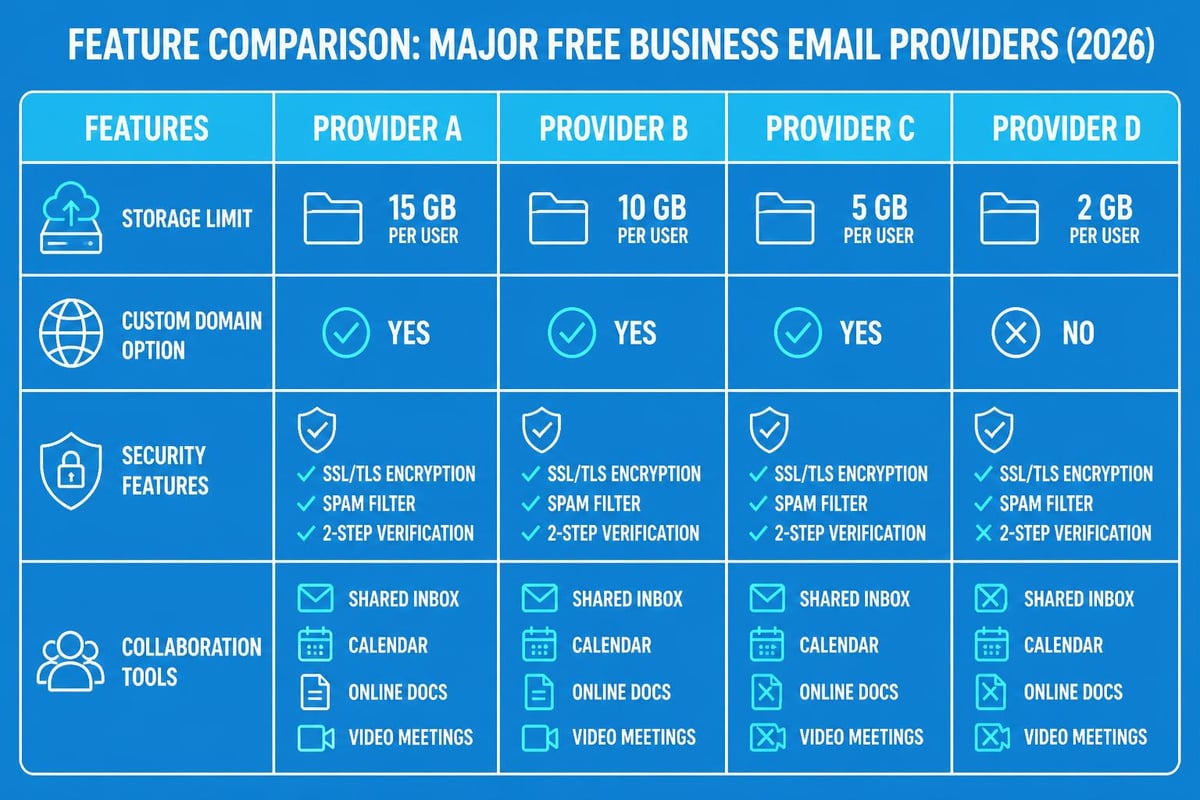
The market offers several compelling options for businesses seeking professional email services without monthly fees. Each provider brings unique strengths to the table, making the selection process dependent on your specific priorities.
Google Workspace (Limited Free Options)
Google's ecosystem provides powerful collaboration tools, though their fully free business email options have become more limited. However, businesses can still leverage Gmail with custom domains through certain configurations, particularly when combined with domain registrars offering email forwarding.
Primary advantages include:
- Seamless integration with Google Drive, Calendar, and Meet
- Industry-leading spam protection
- 15GB storage shared across Google services
- Superior mobile applications
- Familiar interface reducing training time
The platform's search functionality remains unmatched, allowing quick retrieval of critical communications. For businesses already using Google's ecosystem, maintaining consistency across tools enhances workflow efficiency.
Zoho Mail
Zoho Mail stands out as a genuinely free business email account provider offering custom domain support for up to five users. This makes it particularly attractive for startups and micro-businesses requiring professional addresses without costs.
| Feature | Free Plan | Benefit |
|---|---|---|
| Users | Up to 5 | Suitable for small teams |
| Storage per User | 5GB | Adequate for standard usage |
| Custom Domain | Yes | Professional branding |
| Mobile Apps | Full-featured | Remote accessibility |
| Ad-free Interface | Yes | Distraction-free experience |
Zoho's control panel offers granular settings for security and user management. The platform also includes task management and notes applications, creating an all-in-one productivity suite. According to GeeksforGeeks' comprehensive overview, Zoho Mail provides excellent value for businesses prioritising privacy and ad-free communication.
ProtonMail
Security-conscious businesses find ProtonMail compelling due to its end-to-end encryption and Switzerland-based privacy protections. The free tier supports one custom domain and limited storage, making it suitable for businesses where confidentiality outweighs storage needs.
The service's encryption happens automatically, requiring no technical expertise from users. However, the free plan's 500MB storage means it works best for businesses with minimal attachment usage or those willing to archive regularly.
Setting Up Your Free Business Email Account
Creating and configuring a professional email system requires methodical planning to ensure smooth operations from day one. The setup process involves several interconnected steps that establish both functionality and security.
Domain Registration and Configuration
Your business email address begins with owning a domain name. Even when using a free business email account, you'll need to register your domain through a registrar. Popular options include Namecheap, GoDaddy, and Google Domains, with prices typically ranging from £10-£20 annually.
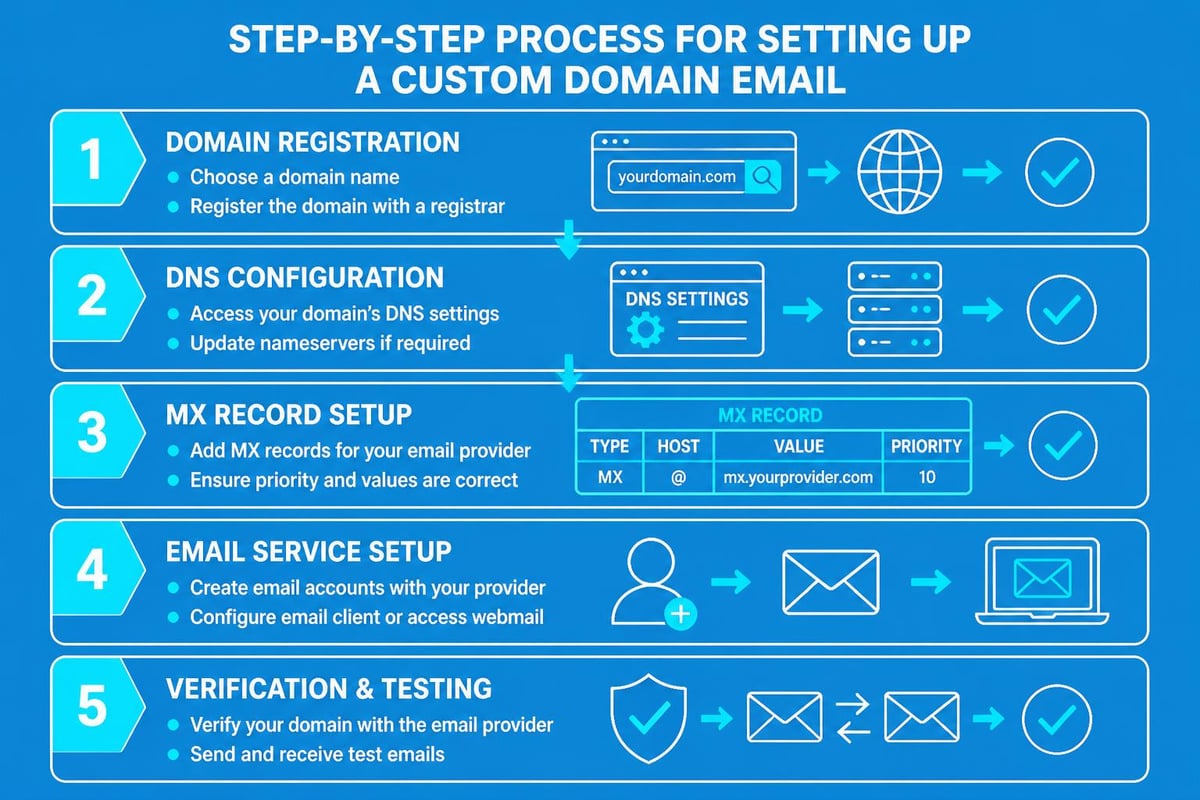
Configuration steps include:
- Purchasing your desired domain name
- Accessing your domain's DNS settings
- Adding MX records provided by your email service
- Verifying domain ownership through provider-specific methods
- Testing email delivery and reception
Most email providers offer detailed guides for common registrars, making the technical aspects manageable even for non-technical users. Elegant Themes provides step-by-step instructions for various scenarios, helping you navigate potential complications.
Configuring Email Clients
Whilst web-based interfaces work well, many professionals prefer desktop or mobile email clients for enhanced productivity. Configuring these applications requires specific server settings from your provider.
Modern email services typically support both IMAP and POP3 protocols, with IMAP being preferable for most business scenarios as it synchronises across devices. When setting up professional email communications, ensure you enable two-factor authentication immediately to prevent unauthorised access.
Security and Compliance Considerations
Email remains the primary vector for cyber attacks, making security paramount when selecting a free business email account. Even without financial investment, you shouldn't compromise on protection features that safeguard your business communications.
Essential Security Features
Multi-factor authentication (MFA) should be non-negotiable. This additional security layer prevents account takeovers even if passwords become compromised. Most reputable providers now offer MFA options including authenticator apps, SMS codes, or hardware keys.
Additional security measures include:
- Regular password updates with strong complexity requirements
- Email encryption for sensitive communications
- Spam and phishing filters with customisable sensitivity
- Automatic virus scanning for attachments
- Login alerts for unusual access patterns
TechRadar's detailed analysis highlights how different providers approach security, helping you make informed choices based on your risk profile.
Data Privacy and Compliance
Businesses operating in the UK must consider GDPR compliance when handling email communications. Your free business email account provider should offer features supporting data protection requirements, including the ability to delete user data permanently and export information upon request.
Understanding where your email data resides matters for compliance and performance. European-based servers may offer advantages for UK businesses regarding data sovereignty and access speeds. Review each provider's privacy policy carefully, noting how they handle your data and whether they scan emails for advertising purposes.
Limitations and When to Upgrade
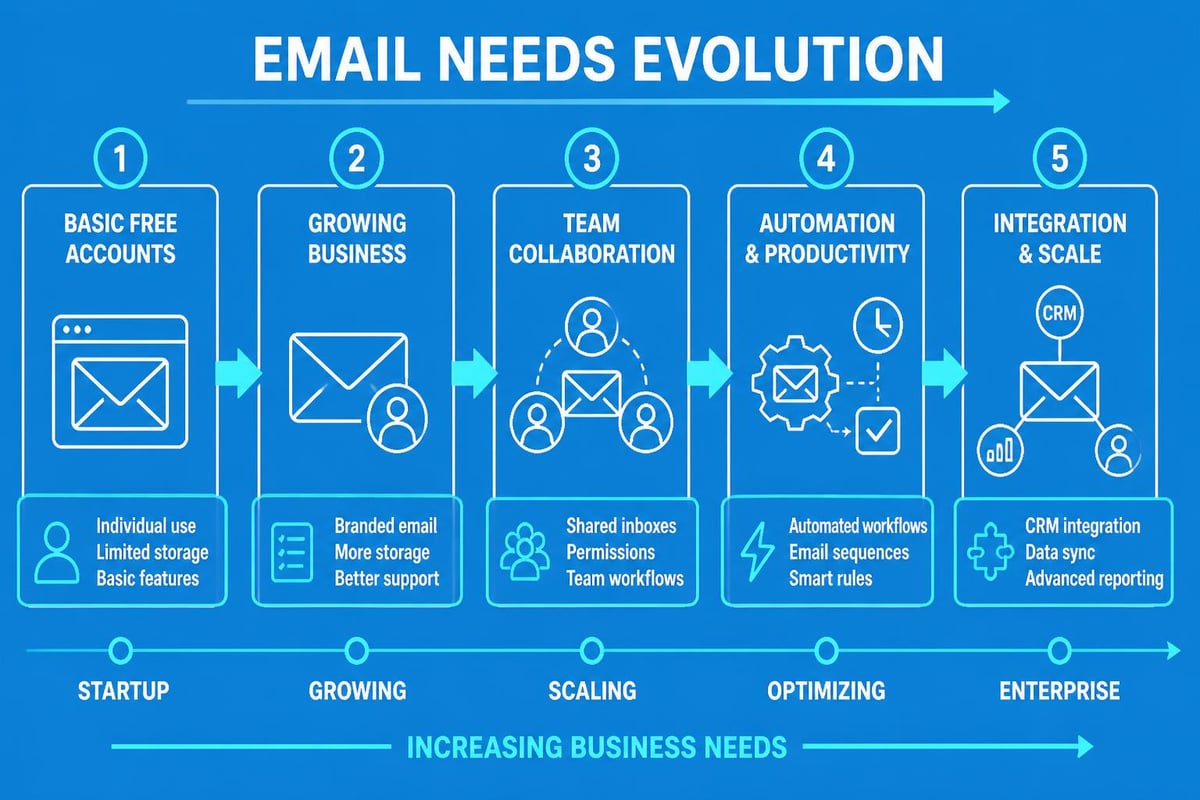
Free business email accounts serve as excellent starting points, but recognising their limitations helps you plan for sustainable growth. Understanding when free solutions no longer serve your needs prevents disruptions during critical business periods.
Storage and Scaling Challenges
The most common limitation involves storage capacity. As your business grows and communication volume increases, free tier storage depletes quickly. Regular archiving or deletion becomes necessary, consuming time better spent on revenue-generating activities.
| Challenge | Free Account Impact | Upgrade Consideration |
|---|---|---|
| Storage Limits | Frequent management required | Unlimited or expanded storage |
| User Restrictions | Team growth constrained | Flexible user additions |
| Support Access | Community forums only | Priority technical support |
| Advanced Features | Limited automation | Workflow integration tools |
| Custom Branding | Basic options | Full customisation capability |
Team collaboration features often remain limited on free plans. Advanced capabilities like shared calendars, resource booking, and team drives typically require paid subscriptions. When considering creating a business email account, factor in your six-month and twelve-month growth projections.
Integration Requirements
Modern businesses rely on integrated software ecosystems where email connects seamlessly with CRM systems, project management tools, and marketing platforms. Free business email accounts may lack API access or integration capabilities, forcing manual data transfer between systems.
For businesses leveraging email marketing alongside transactional communications, these limitations become particularly constraining. When you're ready to implement sophisticated email campaigns, exploring what makes a good business email becomes essential for maximising your communication effectiveness.
Optimising Your Free Business Email Account
Maximising value from your free business email account requires strategic configuration and disciplined usage patterns. Small optimisations compound over time, creating significant efficiency gains without additional costs.
Organisation and Productivity Tips
Implementing a robust folder structure from the outset prevents overwhelming inboxes. Create categories aligned with your business processes, such as:
- Client communications by project or account
- Internal team discussions
- Vendor and supplier correspondence
- Marketing and promotional materials
- Administrative and compliance records
Utilise filters and rules to automate email sorting. Most free providers offer basic automation allowing incoming messages to route automatically based on sender, subject, or content. This reduces manual sorting time and ensures important messages receive prompt attention.
Signature templates enhance professionalism whilst saving time. Include essential contact information, social media links, and a professional sign-off. Some businesses add disclaimer text for legal protection, though keep signatures concise to avoid overwhelming recipients.
Email Management Best Practices
The "inbox zero" methodology, whilst debated, offers valuable principles for email management. Process emails in batches rather than constantly monitoring your inbox. Set specific times for email review, allowing focused work periods without constant interruption.
Archive rather than delete whenever possible. Storage constraints may eventually require more aggressive deletion, but maintaining searchable archives proves invaluable when retrieving past conversations or verifying previous agreements. Clean Email discusses scalable business email solutions that grow with your archiving needs.
Migration Strategies for Growing Businesses
Eventually, most businesses outgrow their free business email account and require migration to more robust solutions. Planning this transition minimises disruption and prevents data loss during critical growth phases.
Preparing for Migration
Before initiating migration, conduct a thorough audit of your current email setup. Document all existing email addresses, forwarding rules, filters, and integrations. This inventory ensures nothing gets overlooked during the transition.
Pre-migration checklist includes:
- Export critical emails and attachments
- Document all automation rules and filters
- List all third-party integrations requiring reconfiguration
- Notify team members of upcoming changes
- Establish parallel operation timeline
- Create backup access to old accounts
Consider running both systems simultaneously for a transition period. This parallel operation allows testing of the new system whilst maintaining business continuity. Gradually shift communications to the new platform, keeping the old account active for receiving forwarded messages.
Choosing the Right Paid Solution
When evaluating paid alternatives to your free business email account, prioritise features addressing your current limitations. If storage was constraining, ensure the new plan offers substantial capacity with reasonable upgrade paths. When team collaboration suffered, focus on platforms with robust shared calendar and document features.
The investment in a paid solution should align with your business scale and projected growth. Small businesses might find Astonish Email's plans offer the right balance of functionality and affordability, particularly when email marketing becomes central to your growth strategy.
Future-Proofing Your Email Strategy
Technology evolves rapidly, and email services continuously add features and modify their offerings. Staying informed about industry developments helps you leverage new capabilities and avoid being caught off-guard by policy changes.
Emerging Trends in Business Email
Artificial intelligence integration represents the most significant shift in email services. Smart composition suggestions, automatic response generation, and intelligent prioritisation already appear in some platforms. Free tiers may lag in receiving these features, but understanding their potential helps you evaluate when upgrades become worthwhile.
Enhanced security measures continue evolving in response to sophisticated threats. Passwordless authentication, advanced phishing detection using machine learning, and automated compliance checking represent areas of active development. When selecting a free business email account, consider the provider's track record of innovation and security updates.
Building Resilience
Never rely exclusively on a single email provider without backup plans. Maintain local backups of critical communications, either through email client downloads or dedicated backup services. This redundancy protects against service outages, account suspensions, or data loss incidents.
Consider having a secondary email service configured for emergency use. During the rare occasions when primary services experience extended outages, this backup allows business continuity. The secondary account needn't handle daily volume but should be tested periodically to ensure functionality when needed.
Maximising Communication Effectiveness
Having a free business email account solves only part of the communication challenge. How you use that account determines whether it enhances or hinders your business relationships. Professional communication standards apply regardless of whether your service is free or paid.
Professional Email Etiquette
Clear, concise subject lines improve open rates and help recipients prioritise messages. Avoid vague subjects like "Question" or "Update," instead providing specific context such as "Q2 Budget Review Meeting Agenda" or "Project Deadline Extension Request."
Proofread every message before sending. Typos and grammatical errors undermine your professional image regardless of how polished your email address appears. Take advantage of built-in spelling and grammar checkers, but don't rely on them exclusively.
Response time expectations vary by industry, but acknowledging emails within 24 hours demonstrates respect for correspondents' time. When detailed responses require research or consideration, send brief acknowledgements promising fuller replies by specific dates. This prevents anxiety about whether messages were received whilst giving you time to formulate appropriate responses.
Understanding new business email account setup fundamentals ensures you start with strong foundations. These practices become habits that serve your business long after you've potentially migrated to paid solutions or expanded your email infrastructure.
Selecting the right free business email account establishes your professional identity whilst managing startup costs effectively. As your business grows and your communication needs evolve, the foundation you build today determines how smoothly you can scale tomorrow. Whether you're just starting out or looking to optimise your existing setup, Astonish Email provides the tools and guidance small businesses need to transform email from a basic utility into a powerful marketing channel that drives genuine growth.