Gmail Microsoft Outlook: Choosing the Right Email Platform
April 30, 2026
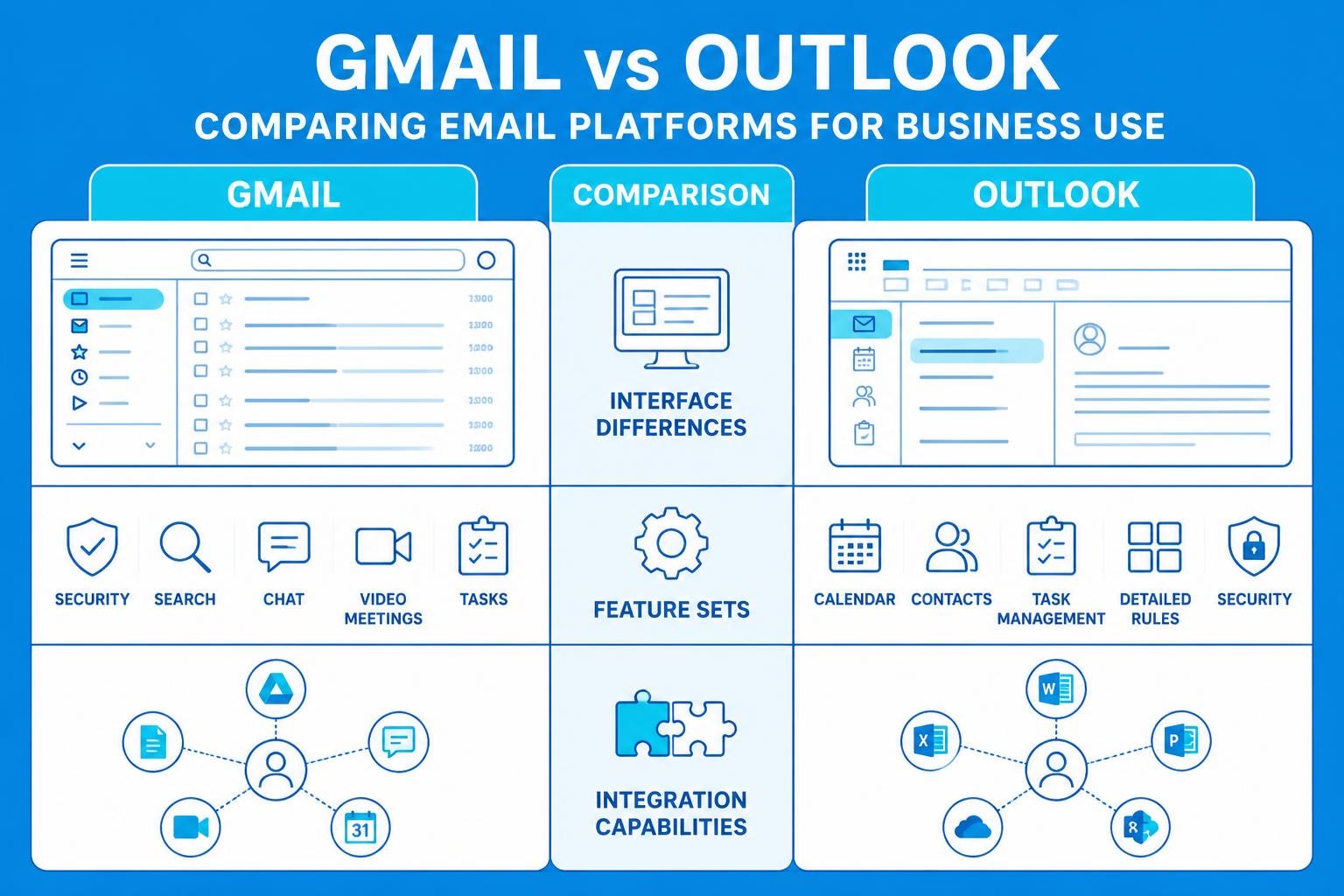
Choosing the right email platform can significantly impact how your small business communicates with customers, manages workflows, and maintains professional relationships. Both Gmail and Microsoft Outlook dominate the business email landscape, each offering distinct advantages for different organisational needs. Understanding the nuances between gmail microsoft outlook options helps you make an informed decision that aligns with your business objectives, team size, and technical requirements. Whether you're setting up your first business email or considering a platform migration, evaluating these two powerhouses requires examining their features, integration capabilities, and how they support your broader email marketing strategy.
Understanding the Core Differences Between Gmail and Outlook
Gmail and Microsoft Outlook represent two fundamentally different approaches to email management. Gmail, developed by Google, offers a web-first experience built around search functionality and conversation threading. The platform organises emails into conversations automatically, making it easier to follow lengthy email chains without scrolling through separate messages.
Microsoft Outlook, conversely, evolved from desktop email clients and maintains a more traditional folder-based organisation system. This structure appeals to users who prefer hierarchical email management with explicit control over categorisation.
Key architectural differences include:
- Storage approach: Gmail provides 15GB shared across Google services, whilst Outlook offers 50GB dedicated email storage
- Interface philosophy: Gmail prioritises simplicity and speed, Outlook emphasises comprehensive features and customisation
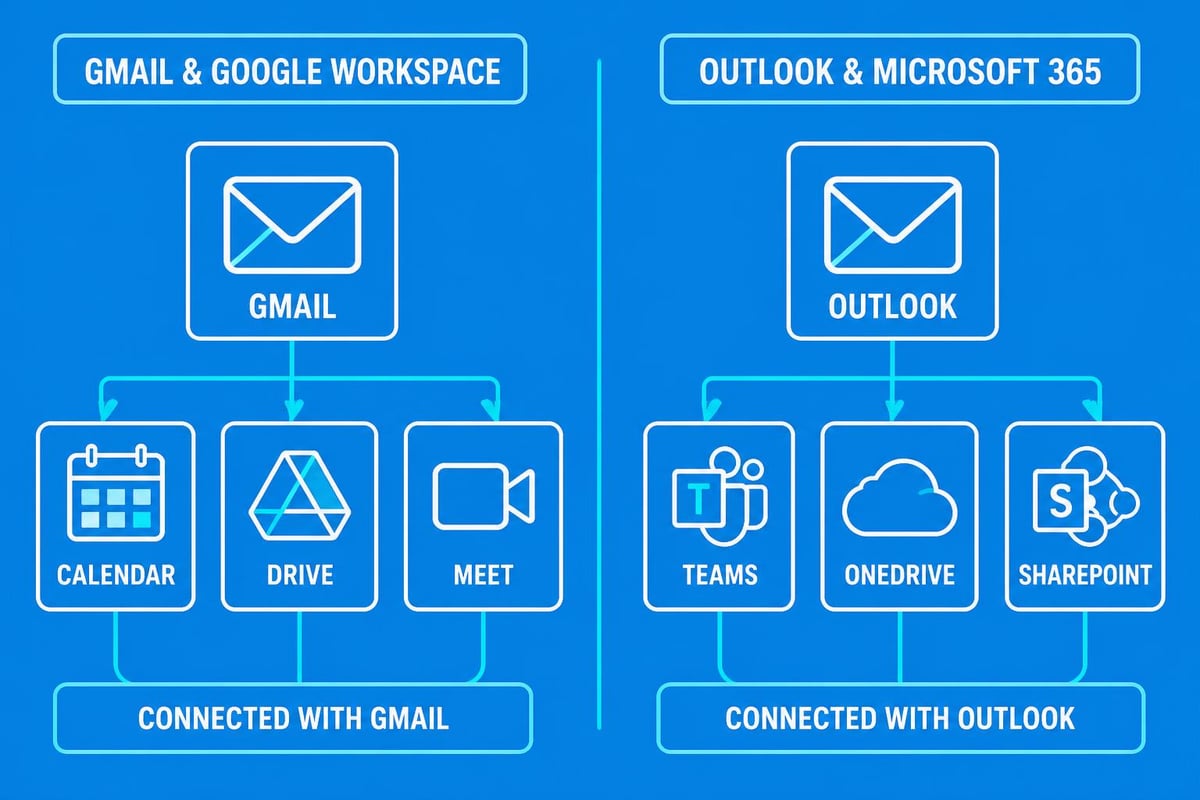
- Integration ecosystem: Gmail connects seamlessly with Google Workspace, Outlook integrates deeply with Microsoft 365
The choice between gmail microsoft outlook platforms often depends on which productivity suite your business already uses. Companies invested in Google Workspace benefit from Gmail's native integration with Calendar, Drive, and Meet. Similarly, Microsoft 365 subscribers gain advantages from Outlook's connections to Teams, OneDrive, and SharePoint.
Email Organisation and Management Features
Managing large volumes of email requires robust organisational tools. Gmail's label system allows multiple tags per email, creating flexible categorisation that surpasses traditional folders. This multi-dimensional approach means a single email about a client project can simultaneously appear under "Client Name," "Project Type," and "Urgent" labels.
Outlook maintains classic folder structures whilst adding categories for colour-coding and Quick Steps for automating repetitive tasks. The platform's Rules feature provides powerful automation for sorting incoming messages based on sender, subject, or content criteria.
| Feature | Gmail | Outlook |
|---|---|---|
| Organisation Method | Labels (multiple per email) | Folders + Categories |
| Search Capability | Advanced operators, conversation view | Boolean search, refinement filters |
| Automation | Filters and auto-labels | Rules and Quick Steps |
| Offline Access | Limited offline mode | Full offline functionality |
| Storage Management | Archive-focused approach | Delete or archive options |
Both platforms excel at email management, but their philosophies differ substantially. Gmail encourages users to archive everything and rely on search, whilst Outlook supports users who prefer manual organisation and folder hierarchies.
Setting Up Gmail with Microsoft Outlook
Many businesses use gmail microsoft outlook together, accessing Gmail accounts through the Outlook client interface. This hybrid approach combines Gmail's storage and spam filtering with Outlook's desktop features and integration capabilities.
Adding a Gmail account to Outlook requires enabling IMAP access in your Gmail settings and configuring Outlook to sync with Google's servers. The process takes approximately ten minutes and provides unified inbox management across multiple email accounts.
Step-by-Step Integration Process
- Enable IMAP in Gmail: Navigate to Settings > Forwarding and POP/IMAP, then enable IMAP access
- Add account in Outlook: Select File > Add Account and enter your Gmail address
- Authenticate: Complete Google's security verification process
- Configure sync settings: Choose which folders to synchronise and set refresh intervals
- Test functionality: Send test emails and verify bidirectional synchronisation
When setting up Outlook with Gmail, small businesses should configure email signatures, out-of-office replies, and filtering rules within their preferred interface. Changes made in Outlook reflect in Gmail's web interface and vice versa, ensuring consistency across platforms.
This integration strategy particularly benefits teams transitioning between platforms or managing multiple email accounts simultaneously. For businesses establishing their professional email presence, understanding these integration options provides flexibility in choosing client software whilst maintaining backend infrastructure.
Email Delivery and Reliability Comparison
Email deliverability directly impacts business communication effectiveness. Both gmail microsoft outlook platforms maintain robust infrastructure, but their delivery performance varies based on several factors including sender reputation, content filtering, and recipient server relationships.
Gmail processes over 300 billion emails daily, employing sophisticated machine learning algorithms to filter spam and prioritise important messages. The platform's AI-powered Priority Inbox learns from user behaviour to surface relevant emails automatically.
Microsoft Outlook utilises similar advanced filtering but integrates additional business-focused security features through Microsoft Defender. This enterprise-grade protection includes advanced threat detection, anti-phishing measures, and attachment sandboxing.
Delivery rate considerations include:
- Spam filtering accuracy: Gmail's machine learning reduces false positives but may over-filter marketing emails
- Inbox placement: Email delivery performance varies based on sender reputation and authentication
- Greylisting behaviour: Outlook temporarily rejects emails from unknown senders more frequently than Gmail
- Authentication requirements: Both platforms increasingly enforce SPF, DKIM, and DMARC verification
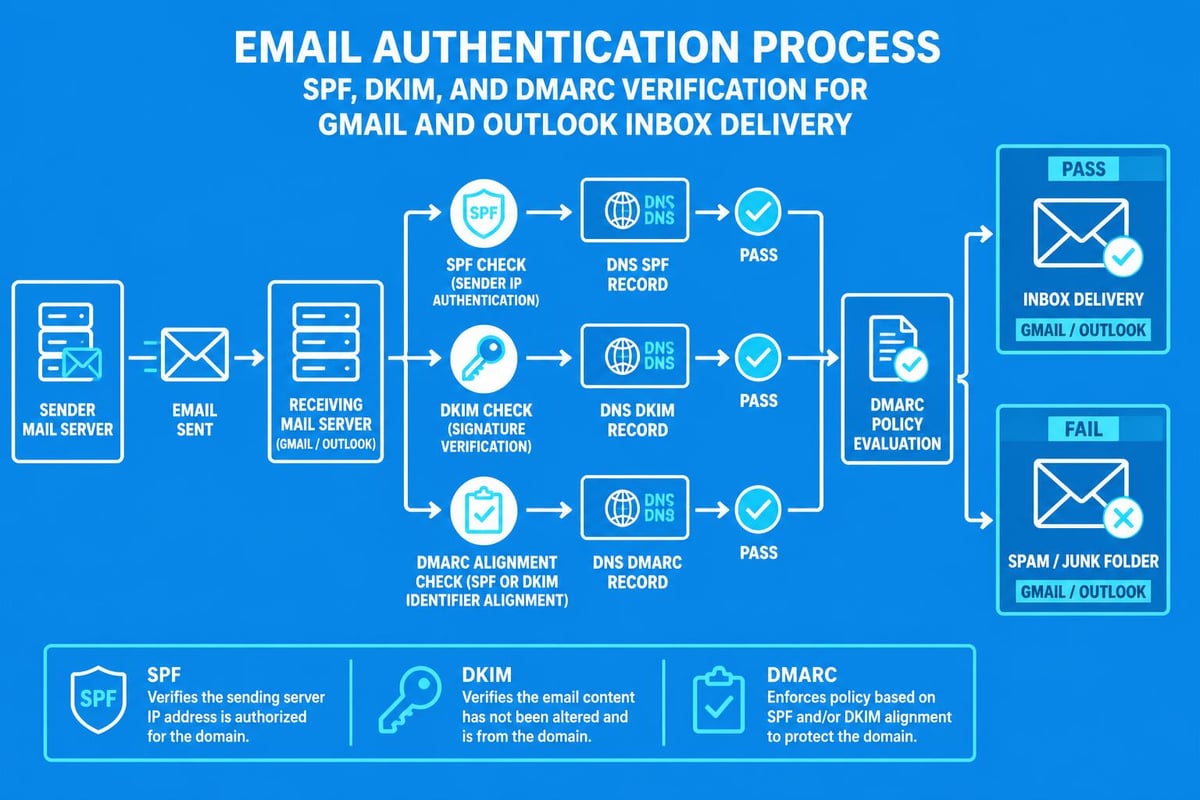
For small businesses using email marketing platforms, understanding these delivery nuances helps optimise campaigns. Maintaining clean lists, implementing proper authentication, and monitoring engagement metrics ensures messages reach customer inboxes regardless of whether recipients use Gmail or Outlook.
Mobile Application Performance
Modern business communication demands reliable mobile email access. Gmail's mobile applications for iOS and Android provide streamlined interfaces optimised for smartphone screens, with features like smart reply suggestions and notification bundling.
Outlook's mobile apps offer comparable functionality whilst adding unique features such as Focused Inbox, which separates important emails from lower-priority messages automatically. The application also includes integrated calendar views and file attachment previews without requiring separate apps.
Both platforms support push notifications, offline reading, and biometric authentication. The choice between gmail microsoft outlook mobile applications often depends on personal preference rather than significant functional differences.
Cost Analysis for Small Businesses
Budget considerations influence platform selection significantly for small businesses. Gmail offers free personal accounts with 15GB storage, whilst Google Workspace Business Starter begins at £4.60 per user monthly, including custom domain email addresses and enhanced security features.
Microsoft 365 Business Basic starts at £4.50 per user monthly, providing 50GB mailbox storage alongside web versions of Office applications. Higher-tier plans include desktop Office applications, advanced security, and compliance tools.
| Plan Tier | Gmail/Workspace | Outlook/Microsoft 365 | Key Differences |
|---|---|---|---|
| Free Tier | 15GB, @gmail.com address | Limited Outlook.com accounts | Gmail more generous storage |
| Basic Business | £4.60/user (30GB) | £4.50/user (50GB) | Outlook includes Office web apps |
| Standard Business | £9.20/user (2TB) | £9.40/user (50GB) | Workspace adds enhanced security |
| Premium Business | £15.10/user (5TB) | £15.60/user (100GB) | Desktop Office apps with Microsoft |
Free options serve solopreneurs adequately, but businesses requiring custom domains and professional features benefit from paid plans. When creating a business email account, investing in branded addresses enhances credibility and brand recognition.
Integration with Business Tools and Workflows
Modern businesses rely on interconnected software ecosystems. The gmail microsoft outlook decision significantly impacts which third-party tools integrate seamlessly into daily workflows.
Gmail's integration marketplace includes thousands of add-ons extending functionality directly within the email interface. Popular integrations include project management tools, CRM systems, and document signing services. The platform's API enables custom integrations for businesses with specific requirements.
Outlook's advantage lies in native Microsoft 365 integration. Teams meetings launch directly from calendar invites, SharePoint documents attach without downloading, and OneNote notebooks link effortlessly to emails. This tight integration reduces context switching and streamlines collaborative workflows.
Automation Capabilities
Both platforms support automation, though through different mechanisms. Gmail users leverage Zapier's integration capabilities to connect Gmail with thousands of business applications, creating automated workflows without coding knowledge.
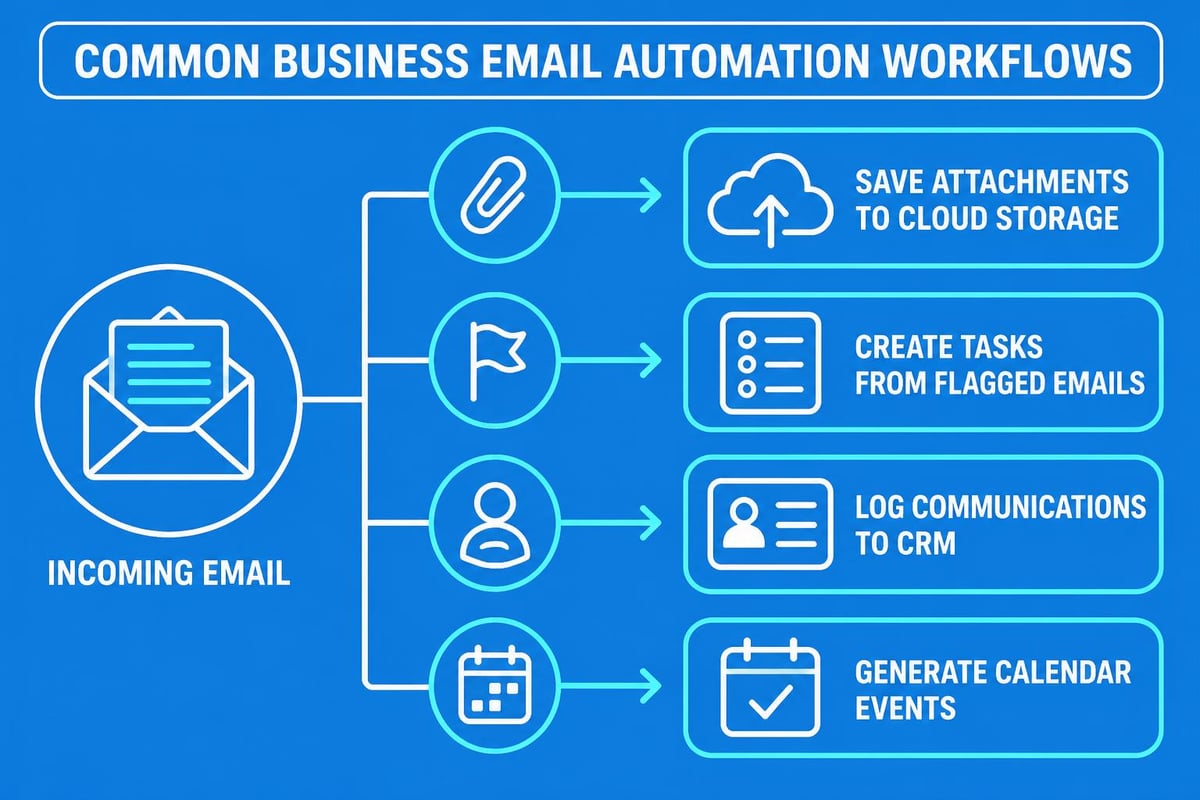
Common automation scenarios include:
- Automatically saving email attachments to cloud storage
- Creating tasks in project management software from flagged emails
- Logging customer communications in CRM systems
- Forwarding specific emails to team Slack channels
- Generating calendar events from email content
Outlook users access Microsoft Power Automate for similar functionality, with the added advantage of deeper integration with other Microsoft services. Power Automate templates enable quick deployment of common workflows whilst allowing customisation for specific business needs.
For small businesses focused on email marketing, understanding these automation options helps maintain contact lists, segment audiences, and trigger campaigns based on customer interactions. Simple business email setups should consider automation potential alongside basic functionality.
Security and Privacy Considerations
Email security protects sensitive business information and customer data. Both gmail microsoft outlook platforms implement robust security measures, though their approaches reflect different corporate philosophies.
Gmail employs automatic encryption for emails in transit and at rest. Google's infrastructure includes built-in DDoS protection, regular security audits, and two-factor authentication options. However, Google's business model involves analysing email content for advertising purposes in free accounts, though this practice ended for Workspace accounts in 2017.
Microsoft emphasises privacy and compliance, positioning Outlook as the enterprise choice for regulated industries. The platform includes advanced threat protection, data loss prevention policies, and compliance tools meeting healthcare, financial, and government requirements.
Authentication and Access Controls
Strong authentication prevents unauthorised account access. Gmail supports various two-factor authentication methods including SMS codes, authenticator apps, and physical security keys. Advanced Protection Programme offers enhanced security for high-risk users.
Outlook provides similar multi-factor authentication alongside conditional access policies that restrict login attempts based on location, device, and risk assessment. Microsoft's enterprise focus includes detailed audit logs and administrator controls for managing organisational security policies.
User Experience and Interface Design
Daily productivity depends significantly on interface usability. Comparing Outlook and Gmail reveals distinct design philosophies that appeal to different user preferences and working styles.
Gmail's minimalist interface emphasises speed and simplicity. The compose window opens as an overlay, enabling reference to other emails whilst writing. Keyboard shortcuts accelerate common actions, and the Priority Inbox surfaces important messages automatically.
Outlook's comprehensive interface provides immediate access to email, calendar, contacts, and tasks in a unified window. The Reading Pane displays message content alongside the inbox list, enabling rapid message processing without opening separate windows.
Interface preference factors include:
- Learning curve: Gmail's simplicity reduces training time for new users
- Feature density: Outlook displays more information simultaneously
- Customisation: Outlook offers extensive layout and appearance options
- Keyboard navigation: Both platforms support extensive keyboard shortcuts
- Accessibility: Microsoft invests heavily in accessibility features for disabled users
Personal preference plays a substantial role in platform selection. Teams should trial both interfaces before committing to ensure the chosen platform aligns with working styles and productivity patterns.
Calendar and Scheduling Integration
Email and calendar functionality intertwine closely in business workflows. Gmail integrates seamlessly with Google Calendar, displaying event details directly in email sidebar panels and enabling one-click meeting scheduling from Gmail compose windows.
Outlook combines email and calendar in a unified interface, simplifying schedule management without switching applications. The platform's scheduling assistant shows team availability when organising meetings, whilst proposed new time features enable efficient meeting rescheduling.
Both platforms support calendar sharing, external meeting invitations, and mobile calendar access. The gmail microsoft outlook choice often depends on which calendar features matter most to your specific business requirements.
Meeting Scheduling Features
Modern scheduling extends beyond basic calendar entries. Gmail users access Google Meet directly from calendar invitations, whilst Outlook integrates Microsoft Teams for video conferencing. Both platforms support external meeting platforms like Zoom through calendar integrations.
Scheduling polls help coordinate meetings across multiple participants. Gmail requires third-party add-ons for this functionality, whilst Outlook includes FindTime as an integrated scheduling poll solution. These features prove particularly valuable for small businesses coordinating client meetings across different time zones.
Migration Strategies and Considerations
Switching between gmail microsoft outlook platforms requires careful planning to avoid data loss and workflow disruption. Migration complexity depends on mailbox size, historical email importance, and integration dependencies.
Google provides migration tools for importing emails, contacts, and calendars from Outlook. The process maintains folder structures and preserves message metadata including timestamps and sender information. Large mailboxes require several hours for complete migration.
Microsoft offers similar tools for migrating from Gmail to Outlook, with staged migration options enabling gradual transition for large organisations. Setting up Gmail in Outlook as an intermediate step allows teams to trial Outlook whilst maintaining Gmail infrastructure.
Migration planning steps include:
- Audit current setup: Document existing integrations, filters, and custom configurations
- Clean email data: Delete unnecessary messages and archive old campaigns
- Test migration: Perform trial migration with subset of data
- Configure new platform: Recreate essential filters, signatures, and settings
- Train users: Provide documentation and training sessions
- Execute migration: Perform full data transfer during low-activity period
- Verify completion: Confirm all data transferred successfully
Small businesses should consider whether migration benefits justify the transition costs. Sometimes maintaining existing infrastructure whilst adding new capabilities through integrations provides better value than complete platform replacement.
Advanced Features for Business Users
Beyond basic email functionality, both platforms offer advanced features supporting sophisticated business workflows. Gmail's Labs section enables experimental features including canned responses for templated emails, multiple inbox views, and preview pane customisation.
Outlook's advanced features include Quick Parts for inserting reusable text blocks, voting buttons for gathering team input via email, and recall functionality for unsent messages. The platform's Rules engine enables complex automated email processing based on multiple criteria.
Email Templates and Productivity Tools
Standardised email templates ensure consistent communication whilst saving time on repetitive messages. Gmail users create templates through the "Canned Responses" feature, storing frequently sent emails for quick insertion with personalisation placeholders.
Outlook's Quick Parts achieve similar results whilst offering more sophisticated formatting options and dynamic content fields. Templates can include current dates, user signatures, and conditional content based on recipient attributes.
For businesses managing customer communications at scale, understanding template capabilities helps maintain quality whilst improving response times. When combined with email marketing platforms, templates ensure brand consistency across all customer touchpoints.
Making the Right Choice for Your Business
Selecting between gmail microsoft outlook requires evaluating multiple factors against your specific business requirements. Neither platform objectively surpasses the other across all criteria; instead, each excels in different scenarios.
Gmail suits businesses that:
- Prioritise search functionality over folder organisation
- Use Google Workspace for document collaboration
- Value simplicity and minimal interface clutter
- Require generous storage at lower price points
- Prefer web-first applications over desktop software
Outlook advantages include:
- Superior offline email access and functionality
- Deep integration with Microsoft 365 productivity suite
- Advanced automation through Rules and Quick Steps
- Comprehensive calendar and scheduling features
- Enterprise-grade security and compliance tools
Small businesses should consider existing software investments, team technical expertise, and long-term scalability requirements. The business email setup you choose today should accommodate growth over the next several years without requiring disruptive migration.
Testing both platforms through free trials provides hands-on experience that reveals workflow compatibility better than feature comparisons alone. Involve team members in evaluation to ensure the selected platform meets diverse working style preferences.
Choosing between Gmail and Microsoft Outlook fundamentally shapes how your business manages email communication, integrates productivity tools, and maintains customer relationships. Both platforms offer robust capabilities suitable for small businesses, with specific advantages depending on your existing technology ecosystem and workflow preferences. Whether you select Gmail's search-focused simplicity or Outlook's comprehensive feature set, success ultimately depends on implementing proper email practices and maintaining consistent communication standards. Astonish Email helps small businesses maximise email marketing effectiveness regardless of which platform you choose, providing intuitive campaign management tools that integrate seamlessly with your existing email infrastructure to drive customer engagement and business growth.