Send to Email: Complete Guide for Small Businesses
May 4, 2026
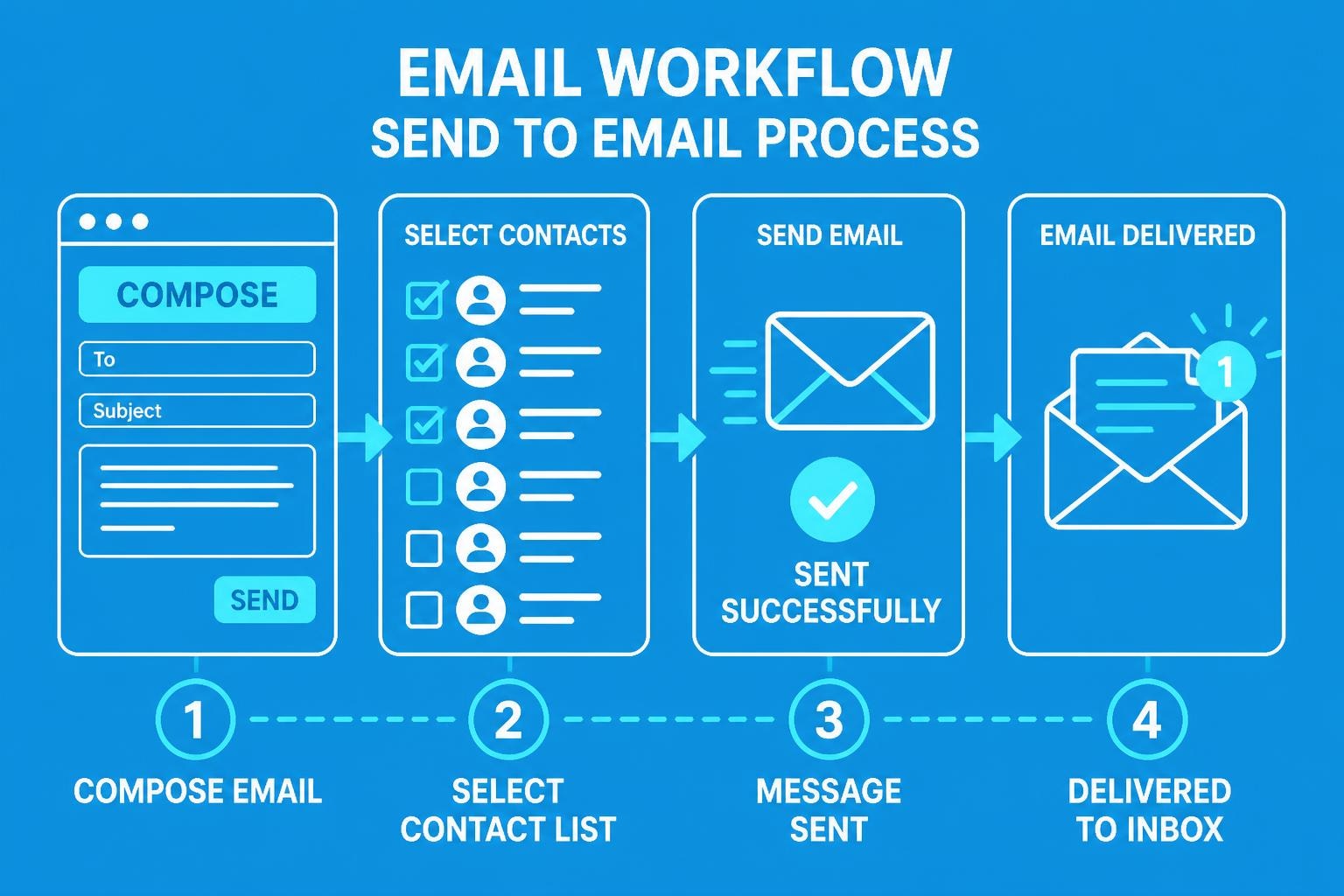
The ability to send to email effectively remains one of the most critical skills for small business owners in 2026. Whether you're distributing newsletters, following up with prospects, or maintaining customer relationships, understanding the nuances of email delivery can dramatically impact your business success. This comprehensive guide explores everything from basic functionality to advanced strategies that ensure your messages reach their intended recipients and drive meaningful engagement.
Understanding the Send to Email Function
At its core, the send to email function represents the process of transmitting electronic messages from one address to another through internet protocols. For small businesses, this seemingly simple action involves multiple technical layers that determine whether your message lands in the primary inbox, promotions folder, or spam.
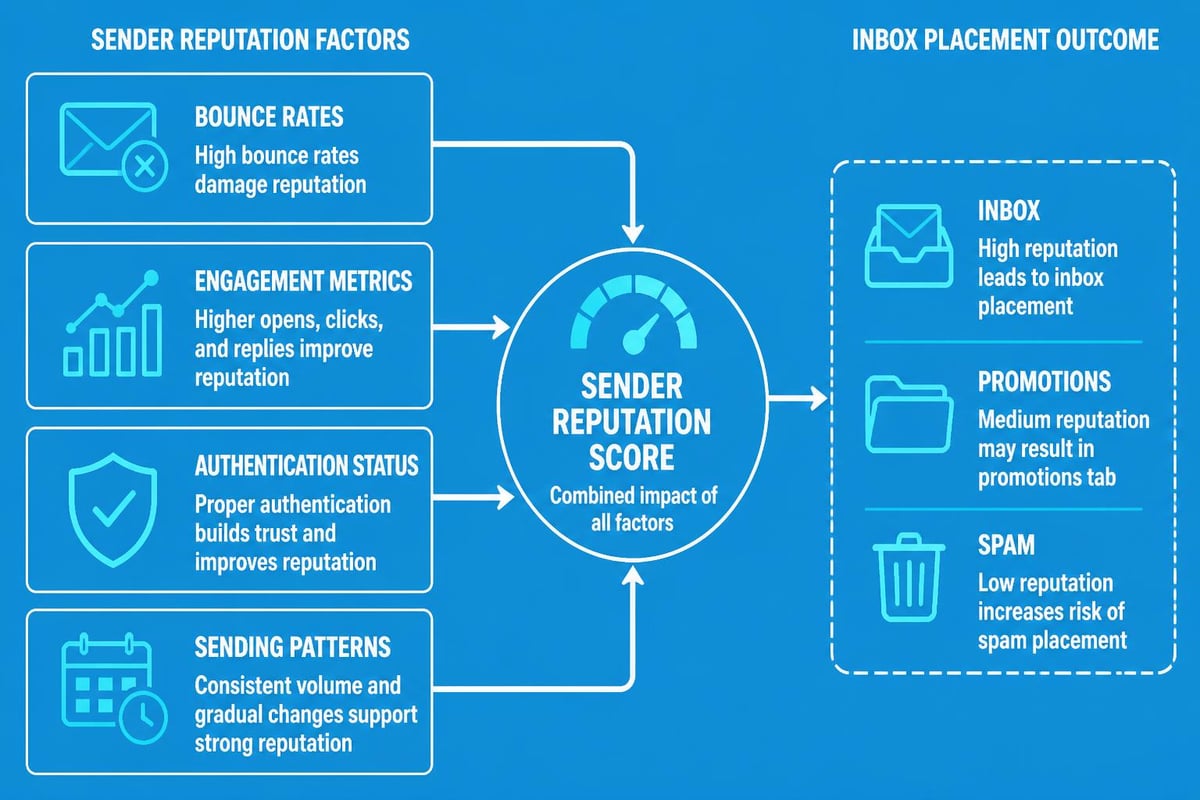
The modern email ecosystem has evolved significantly beyond basic transmission. When you send to email today, sophisticated algorithms evaluate your sender reputation, content quality, authentication protocols, and recipient engagement patterns. These factors collectively determine deliverability rates and ultimately influence your marketing ROI.
Technical Infrastructure Requirements
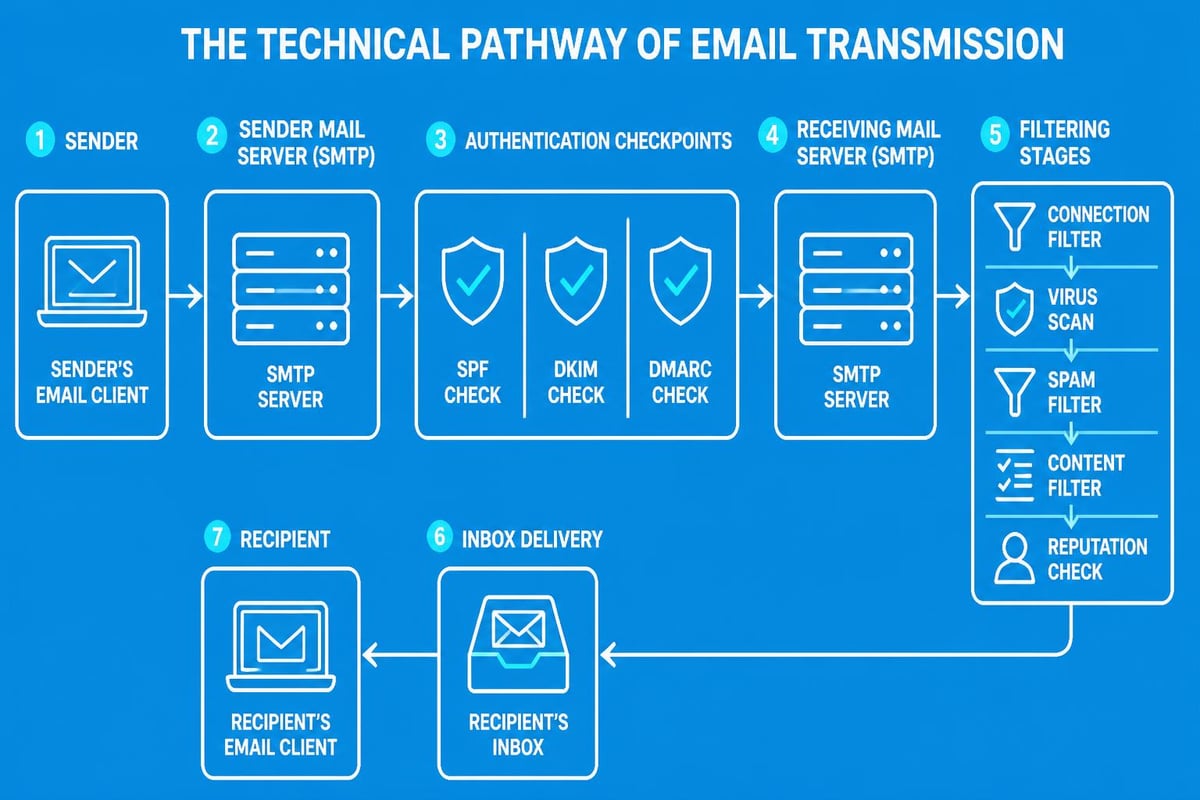
Every time you send to email, your message travels through multiple servers and checkpoints. SMTP (Simple Mail Transfer Protocol) serves as the foundation for email transmission, while authentication protocols like SPF, DKIM, and DMARC verify your identity as a legitimate sender.
Small businesses often overlook these technical requirements when setting up email campaigns. Without proper authentication, your messages face higher rejection rates regardless of content quality. According to best practices for email deliverability, maintaining authenticated sending infrastructure improves inbox placement by up to 40%.
| Authentication Protocol | Purpose | Impact on Deliverability |
|---|---|---|
| SPF | Verifies sending IP addresses | High |
| DKIM | Adds digital signature to messages | Very High |
| DMARC | Provides policy for authentication failures | Critical |
Crafting Messages That Convert
When you send to email, the content quality directly influences recipient actions. Professional communication requires attention to structure, clarity, and purpose. Your subject line serves as the gateway-compelling enough to drive opens whilst remaining truthful to avoid spam flags.
Effective email composition includes:
- Clear, action-oriented subject lines (6-10 words)
- Personalized greeting addressing recipients by name
- Concise body text focused on single call-to-action
- Mobile-responsive formatting for cross-device compatibility
- Professional signature with complete contact information
The importance of maintaining proper email etiquette cannot be overstated. Recipients form impressions within seconds of opening your message. Grammatical errors, unclear messaging, or aggressive sales language can permanently damage business relationships.
Timing and Frequency Considerations
Deciding when to send to email significantly affects engagement rates. Research indicates that Tuesday through Thursday morning hours generate optimal open rates for B2B communications, whilst B2C messages often perform better during evening hours and weekends.
Frequency management prevents subscriber fatigue. Bombarding contacts with daily messages leads to increased unsubscribe rates and spam complaints. Most successful small businesses send to email between 2-4 times monthly, adjusting based on engagement metrics and subscriber preferences.
Security and Privacy Protocols
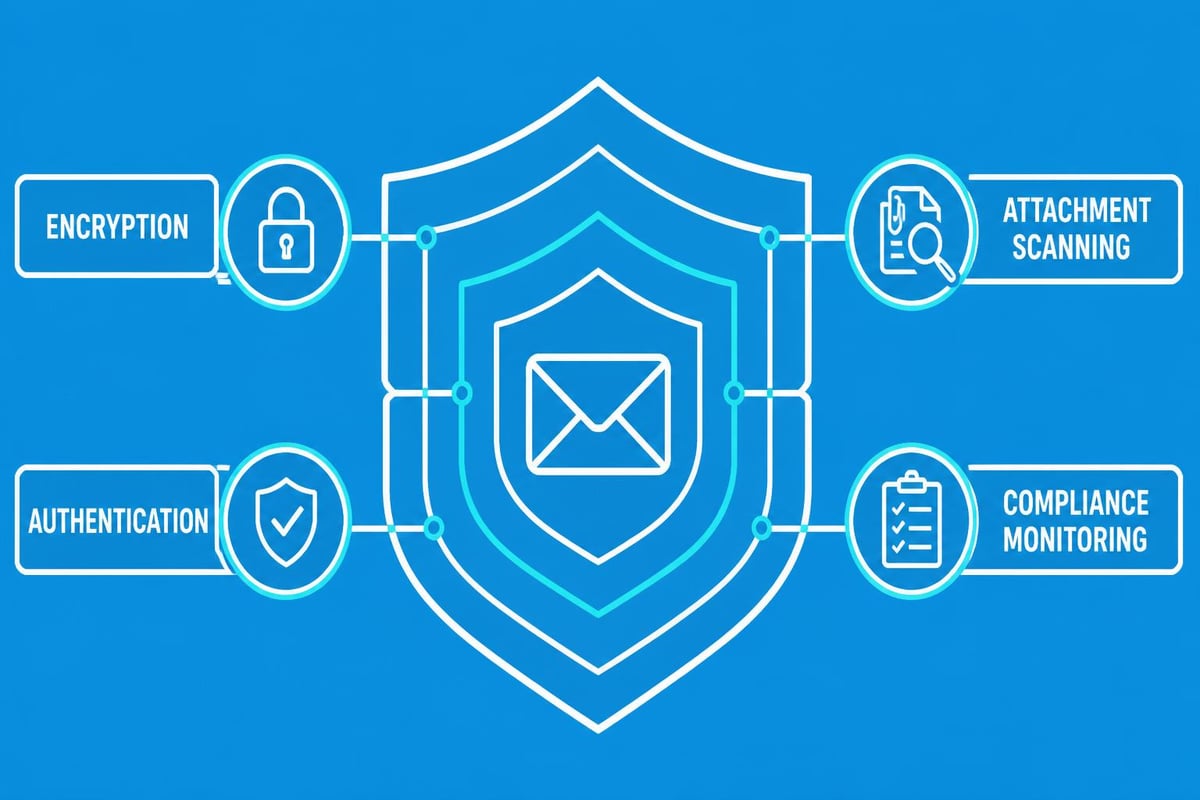
Security concerns grow increasingly important as cyber threats evolve. When you send to email containing sensitive business information, implementing proper protection measures safeguards both your company and recipients. Understanding email security with attachments becomes essential for businesses handling confidential data.
Key security practices include:
- Encryption: Use TLS encryption for message transmission
- Password protection: Secure sensitive attachments with unique passwords
- Limited retention: Establish clear data retention policies for email archives
- Access controls: Restrict sending permissions to authorized personnel only
- Regular audits: Monitor sending patterns for unusual activity
Small businesses must balance convenience with security. Whilst it's tempting to send to email quickly without additional safeguards, one data breach can destroy customer trust and result in significant financial penalties under GDPR and similar regulations.
Attachment Best Practices
Email attachments require special consideration when you send to email. File size limitations vary by provider, but keeping attachments under 10MB ensures broader compatibility. The best practices for email attachments recommend using cloud storage links for larger files rather than direct attachments.
Common file formats like PDF, DOCX, and XLSX generally pass through spam filters without issue. However, executable files (.exe, .zip with executables) often trigger automatic rejection. When sharing documents, convert them to universally accessible formats that don't require specific software versions.
Building and Managing Contact Lists
The quality of your recipient list determines campaign success more than any other factor. When you send to email addresses collected through organic signup processes, engagement rates soar compared to purchased or scraped lists. Businesses investing in proper email contacts management see measurably better ROI.
List Segmentation Strategies
Segmentation allows targeted messaging based on subscriber characteristics, behaviors, or preferences. Rather than sending generic broadcasts, create segments for:
- New subscribers (welcome series and onboarding)
- Active customers (product updates and exclusive offers)
- Dormant contacts (re-engagement campaigns)
- Geographic locations (region-specific promotions)
- Purchase history (cross-sell and upsell opportunities)
| Segment Type | Message Focus | Typical Frequency |
|---|---|---|
| New Subscribers | Welcome, education | 3-5 emails/first week |
| Active Customers | Value delivery, updates | 2-4 emails/month |
| Dormant Contacts | Re-engagement offers | 1 email/quarter |
| VIP Customers | Exclusive content, early access | 4-6 emails/month |
When you send to email with segment-specific content, open rates improve by an average of 14% whilst click-through rates increase by 101% compared to unsegmented campaigns. This personalization makes recipients feel valued rather than treated as generic database entries.
Deliverability Optimization Techniques
Email deliverability represents the percentage of sent messages that successfully reach recipient inboxes. When you send to email, numerous factors influence this crucial metric. Maintaining high deliverability requires ongoing attention to sender reputation, content quality, and technical configuration.
Critical deliverability factors:
- Bounce rate management (keep below 2%)
- Spam complaint monitoring (target under 0.1%)
- Engagement metrics (opens, clicks, forwards)
- List hygiene and regular cleaning
- Consistent sending patterns and volume
Internet service providers track sender behavior patterns. Sudden volume spikes when you send to email trigger spam filters even for legitimate businesses. Gradually increase sending volume when scaling campaigns, allowing ISPs to recognize normal patterns for your domain.
Managing Bounce Rates
Hard bounces occur when you send to email addresses that no longer exist or were never valid. Soft bounces represent temporary delivery failures like full mailboxes or server issues. Effective email platforms automatically suppress hard bounces, but manual list cleaning removes problem addresses before damage occurs.
Maintaining bounce rates below 2% preserves sender reputation. For strategies on effective email outreach, focus on double opt-in confirmation processes that verify address validity before adding subscribers to active lists.
Measuring Campaign Performance
Analytics transform email marketing from guesswork into data-driven strategy. When you send to email campaigns, tracking key performance indicators reveals what resonates with your audience and identifies improvement opportunities. Small businesses often focus on vanity metrics whilst overlooking actionable insights.
Essential Metrics to Monitor
Primary metrics include:
- Open rate: Percentage of recipients who opened your message
- Click-through rate: Proportion clicking links within email
- Conversion rate: Subscribers completing desired actions
- Unsubscribe rate: Percentage opting out after receiving message
- Revenue per email: Direct financial impact of campaigns
Beyond basic metrics, examine engagement patterns over time. Notice which subject lines generate higher opens, which content drives clicks, and what time-of-day performs best. This intelligence refines future campaigns when you send to email.
| Metric | Industry Average | Good Performance | Excellent Performance |
|---|---|---|---|
| Open Rate | 21.3% | 25-30% | 35%+ |
| Click Rate | 2.6% | 3-5% | 7%+ |
| Conversion Rate | 1.2% | 2-3% | 5%+ |
| Unsubscribe Rate | 0.5% | <0.3% | <0.1% |
Automation and Workflow Integration
Modern email marketing platforms enable sophisticated automation that maintains personal touch whilst scaling operations. When you send to email through automated workflows, consistency improves and manual workload decreases dramatically. Small businesses leveraging automation report 45% higher productivity in marketing operations.
Triggered emails based on subscriber actions generate significantly higher engagement than broadcast messages. Welcome sequences when someone joins your list, abandoned cart reminders for e-commerce, or birthday greetings for loyalty programmes all exemplify effective automation.
Creating Effective Workflows
Workflow design requires mapping customer journeys and identifying optimal touchpoints. Start with basic sequences like welcome series before advancing to complex behavioural triggers. When you send to email through workflows, ensure each message delivers value rather than simply occupying inbox space.
Successful workflow components:
- Clear entry triggers (subscription, purchase, inactivity)
- Defined delay periods between messages
- Conditional logic based on recipient actions
- Exit criteria preventing endless loops
- Regular performance reviews and optimization
For businesses ready to implement sophisticated email strategies, exploring professional email solutions provides foundation for growth-focused marketing.
Compliance and Legal Requirements
Email marketing operates within strict legal frameworks designed to protect consumer privacy. When you send to email for commercial purposes, compliance with regulations like GDPR, CAN-SPAM, and CASL becomes legally mandatory. Violations result in substantial fines and reputational damage.
Core compliance requirements:
- Explicit consent before adding contacts to lists
- Clear identification of sender in every message
- Functional unsubscribe mechanism in each email
- Physical mailing address in footer
- Prompt processing of opt-out requests (within 10 days)
Understanding antispam policies helps businesses navigate complex regulatory landscapes. Small businesses sometimes assume regulations only affect large enterprises, but enforcement applies equally regardless of company size.
Permission-Based Marketing
The permission model forms the ethical foundation of email marketing. When you send to email only to subscribers who explicitly requested communication, engagement naturally increases whilst legal risk decreases. This approach builds sustainable audience relationships rather than temporary transaction focus.
Double opt-in processes, whilst reducing list growth speed, ensure higher quality subscribers genuinely interested in your content. These engaged recipients generate better campaign performance and lower spam complaint rates.
Platform Selection and Implementation
Choosing appropriate email marketing software significantly impacts campaign success. When you send to email through professional platforms designed for small businesses, advanced features become accessible without requiring technical expertise. Evaluating options based on your specific needs ensures optimal investment.
Platform evaluation criteria:
| Feature | Importance | Why It Matters |
|---|---|---|
| Deliverability infrastructure | Critical | Determines inbox placement |
| Automation capabilities | High | Scales operations efficiently |
| Analytics dashboard | High | Guides data-driven decisions |
| Template editor | Medium | Simplifies design process |
| Integration options | Medium | Connects marketing ecosystem |
| Support quality | High | Resolves issues quickly |
For small businesses exploring email solutions, reviewing available plans and pricing helps identify appropriate service levels matching budget and feature requirements.
Migration and Onboarding
Transitioning to new email platforms requires careful planning to maintain list integrity and preserve sender reputation. When you send to email through a new system, gradual volume ramping prevents deliverability issues. Export contacts from existing platforms with all available data fields to maintain segmentation capabilities.
Most modern platforms offer migration assistance and onboarding support. Taking advantage of these resources accelerates time-to-value and prevents common implementation mistakes that compromise early campaign performance.
Reply Management and Engagement
Email marketing shouldn't function as one-way broadcasting. When recipients respond to your messages, prompt professional replies build relationships and gather valuable feedback. According to research on increasing email reply rates, timely responses significantly influence customer perception and loyalty.
Reply management best practices:
- Monitor dedicated reply addresses regularly
- Respond to inquiries within 24 hours
- Use responses to gather customer insights
- Create FAQ resources addressing common questions
- Track reply volume as engagement indicator
Some businesses configure email campaigns with no-reply addresses, eliminating dialogue opportunities. This approach damages relationship-building potential and frustrates customers seeking genuine connection. When you send to email, enabling two-way communication demonstrates respect for recipient input.
Advanced Personalization Techniques
Modern email platforms enable personalization extending far beyond inserting first names. Dynamic content blocks adapt message components based on subscriber data, creating unique experiences for different audience segments when you send to email.
Personalization opportunities include:
- Product recommendations based on browsing history
- Location-specific event invitations or store promotions
- Industry-relevant content for B2B audiences
- Anniversary messages celebrating customer relationships
- Behaviour-triggered content addressing specific interests
Personalized emails generate six times higher transaction rates than generic broadcasts. Small businesses implementing even basic personalization see measurable improvements in customer engagement and revenue generation.
Data Collection for Personalization
Effective personalization requires robust data infrastructure. Progressive profiling techniques gradually collect subscriber information through preference centres and behaviour tracking. When you send to email campaigns, each interaction provides opportunity to learn more about recipient interests and preferences.
Balance data collection with privacy concerns. Transparently communicate how you use subscriber information and provide control over data sharing. For guidance on creating simple business email strategies that respect privacy whilst delivering value, focus on permission-based data gathering.
Testing and Optimization Strategies
Continuous improvement through systematic testing separates successful email programmes from mediocre campaigns. When you send to email variations to different audience segments, A/B testing reveals which elements drive better performance. Small incremental improvements compound into significant results over time.
Elements worth testing:
- Subject line variations (length, personalization, urgency)
- Send time and day combinations
- From name (company vs. individual)
- Email length and format
- Call-to-action button text and placement
- Image vs. text-heavy layouts
Testing requires statistical discipline. Ensure sample sizes provide meaningful results before implementing changes broadly. When you send to email test variations, isolate single variables to identify specific performance drivers rather than testing multiple changes simultaneously.
Mastering the send to email function transforms small business marketing from sporadic outreach into systematic customer engagement. By implementing proper authentication, crafting compelling content, maintaining list quality, and continuously optimizing based on performance data, businesses build sustainable communication channels that drive growth. Whether you're just getting started with email marketing or refining established programmes, Astonish Email provides the tools and infrastructure small businesses need to succeed with professional email campaigns that deliver measurable results.