Create Email Account Easy: Complete Setup Guide 2026
May 9, 2026
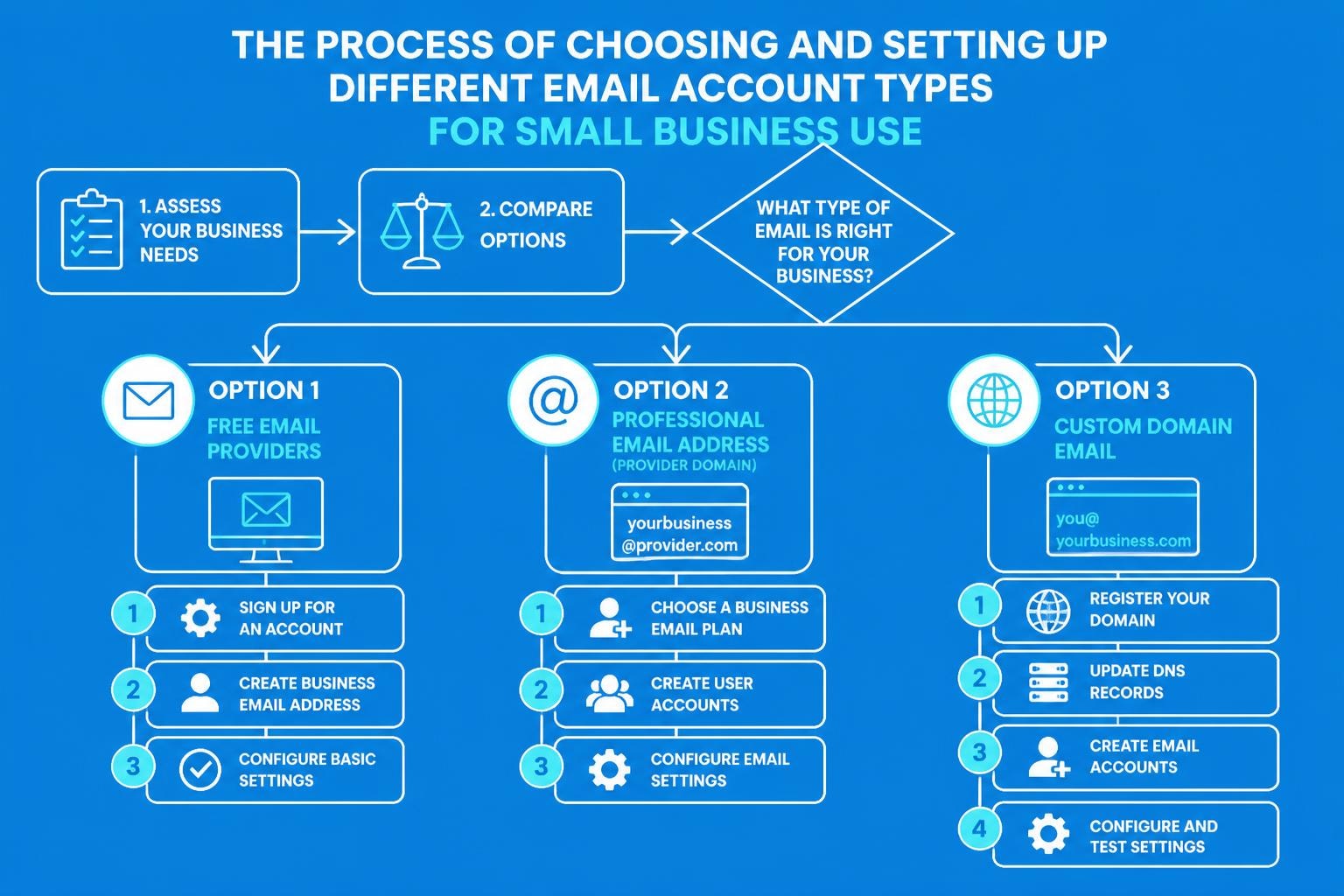
Email remains the cornerstone of business communication in 2026, and knowing how to create email account easy is essential for small business owners, freelancers, and entrepreneurs. Whether you're launching your first venture or expanding your online presence, establishing professional email addresses helps you connect with customers, manage marketing campaigns, and build credibility. This comprehensive guide walks you through the entire process, from selecting the right provider to implementing security measures that protect your business communications.
Understanding Your Email Account Options
Before you create email account easy systems for your business, you need to understand the landscape of available options. The choice you make impacts your brand perception, functionality, and long-term scalability.
Free Email Providers
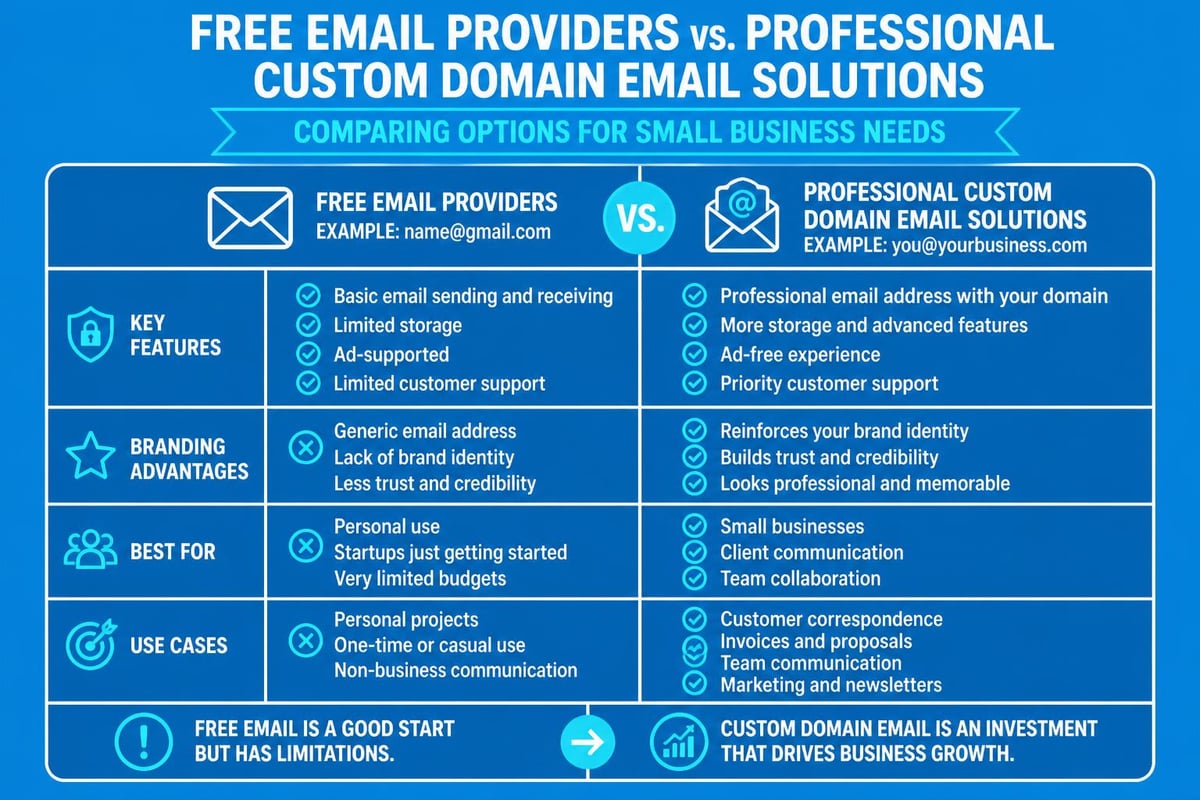
Free email services like Gmail, Outlook, and Yahoo Mail offer straightforward setup processes perfect for beginners. These platforms provide:
- Generous storage capacity ranging from 15GB to unlimited space
- Integrated tools including calendars, cloud storage, and task management
- Mobile applications for iOS and Android devices
- Spam filtering and basic security features
- No financial investment required to get started
However, free accounts typically use the provider's domain ([email protected]), which may appear less professional than a custom business address.
Professional Email Solutions
Professional email addresses use your own domain name ([email protected]), presenting a more credible image to clients and partners. These solutions often include:
| Feature | Free Email | Professional Email |
|---|---|---|
| Custom Domain | No | Yes |
| Brand Recognition | Low | High |
| Storage | 15-50GB | 50GB-Unlimited |
| Support | Community | Dedicated |
| Cost | Free | £3-15/month |
Many small businesses start with free accounts before transitioning to professional solutions as they grow. Understanding when to make this shift can significantly impact your brand's perception.
How to Create Email Account Easy with Gmail
Gmail remains one of the most popular choices when you want to create email account easy processes. Google's platform combines user-friendly design with powerful features suitable for small business owners.
Step-by-Step Gmail Account Creation
- Navigate to the Gmail website and click "Create account"
- Select account type choosing "For my personal use" or "To manage my business"
- Enter your personal information including first name, last name, and desired email address
- Create a secure password following expert password creation tips
- Add recovery options with phone number and backup email address
- Complete verification through SMS or voice call
- Accept Google's terms and configure privacy settings
The entire process typically takes under five minutes, making it genuinely possible to create email account easy without technical expertise.
Optimising Your Gmail for Business Use
Once your account exists, customise it for professional purposes:
- Enable two-factor authentication immediately
- Configure signature blocks with contact information
- Organise with labels and filters for client communications
- Install the Gmail mobile app for on-the-go access
- Connect third-party tools for email marketing campaigns
Gmail integrates seamlessly with Google Workspace, allowing you to upgrade to a custom domain later without losing data or functionality.
Creating Outlook Email Accounts Efficiently
Microsoft's Outlook platform offers another excellent option to create email account easy, particularly for businesses already using Microsoft products. The integration with Office applications makes it attractive for small business owners.
Outlook Account Setup Process
Microsoft streamlines the account creation experience. Visit the official Microsoft support page for detailed guidance, or follow these simplified steps:
- Access Outlook.com and select "Create free account"
- Choose your desired email address (you can use outlook.com, hotmail.com, or live.com domains)
- Set up a strong password with at least 8 characters
- Provide your name and country/region information
- Add your birth date for account recovery purposes
- Complete the CAPTCHA verification
- Configure security information for account protection
The platform immediately grants access to OneDrive storage, Microsoft Office online applications, and Skype integration.
Advanced Outlook Features for Small Business
Outlook provides several tools that help small businesses manage email communications effectively:
Focused Inbox automatically separates important messages from promotional content, helping you prioritise client communications. Sweep functionality removes clutter by automatically handling repetitive emails. Rules create automated workflows that sort incoming messages into designated folders.
| Outlook Feature | Business Benefit | Time Saved |
|---|---|---|
| Focused Inbox | Priority management | 15 min/day |
| Email Rules | Automatic sorting | 20 min/day |
| Quick Steps | Batch processing | 10 min/day |
| Templates | Standardised responses | 30 min/week |
These features make Outlook particularly valuable when you need to create email account easy systems that scale with business growth.
Setting Up Custom Domain Email Accounts
For established businesses, custom domain email addresses significantly enhance credibility. When you create a business email account with your own domain, clients perceive your organisation as more legitimate and trustworthy.
Choosing Your Email Hosting Provider
Several platforms facilitate custom domain email setup:
- Google Workspace offers Gmail functionality with custom domains
- Microsoft 365 provides Outlook with business domain addresses
- Zoho Mail delivers affordable options for small teams
- ProtonMail focuses on encrypted, secure communications
- Specialised providers like those reviewed in secure email provider comparisons
Price points range from £3 to £15 per user monthly, depending on storage requirements and feature sets.
Domain Configuration Requirements
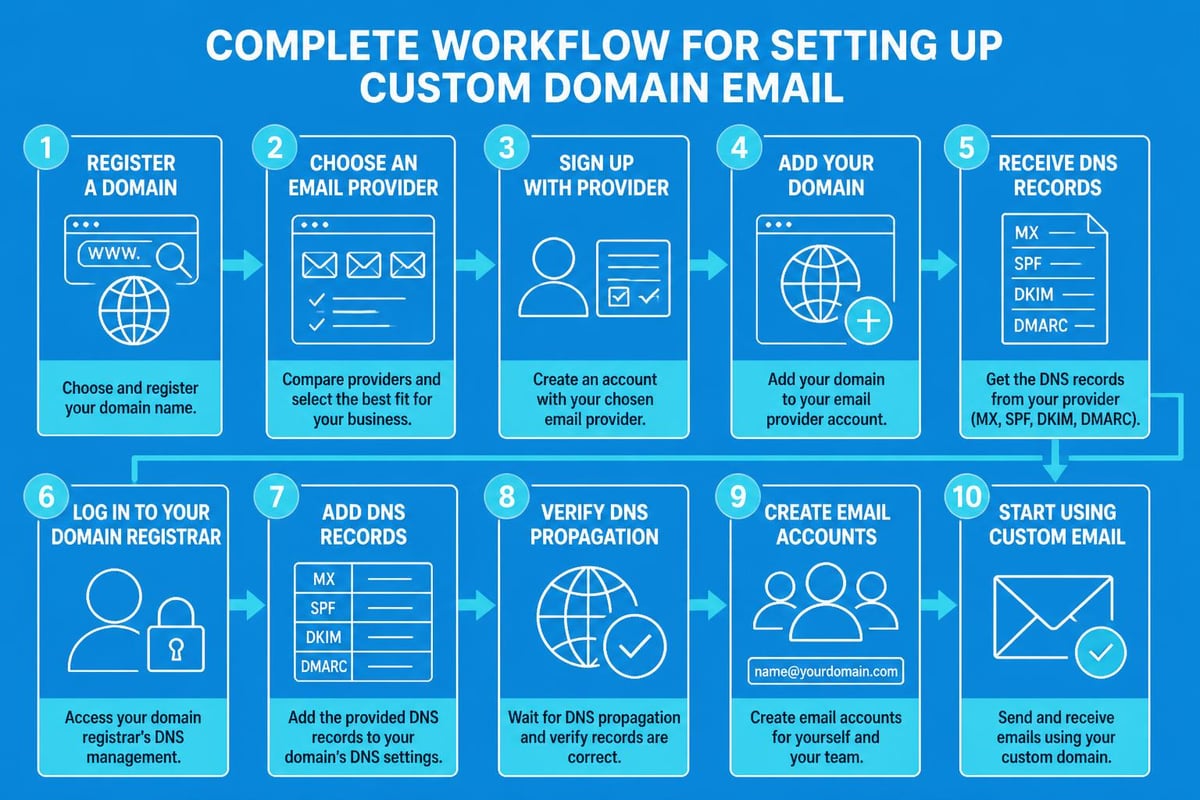
To create email account easy with custom domains, you'll need:
- A registered domain name owned by your business
- Access to DNS settings through your domain registrar
- MX records pointing to your chosen email provider
- SPF and DKIM records for email authentication
- Account credentials from your email hosting service
Most providers offer automated setup wizards that configure DNS records automatically. However, manual configuration typically requires 24-48 hours for DNS propagation across the internet.
Essential Security Measures for New Email Accounts
Security should be a priority when you create email account easy solutions. Cyber threats continue to evolve, making robust protection critical for business communications.
Immediate Security Actions
Upon creating any email account, implement these security measures:
- Enable two-factor authentication (2FA) using authenticator apps rather than SMS
- Create unique, complex passwords of at least 12 characters combining letters, numbers, and symbols
- Configure account recovery options with multiple backup methods
- Review privacy settings limiting data sharing with third parties
- Enable login alerts to monitor unauthorised access attempts
Many small businesses overlook these fundamental steps, leaving their communications vulnerable to attacks. The security considerations extend beyond basic password protection.
Ongoing Email Security Practices
Maintaining email security requires consistent attention:
Regular password updates every 90 days prevent long-term compromise. Suspicious link verification stops phishing attempts before they succeed. Attachment scanning catches malware before it infiltrates your systems. Encryption for sensitive content protects confidential business information.
Additionally, educate team members about social engineering tactics. Human error remains the primary vulnerability in email security, making staff training as important as technical measures.
Managing Multiple Email Accounts Effectively
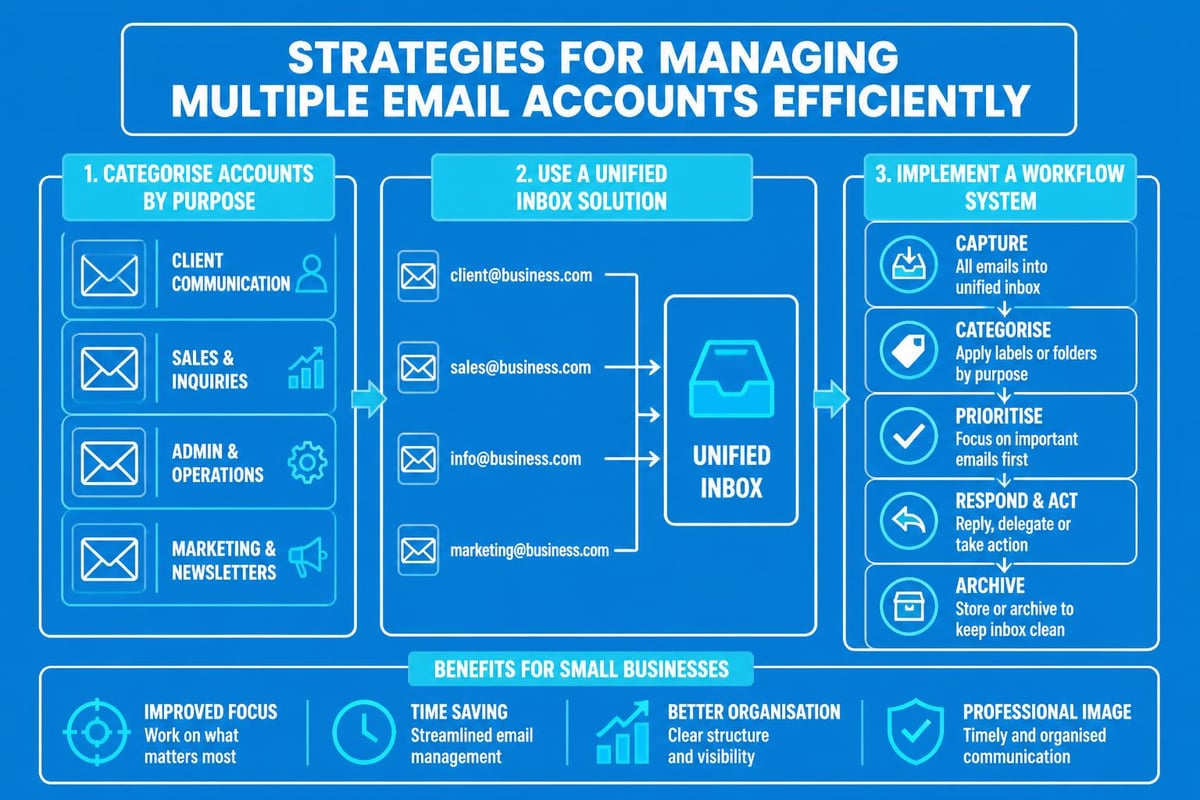
Many small business owners need to create email account easy systems for different purposes: customer service, sales, marketing, and personal communications. Managing these efficiently prevents overwhelm and missed messages.
Email Client Consolidation
Modern email clients allow centralised management of multiple accounts:
- Desktop applications like Outlook, Thunderbird, or Apple Mail aggregate all accounts
- Mobile apps provide unified inboxes across iOS and Android devices
- Web-based dashboards offer browser access without software installation
- Third-party tools like Mailbird or Spark enhance multi-account workflows
This consolidation helps you send email messages from appropriate addresses without switching between platforms constantly.
Organisational Systems for Multiple Accounts
Develop clear protocols for account usage:
| Account Type | Purpose | Check Frequency | Response Time |
|---|---|---|---|
| Customer Service | Support enquiries | Every 2 hours | 4 hours max |
| Sales | Lead communications | Every hour | 2 hours max |
| Marketing | Campaign management | Daily | 24 hours |
| Personal | Internal team chat | Hourly | As needed |
Clear boundaries prevent confusion about which address to use for specific communications. This structure becomes particularly important when scaling your business email systems beyond a single account.
Choosing Between Free and Paid Email Solutions
The decision to create email account easy with free or paid services depends on your business stage, budget, and professional requirements.
When Free Email Accounts Work Best
Free accounts suit specific business scenarios:
- Startup phase with limited budget for tools
- Side projects that don't require professional branding
- Testing concepts before committing to paid services
- Personal freelance work with informal client relationships
- Non-customer-facing roles where domain addresses aren't visible
You can always transition from free business email solutions to paid options as your needs evolve.
Advantages of Premium Email Services
Investing in professional email accounts delivers tangible benefits:
Enhanced credibility with custom domain addresses makes your business appear established and legitimate. Superior support provides assistance when technical issues arise. Advanced features including larger storage, better spam filtering, and comprehensive analytics improve efficiency. Integration capabilities connect with CRM systems, marketing platforms, and productivity tools.
For businesses serious about growth, the modest monthly investment typically generates positive returns through improved client trust and operational efficiency.
Mobile Email Account Setup Considerations
In 2026, mobile-first email access has become standard practice. When you create email account easy systems, ensure mobile optimisation from the start.
Native Mobile Email Applications
Both iOS and Android offer built-in email applications:
- iPhone Mail app integrates seamlessly with all major providers
- Gmail app works across platforms with superior performance
- Outlook mobile offers excellent Microsoft ecosystem integration
- Third-party apps like Spark or Edison Mail provide enhanced features
Native applications typically offer better battery efficiency and notification management than web-based alternatives.
Mobile Security Specifics
Mobile devices introduce unique security considerations:
Enable biometric authentication using fingerprint or face recognition. Configure remote wipe capabilities to protect data if devices are lost or stolen. Use VPN connections when accessing email on public Wi-Fi networks. Implement MDM solutions for team devices requiring additional control.
These measures ensure that creating email account easy doesn't compromise the security of your business communications on mobile platforms.
Email Account Best Practices for Small Businesses
Establishing strong email habits from the beginning prevents issues as your business grows. These practices apply regardless of which provider you choose when you create email account easy.
Professional Email Etiquette Standards
Maintain professionalism in all business communications:
- Craft clear, descriptive subject lines that indicate message content
- Use proper grammar and spelling throughout messages
- Include professional signatures with contact information
- Respond to enquiries within 24 hours during business days
- Avoid excessive exclamation marks or informal language
- Proofread messages before sending to clients or partners
These standards build trust and demonstrate attention to detail that clients appreciate.
Email Organisation Techniques
Implement systems that keep your inbox manageable:
Zero inbox methodology processes all messages daily, moving them to appropriate folders or archives. Folder hierarchies categorise communications by client, project, or topic. Star or flag systems highlight messages requiring follow-up action. Automated filters route incoming messages to designated locations based on sender or content.
Regular maintenance prevents the overwhelming accumulation of unprocessed messages that hampers productivity and potentially loses important communications.
Transitioning from Personal to Business Email
Many entrepreneurs initially create email account easy using personal addresses before realising they need professional alternatives. This transition requires careful planning to maintain continuity.
Planning Your Email Migration
Successful transitions follow these steps:
- Set up new professional account with desired custom domain
- Configure email forwarding from old address to new account
- Update contact information across websites, business cards, and directories
- Notify key contacts about the new address with transition timeline
- Maintain dual monitoring of both accounts for 3-6 months
- Archive old account rather than deleting to preserve message history
This gradual approach prevents missed communications during the changeover period.
Importing Historical Messages
Most email platforms support importing existing messages:
IMAP transfer moves messages between accounts whilst preserving folder structure. Export/import functions using PST or MBOX files transfer complete mailboxes. Third-party migration tools automate bulk transfers for large volumes. Cloud backup services provide additional safety during transitions.
Preserving historical communications maintains continuity and provides access to important reference materials from previous business interactions.
Integration with Email Marketing Platforms
When you create email account easy, consider how it integrates with marketing tools. Small businesses increasingly rely on email marketing to nurture leads and maintain customer relationships.
Connecting Email Accounts to Marketing Software
Most email marketing platforms allow connection of business email accounts:
- SMTP integration enables sending campaigns through your domain
- Reply monitoring captures responses to marketing messages
- Contact synchronisation updates subscriber lists with email interactions
- Analytics tracking measures engagement with sent communications
This integration maintains brand consistency whilst leveraging specialised marketing features that standard email accounts lack.
Choosing Complementary Services
Select email marketing platforms that work seamlessly with your email provider. Consider factors like deliverability rates, template libraries, automation capabilities, and reporting features. Many small businesses benefit from starting with platforms specifically designed for their needs, allowing them to set up business email systems that grow with their requirements.
Creating email accounts need not be complicated when you follow systematic approaches tailored to your business requirements. Whether you choose free providers or invest in professional custom domain solutions, the key lies in implementing proper security measures, maintaining professional standards, and selecting platforms that integrate with your broader business tools. Once your email infrastructure is established, Astonish Email can help you leverage those professional addresses for effective marketing campaigns that engage customers and drive business growth. Our platform specifically serves small businesses, making email marketing accessible and results-driven.