Create Your Business Email: A Complete 2026 Guide
June 5, 2026
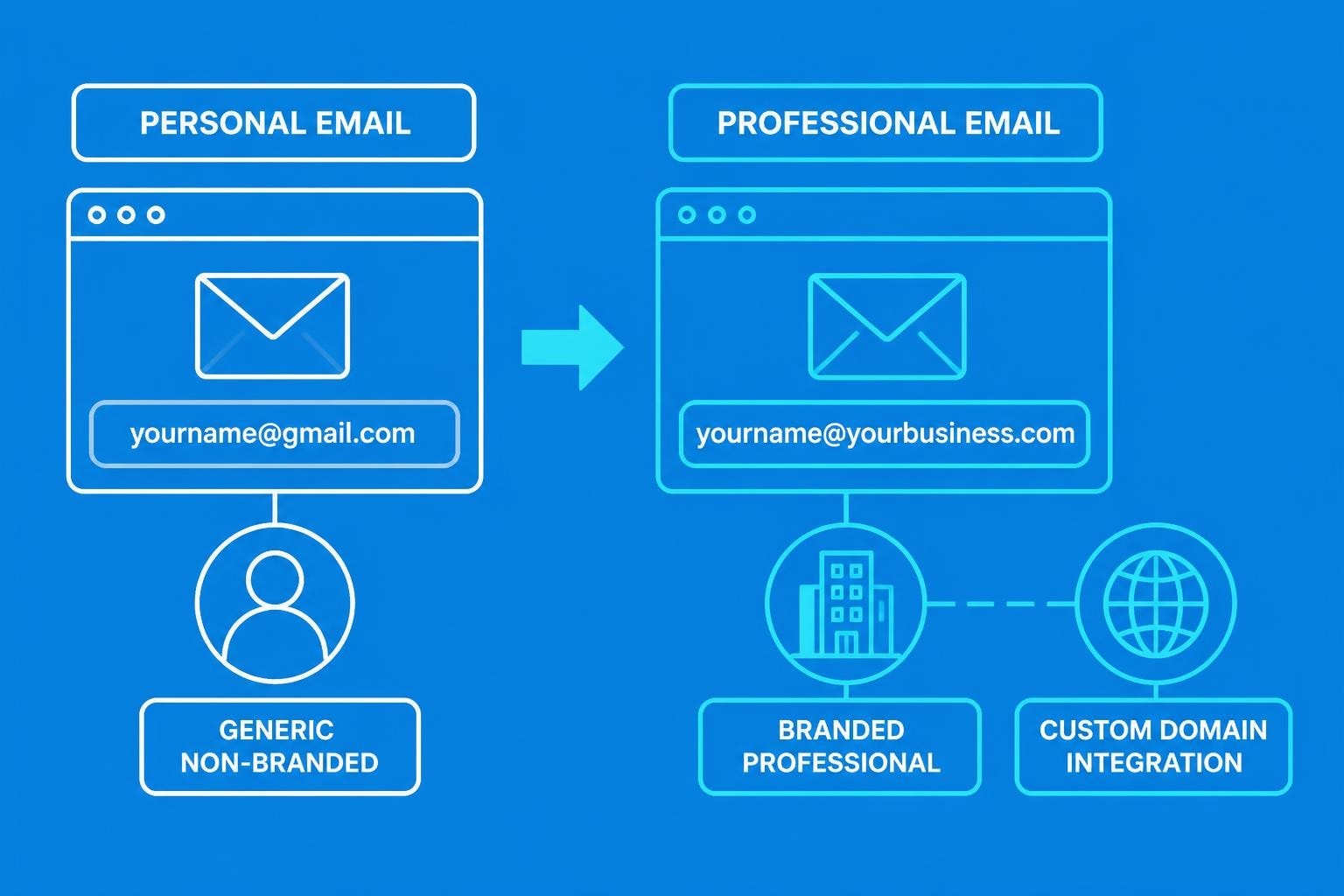
Your email address is often the first impression potential customers have of your business. A professional email address establishes credibility, builds trust, and separates you from competitors still using free consumer email services. When you create your business email, you're making a statement about your commitment to professionalism and your investment in building a legitimate enterprise. For small businesses, this decision impacts everything from customer perception to marketing effectiveness.
Why Professional Email Addresses Matter for Small Businesses
Every interaction with customers reinforces your brand identity. When someone receives an email from [email protected] instead of [email protected], they immediately perceive your company as more established and trustworthy.
Research consistently demonstrates that professional email addresses increase customer confidence. Business owners who create your business email with a custom domain see higher response rates, improved deliverability, and stronger brand recognition. This investment pays dividends across every customer touchpoint.
The Cost of Using Free Email Services
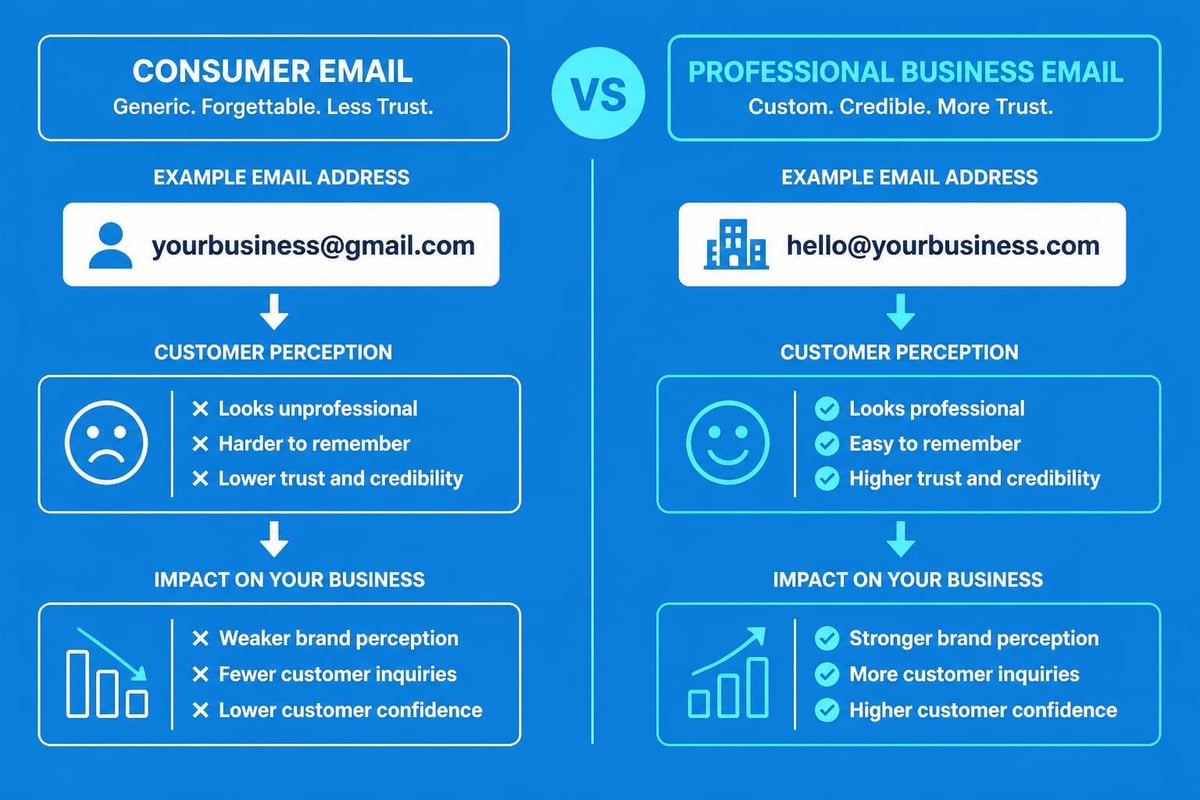
Free email providers serve personal communication needs brilliantly, but they create significant limitations for businesses:
- Brand dilution: Your company name gets lost amongst generic domain names
- Credibility concerns: Customers question whether you're a legitimate business
- Limited control: You're subject to the provider's terms, restrictions, and potential service changes
- Marketing challenges: Many email marketing platforms flag free email addresses, impacting deliverability
- Professionalism gaps: You cannot align your email with your website domain
The choice between free and professional email isn't merely aesthetic. It fundamentally affects how customers perceive and interact with your business.
Choosing Your Business Email Domain Name
Your domain name becomes the foundation of your digital identity. When you create your business email, selecting the right domain requires careful consideration of several factors.
Domain Selection Criteria
| Criterion | Why It Matters | Example |
|---|---|---|
| Brevity | Shorter domains are memorable and reduce typing errors | techsolutions.co.uk beats technologysolutionsltd.co.uk |
| Clarity | Clear pronunciation prevents confusion in verbal communication | clearname.co.uk vs. clr-nm.co.uk |
| Extension | .co.uk suggests UK presence; .com offers global appeal | Choose based on your market |
| Availability | Secure matching social media handles | Check before finalizing |
Most successful small businesses opt for their registered company name as their domain. This alignment strengthens brand consistency across all channels, from your website to your email signatures to your social media profiles. Understanding what makes the best business email address helps inform these crucial early decisions.
Consider whether hyphens or numbers serve your interests. Generally, they complicate verbal communication and create confusion. Someone hearing your email address might not know whether to include a hyphen or where numbers appear.
Step-by-Step Guide to Create Your Business Email
The technical process of setting up professional email has become remarkably straightforward in 2026. Multiple providers offer streamlined solutions designed specifically for small businesses.
Selecting Your Email Hosting Provider
Your email hosting provider determines your features, reliability, and ongoing costs. Google Workspace's business email solutions remain popular amongst small businesses seeking integrated productivity tools alongside professional email services.
Key factors when evaluating providers:
- Storage capacity: Ensure sufficient space for attachments and growing email volumes
- Security features: Look for spam filtering, virus protection, and encryption
- Mobile access: Verify robust smartphone and tablet applications
- Integration capabilities: Consider compatibility with your existing tools
- Customer support: Prioritize providers offering responsive technical assistance
Many small businesses discover that specialized email marketing platforms provide excellent value. When you explore professional email options, consider how your email hosting integrates with your broader marketing strategy.
Domain Purchase and Configuration
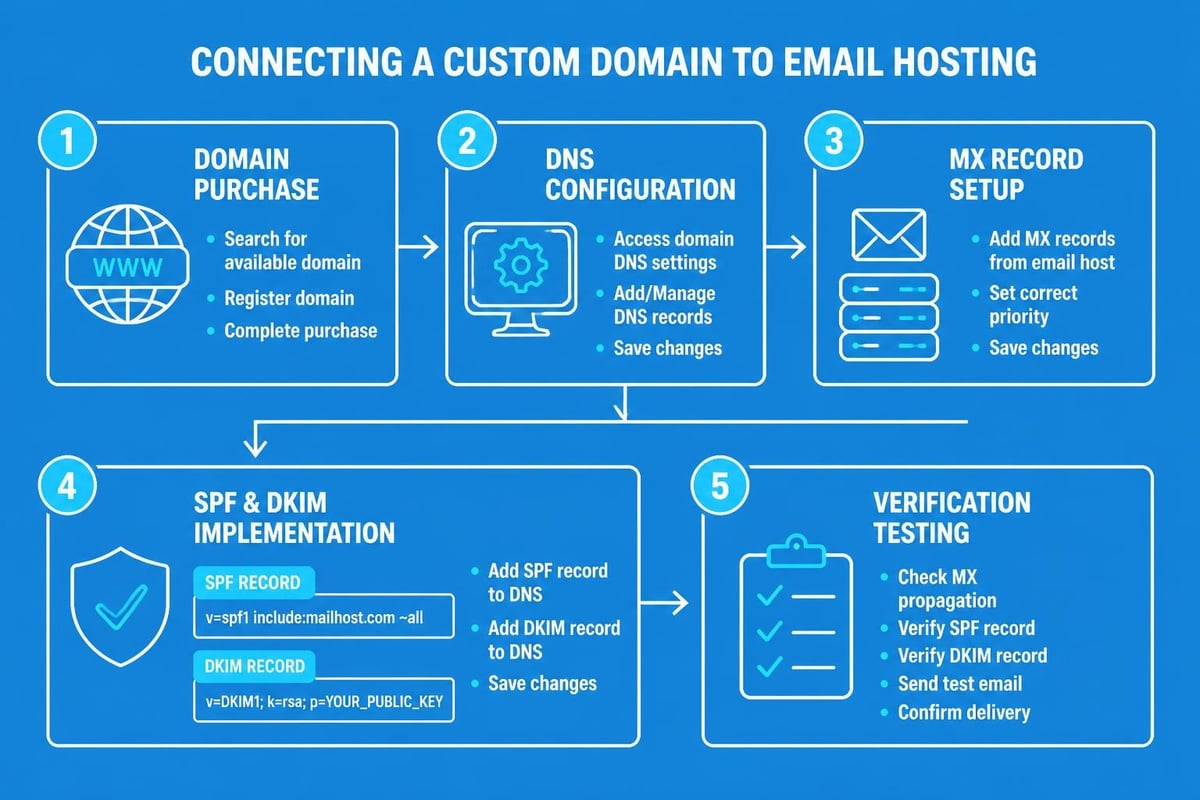
Once you've selected your domain name, purchase it through a reputable registrar. This process typically costs between £10-£20 annually for standard domains.
After purchasing your domain, you'll configure DNS (Domain Name System) records to connect it with your email provider. This technical step involves updating MX (Mail Exchange) records, which direct incoming email to the correct servers.
Standard configuration steps:
- Access your domain registrar's control panel
- Navigate to DNS management settings
- Add MX records provided by your email host
- Include SPF records to improve deliverability
- Configure DKIM authentication for security
- Set up DMARC policies to prevent spoofing
Most modern email providers offer detailed setup wizards that guide you through each step. The entire process typically takes 15-30 minutes, though DNS propagation can require up to 48 hours.
Structuring Your Business Email Addresses
After you create your business email infrastructure, determine how to structure individual addresses. Consistency matters enormously for professional presentation and operational efficiency.
Standard Email Naming Conventions
| Format | Best For | Example | Advantages |
|---|---|---|---|
| [email protected] | Small teams, personal touch | [email protected] | Personal, memorable |
| [email protected] | Larger teams, common names | [email protected] | Clear identification |
| [email protected] | Functional addresses | [email protected] | Continuity, team inboxes |
| [email protected] | Departmental communication | [email protected] | Clear routing |
Mailchimp's business email name best practices emphasize avoiding numbers, underscores, and abbreviations that compromise professionalism. Your email address should be immediately clear when spoken aloud.
Many successful small businesses implement both personal and functional addresses. Staff members receive individual addresses ([email protected]) whilst departments maintain shared inboxes ([email protected]). This dual approach balances personal connection with operational flexibility.
Creating Role-Based Addresses
Role-based addresses serve specific business functions regardless of individual staff changes:
- info@ for general enquiries
- support@ for customer service requests
- sales@ for commercial enquiries
- billing@ for financial matters
- admin@ for internal administration
These addresses can forward to individual staff members or function as shared inboxes accessed by multiple team members. When you create your business email structure, plan for growth and potential staff turnover.
Email Security and Deliverability Best Practices
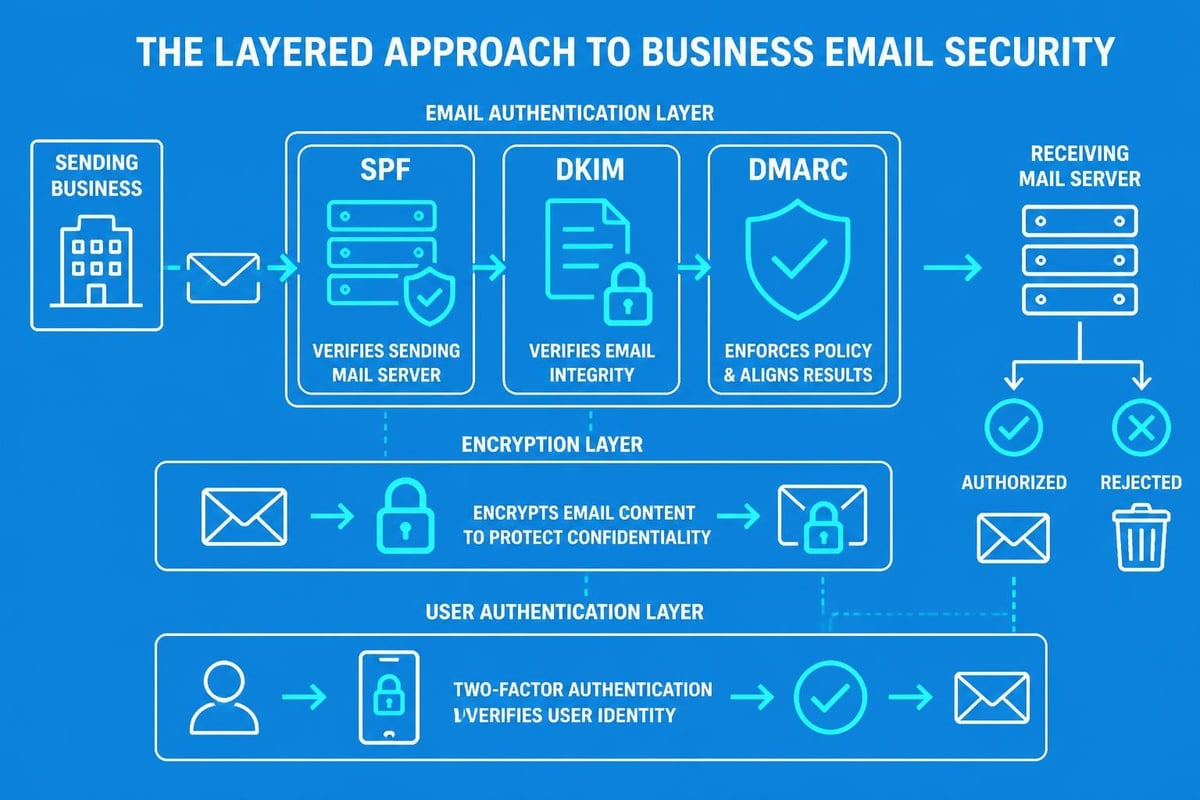
Professional email infrastructure requires robust security measures. Cybersecurity threats continue evolving, making proactive protection essential for businesses of all sizes.
Essential Security Configurations
Two-factor authentication (2FA) should be mandatory for all business email accounts. This additional security layer prevents unauthorized access even if passwords become compromised.
Implement these security standards when you create your business email:
- Regular password updates every 90 days
- Complex password requirements (minimum 12 characters, mixed case, numbers, symbols)
- Automatic logout after inactivity periods
- Encrypted connections (SSL/TLS) for all email transmission
- Regular security audits and access reviews
Your email provider should offer comprehensive spam and malware filtering. Configure these filters appropriately, balancing security with ensuring legitimate messages reach your inbox.
Improving Email Deliverability
Technical authentication protocols ensure your emails reach recipient inboxes rather than spam folders. Three critical protocols work together:
- SPF (Sender Policy Framework): Specifies which servers can send email from your domain
- DKIM (DomainKeys Identified Mail): Adds digital signatures verifying message authenticity
- DMARC (Domain-based Message Authentication): Instructs receiving servers how to handle authentication failures
These protocols require one-time configuration when you create your business email. Most modern email providers offer simplified setup processes or implement these automatically.
Professional Email Etiquette and Communication Standards
Technical infrastructure represents only half the equation. How you use your business email matters equally for maintaining professionalism and building customer relationships.
Crafting Professional Email Messages
Expert guidance on writing perfect emails emphasizes clarity, brevity, and appropriate tone. Your email communications reflect your brand values and professional standards.
Essential components of professional emails:
- Clear subject lines: Summarize the email's purpose in 5-7 words
- Appropriate greetings: Match formality to relationship and context
- Structured content: Use paragraphs, bullet points, and white space
- Professional signatures: Include name, title, company, and contact information
- Careful proofreading: Eliminate errors before sending
Understanding proper email etiquette rules helps establish communication standards across your team. Consistency in tone and formatting strengthens your brand identity.
Response Time Expectations
Modern business operates at unprecedented speed. Customer expectations for email responses have shortened considerably:
- Urgent enquiries: Within 1-2 hours during business hours
- Standard requests: Within 24 hours
- Complex matters: Acknowledge within 24 hours, provide timeline for full response
- Non-urgent communication: Within 48 hours
When you create your business email system, establish clear response protocols. Consider automated acknowledgement messages for general enquiry addresses, assuring customers their message was received and setting expectations for response timing.
Integrating Email with Your Marketing Strategy
Your business email infrastructure extends beyond individual communications. Modern email marketing requires seamless integration between transactional messages and marketing campaigns.
Separating Transactional and Marketing Email
Best practices suggest maintaining separate infrastructure for transactional email (order confirmations, password resets, shipping notifications) and marketing email (newsletters, promotions, announcements).
This separation offers several advantages:
- Improved deliverability: Transactional emails maintain high sender reputation
- Better analytics: Clear performance metrics for each email type
- Compliance simplicity: Easier adherence to marketing regulations
- Technical optimization: Different infrastructure requirements for each purpose
When you create your business email framework, consider how it connects with your broader marketing technology. Platforms like Astonish Email specialize in email marketing for small businesses, offering integrated solutions that complement your professional email infrastructure.
Building Your Email Marketing Foundation
Professional email addresses enhance marketing credibility significantly. Messages sent from [email protected] generate higher open rates than those from generic addresses.
| Email Type | Purpose | Recommended Frequency | Key Metrics |
|---|---|---|---|
| Welcome Series | New customer onboarding | Triggered by signup | Open rate, click rate |
| Newsletters | Regular updates, content | Weekly or fortnightly | Engagement, unsubscribes |
| Promotional | Special offers, sales | Monthly maximum | Conversion rate, revenue |
| Transactional | Order updates, confirmations | As needed | Delivery rate |
Learning about effective email campaigns helps maximize return on your email marketing investment. Your professional email address provides the foundation, whilst strategic content drives results.
Managing Multiple Email Accounts and Team Access
As your business grows, email management complexity increases. Strategic planning when you create your business email prevents future complications.
Email Forwarding and Aliases
Email aliases allow multiple addresses to deliver to a single inbox. This functionality proves invaluable for small teams managing various business functions.
For example, you might configure:
- info@, enquiries@, and hello@ all forwarding to your main customer service inbox
- sales@, commercial@, and partnerships@ directing to your sales team
- Your personal name with common misspellings forwarding to your correct address
This approach ensures no customer message gets lost due to addressing variations. Most email providers allow unlimited aliases, though policies vary.
Delegation and Shared Inbox Management
Team collaboration requires structured access protocols. Shared inboxes prevent messages from falling through gaps whilst maintaining accountability.
Modern email platforms offer sophisticated delegation features:
- Multiple users accessing a single inbox
- Internal notes and tags for message coordination
- Assignment systems for distributing enquiries
- Performance tracking for response times
- Automated routing based on keywords or customer segments
When implementing shared inboxes, establish clear ownership. Determine who monitors which addresses, during what hours, and how urgent matters get escalated.
Mobile Email Access and Remote Work Considerations
Business rarely confines itself to office hours or desktop computers. Mobile email access has become essential for modern commerce.
Configuring Email on Mobile Devices
Smartphone and tablet email configuration takes minutes. Most providers offer dedicated applications that simplify setup and provide enhanced features beyond generic email clients.
When configuring mobile access:
- Download your provider's official application
- Enable push notifications for urgent messages
- Configure signature specifically for mobile (shorter, essential information only)
- Set up intelligent filtering to prioritize important messages
- Enable biometric authentication for security
Mobile email presents unique etiquette considerations. Brief responses are acceptable when sent from mobile devices, though follow up from desktop when detailed responses are needed. Many professionals add "Sent from my mobile device" to signatures, explaining potential brevity or formatting issues.
Balancing Accessibility and Boundaries
Constant email availability can harm work-life balance and productivity. Professional email etiquette guidelines increasingly emphasize setting appropriate boundaries.
Consider these strategies:
- Scheduled send features: Write emails anytime, schedule delivery during business hours
- Auto-responders: Set expectations during holidays or after hours
- Priority filtering: Configure systems to alert only for genuinely urgent messages
- Email-free periods: Designate times for focused work without email interruptions
When you create your business email policies, balance customer service expectations with team wellbeing. Sustainable practices prevent burnout whilst maintaining professional responsiveness.
Cost Considerations and Budgeting for Business Email
Professional email infrastructure represents a recurring business expense. Understanding costs helps you budget appropriately and select suitable solutions.
Typical Email Hosting Costs
| Provider Type | Monthly Cost Per User | Storage | Best For |
|---|---|---|---|
| Basic Business Email | £3-£5 | 10-30 GB | Solo entrepreneurs, minimal needs |
| Productivity Suites | £8-£15 | 30-100 GB | Teams needing collaboration tools |
| Premium Enterprise | £15-£25 | Unlimited | Larger teams, advanced security |
| Email Marketing Platforms | £10-£50+ | Varies | Businesses prioritizing marketing |
These costs typically decrease per-user as team size grows. Many providers offer discounted annual billing, reducing costs by 15-20% compared with monthly payments.
Beyond hosting, budget for:
- Annual domain registration (£10-£20)
- Potential migration costs if switching providers
- Training time for staff
- Email signature design or templates
- Potential consulting for complex configurations
Calculating Return on Investment
Professional email infrastructure delivers measurable returns. Consider these value factors:
Increased credibility typically improves conversion rates by 5-15% for small businesses. If you generate £100,000 annual revenue, that represents £5,000-£15,000 in additional income.
Time savings from integrated tools and efficient email management often exceed 2-3 hours weekly per staff member. At average hourly rates, this quickly justifies investment costs.
Reduced security risks prevent potentially devastating data breaches or phishing attacks. The average small business data breach costs exceed £25,000 in remediation, lost business, and reputational damage.
When you create your business email with appropriate infrastructure, you're investing in foundational business capabilities that compound returns over time.
Email Migration and Transitioning from Personal Accounts
Many small businesses initially operate using personal email addresses before transitioning to professional infrastructure. Strategic migration prevents lost messages and maintains customer relationships.
Planning Your Email Migration
Successful migration requires methodical planning:
- Inventory existing addresses: Document all email accounts currently in use
- Map new structure: Determine corresponding professional addresses
- Set transition timeline: Plan 30-60 day overlap period
- Communicate changes: Inform customers, suppliers, and contacts
- Configure forwarding: Ensure old addresses redirect to new ones
- Update listings: Modify website, social media, directories, and marketing materials
- Transfer historical emails: Import important past communications
Most email providers offer migration tools that transfer existing messages to your new professional account. This preserves important customer communications and reference materials.
Managing the Transition Period
Maintain both email systems simultaneously for at least 30 days. This overlap period catches messages sent to old addresses whilst you complete the transition.
Use email signatures and automated responses to inform correspondents of your new address:
"We've recently upgraded our email infrastructure. Please update your contacts to reflect our new address: [email protected]. This address ([email protected]) will be discontinued on 15th July 2026."
Monitor old addresses for several months after the official transition date. Some contacts may take time to update their records, and you don't want to lose opportunities due to technical changes.
Ongoing Email Account Maintenance and Optimization
Creating your business email represents the beginning, not the conclusion, of professional email management. Regular maintenance ensures optimal performance and security.
Quarterly Email Audits
Schedule regular reviews of your email infrastructure:
- Review user access permissions and remove unnecessary accounts
- Audit forwarding rules and aliases for continued relevance
- Update security protocols and password policies
- Assess storage usage and upgrade if approaching limits
- Review spam filter effectiveness and adjust settings
- Check deliverability metrics and authentication status
- Evaluate response time performance against targets
These audits identify issues before they impact business operations. Many problems that seem sudden actually develop gradually over months.
Adapting to Changing Business Needs
Your email infrastructure should evolve alongside your business. When you hire new staff, launch new products, or enter new markets, reassess whether your email structure remains optimal.
Consider creating additional role-based addresses for:
- New service offerings (consulting@, training@)
- Geographic expansion (manchester@, london@)
- Specialized teams (technical@, creative@)
- Partnership inquiries (partners@, wholesale@)
Regular optimization when you create your business email systems ensures they continue serving your evolving needs efficiently. Understanding your options for business email in the UK helps inform these ongoing decisions.
Professional email infrastructure forms the cornerstone of effective business communication and credible brand presentation. By carefully selecting your domain, configuring proper security protocols, and establishing clear communication standards, you create a foundation that supports sustainable business growth. Astonish Email helps small businesses maximize their email marketing potential with intuitive tools designed specifically for growing companies. Whether you're just beginning to create your business email or looking to enhance existing infrastructure, exploring integrated solutions can transform how you connect with customers and drive business results.