Best Business Email Address: Guide to Professional Setup
May 1, 2026
Your business email address is often the first digital impression you make on potential customers, partners, and stakeholders. In 2026, choosing the best business email address remains a critical decision that impacts your brand credibility, marketing effectiveness, and professional reputation. With countless formatting options and provider choices available, small business owners must navigate both technical requirements and professional standards to establish email addresses that inspire trust and support business growth. This guide explores the essential elements of creating professional email addresses that serve as powerful brand assets whilst supporting your broader communication and marketing strategies.
Understanding Professional Email Address Formats
The structure of your email address communicates volumes about your business professionalism before anyone reads a single message. When evaluating different professional email address formats, several patterns emerge as industry standards across sectors.
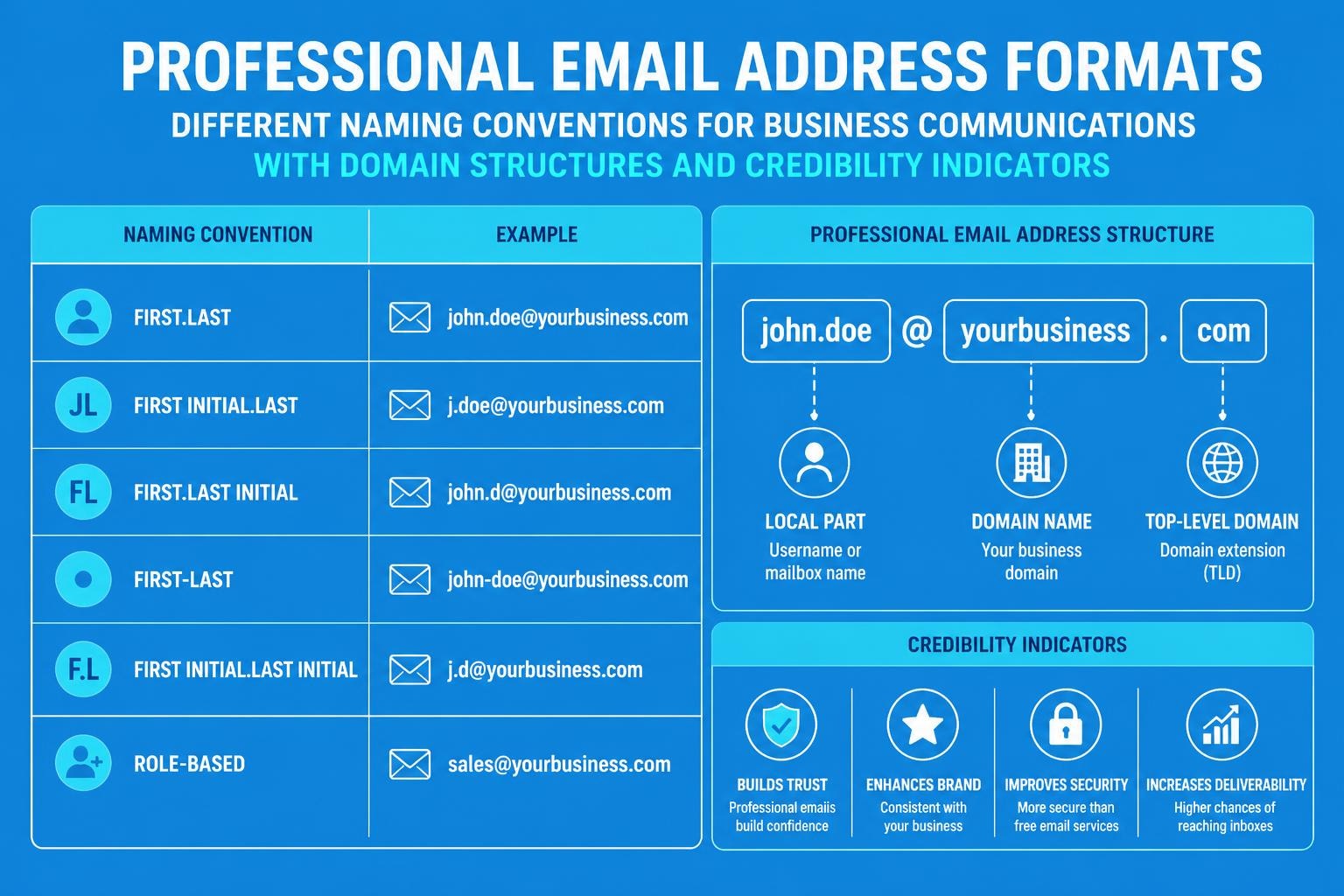
Standard Naming Conventions
The most effective business email formats follow predictable patterns that recipients recognise immediately:
- [email protected] - The gold standard for individual professionals
- [email protected] - Suitable for smaller teams or sole traders
- [email protected] - Space-saving alternative for common names
- [email protected] - Essential for team-based communications
- [email protected] - Clear functional purpose (sales@, support@, hello@)
Consistency across your organisation strengthens brand recognition. When every team member follows the same format, clients immediately understand they're communicating with legitimate representatives of your business.
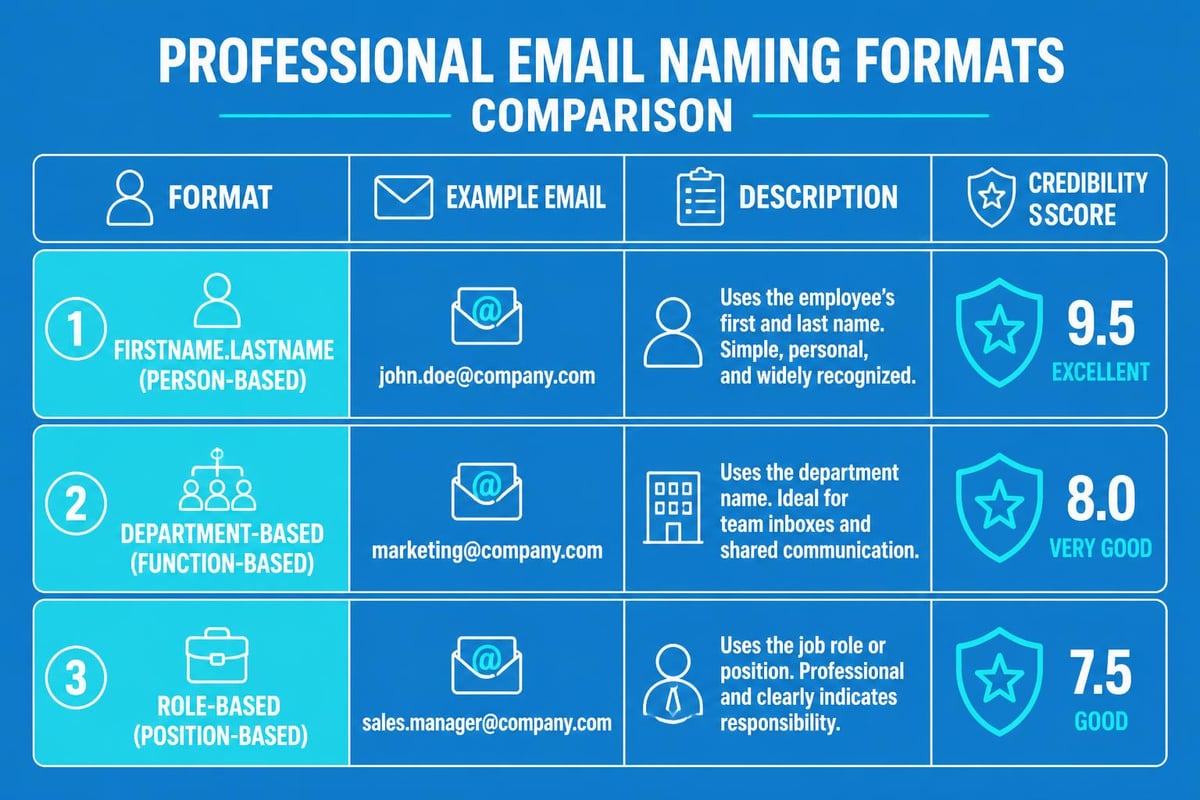
The best business email address format balances memorability with professionalism. Whilst creative variations might seem appealing, standard formats reduce confusion and ensure deliverability. Research indicates that emails from recognisable professional addresses achieve higher open rates and lower spam flags than those from unconventional formats.
Selecting the Right Email Provider
Your email provider choice significantly impacts functionality, security, and professional presentation. The landscape of email providers in 2026 offers diverse options tailored to different business needs.
| Provider Type | Best For | Key Features | Typical Cost |
|---|---|---|---|
| Custom Domain Services | Established businesses | Full branding control, unlimited addresses | £4-15/user/month |
| Free Professional Tiers | Startups, sole traders | Basic custom domain, limited storage | £0-5/month |
| Enterprise Platforms | Growing teams | Advanced security, collaboration tools | £10-25/user/month |
| Email Marketing SaaS | Marketing-focused businesses | Campaign tools, automation, analytics | Variable pricing |
When creating a professional email address, prioritise providers offering custom domain support. Generic providers (gmail.com, yahoo.com, outlook.com) undermine professional credibility regardless of your business size or industry.
Essential Provider Features
Modern business communications demand more than basic sending and receiving capabilities:
- Custom domain integration - Non-negotiable for professional branding
- Robust spam filtering - Protects reputation and ensures deliverability
- Mobile accessibility - Seamless experience across devices
- Adequate storage capacity - Prevents workflow disruptions
- Security protocols - DKIM, SPF, and DMARC authentication
- Calendar and contact management - Streamlines business operations
Integration capabilities matter increasingly in 2026. Your email provider should connect smoothly with CRM systems, project management tools, and marketing automation platforms. For small businesses using email marketing, platforms like Astonish Email combine professional email capabilities with campaign management tools, eliminating the need for multiple disconnected services.
Domain Selection and Email Address Strategy
Your domain name forms the foundation of the best business email address structure. This decision carries long-term implications for brand recognition, marketing effectiveness, and professional perception.
Primary Domain Considerations
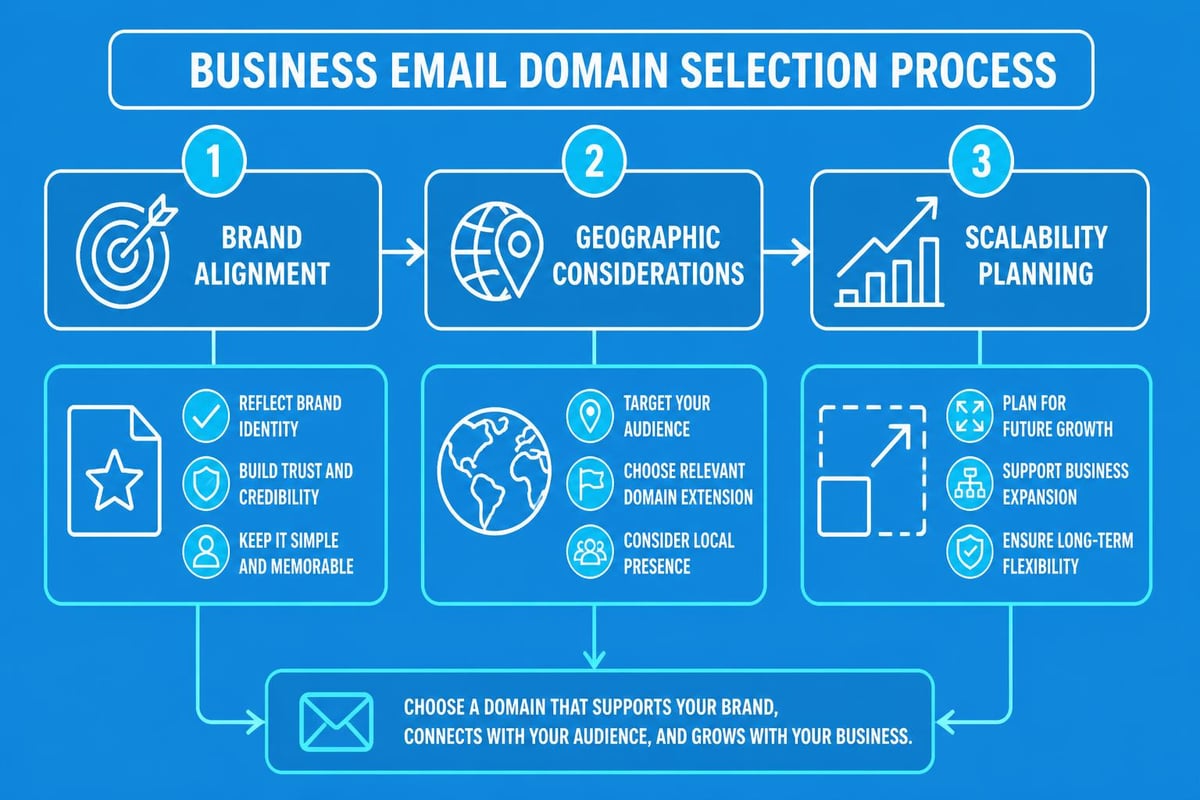
Selecting or optimising your email domain requires strategic thinking:
Brand alignment ensures your email domain matches your primary business name. Discrepancies between your company name, website domain, and email addresses create confusion and erode trust. If you operate as "Smith Consulting" but use [email protected], recipients question your legitimacy.
Geographic relevance matters particularly for location-based businesses. UK companies often benefit from .co.uk domains, whilst international operations might prefer .com or industry-specific extensions. When establishing a UK business email address, domain extensions signal local presence and regulatory compliance.
Future scalability prevents costly rebranding exercises. Choose domains that accommodate business expansion, new service lines, or geographic growth. A domain that's too narrow (smithlondonaccounting.com) limits options if you expand to other cities or service areas.
Multiple Email Address Architecture
Even small businesses benefit from structured email address systems. A thoughtful approach to creating business email accounts supports growth and professionalism:
- Individual addresses for every team member maintain accountability
- Departmental addresses (info@, sales@, support@) distribute incoming communications
- Role-based addresses clarify responsibilities and improve response management
- Project-specific addresses organise complex client engagements
- Marketing addresses separate promotional communications from operational messages
The best business email address strategy incorporates forwarding rules and shared access where appropriate. Sales@ might forward to your sales team members, whilst support@ routes to your help desk system. This structure ensures continuity when team members are unavailable whilst maintaining professional presentation to external contacts.
Professional Standards and Best Practices
Creating technically correct email addresses represents only half the equation. Professional standards govern how businesses manage email communications in 2026.
Avoiding Common Mistakes
Numerous pitfalls undermine otherwise professional email addresses:
Numbers and special characters rarely belong in business email addresses. Whilst [email protected] might seem necessary if multiple John Smiths work at your organisation, alternatives like [email protected] or [email protected] maintain professionalism. Underscores, hyphens (except between name components), and numbers signal either poor planning or lack of professional awareness.
Overly casual usernames damage credibility immediately. Creative or humorous handles appropriate for personal communications (coolconsultant@, theboss@, ninja@) appear unprofessional in business contexts. Even seemingly innocuous variations like initials (jsmith123@) or shortened names (jonnysmith@) often create more confusion than they prevent.
Inconsistent formatting across team members suggests organisational disarray. When one colleague uses firstname.lastname@, another uses firstnamelastname@, and a third uses lastname.firstname@, clients perceive lack of coordination or professionalism.
Security and Privacy Considerations
The best business email address incorporates robust security practices from inception. Modern email threats demand proactive protection measures that extend beyond basic password requirements.
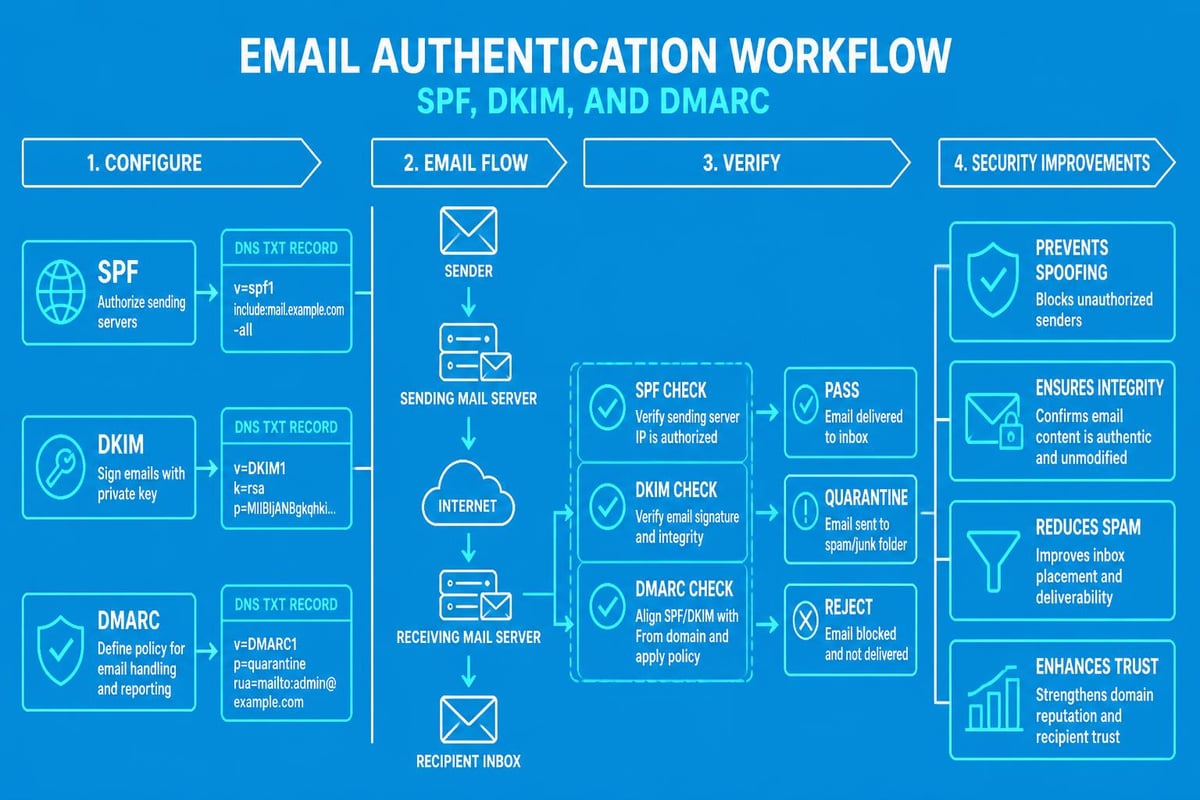
Email authentication protocols (SPF, DKIM, DMARC) verify sender legitimacy and prevent spoofing attacks. In 2026, major email providers increasingly reject messages lacking proper authentication, making these technical configurations essential for deliverability. Academic research into email address privacy and marketing practices highlights how professional email management protects both businesses and their customers.
Two-factor authentication (2FA) adds critical security layers for business email accounts. Given that email addresses unlock password resets across countless business services, unauthorised access to business email accounts can cascade into broader security breaches.
Email Addresses for Marketing and Customer Communication
Your marketing email addresses require particular attention given their high-visibility role in customer acquisition and retention. The intersection of professional presentation and marketing effectiveness defines optimal strategies for promotional communications.
Marketing-Specific Address Configuration
Dedicated marketing addresses serve multiple strategic purposes:
- Sender reputation management isolates marketing sends from operational communications
- Compliance tracking simplifies adherence to GDPR and email marketing regulations
- Performance analytics enables accurate measurement of marketing-specific metrics
- Brand consistency reinforces professional image in promotional contexts
- Recipient trust establishes recognisable sender patterns
Marketing addresses typically follow department@ or function@ patterns: [email protected], [email protected], or [email protected]. Some businesses personalise marketing addresses ([email protected] with Sarah identified as Marketing Director) to increase open rates whilst maintaining professionalism.
For businesses focused on email marketing for small businesses, integration between email addresses and campaign management tools streamlines operations. Platforms that unify professional email infrastructure with marketing capabilities eliminate synchronisation challenges and maintain consistent brand presentation.
Reply-To and Engagement Addresses
The best business email address strategy distinguishes between sending addresses and reply destinations. Marketing emails often send from [email protected] or [email protected] whilst directing replies to monitored addresses like [email protected] or [email protected].
However, 2026 best practices increasingly discourage noreply addresses. Recipients perceive them as dismissive of customer engagement, and some email providers flag them as potential spam. Interactive reply addresses that invite genuine two-way communication improve deliverability, engagement rates, and customer relationships.
Implementation and Technical Setup
Theoretical knowledge about the best business email address formats delivers value only through proper implementation. Technical setup processes vary by provider but share common elements requiring careful attention.
DNS Configuration Requirements
Custom business email addresses require DNS record modifications that connect your domain to your email provider. These technical configurations might seem daunting but follow standardised processes:
MX records direct incoming email to your provider's servers. Your email host provides specific MX record values that you add through your domain registrar's control panel. Priority numbers determine backup routing if primary servers are unavailable.
SPF records authorise specific servers to send email on your domain's behalf. Properly configured SPF records significantly reduce spam classification and improve deliverability. The record format specifies which IP addresses or domains can legitimately send email from @yourdomain.com.
DKIM signatures add encrypted authentication to outgoing messages. Your email provider generates public and private key pairs, with the public key published in your DNS records. Recipients verify that messages haven't been altered in transit and genuinely originate from your domain.
DMARC policies instruct receiving servers how to handle messages that fail authentication checks. DMARC builds upon SPF and DKIM to provide comprehensive sender verification and phishing protection.
| DNS Record Type | Purpose | Typical Setup Time | Skill Level Required |
|---|---|---|---|
| MX Records | Route incoming mail | 5-15 minutes | Beginner-Intermediate |
| SPF Records | Authorise sending servers | 10-20 minutes | Intermediate |
| DKIM Keys | Authenticate messages | 15-30 minutes | Intermediate-Advanced |
| DMARC Policy | Specify handling rules | 20-40 minutes | Advanced |
Most email providers offer setup guides with specific values for your configuration. DNS changes typically propagate within 24-48 hours, though some updates appear within minutes. When setting up a business email, patience during DNS propagation prevents troubleshooting unnecessary "problems" that resolve naturally.
Email Client Configuration
Once DNS records route email correctly, configuring email clients ensures team members access their professional addresses effectively. Modern email clients support multiple configuration methods:
Automatic configuration works when email providers maintain auto-discovery databases. Users enter their email address and password, and the client automatically retrieves server settings. This approach minimises technical barriers for team members without IT expertise.
Manual configuration requires specific server addresses, ports, and security protocols. IMAP typically uses port 993 with SSL/TLS encryption for incoming mail, whilst SMTP uses port 587 with STARTTLS for outgoing messages. Your email provider supplies these details, which remain consistent across different email clients.
Mobile device setup follows similar principles but often uses provider-specific apps offering enhanced functionality. Native iOS and Android email apps support standard protocols, whilst provider apps might include additional features like enhanced search, calendar integration, or offline access.
Scaling Your Business Email Infrastructure
The best business email address strategy evolves with your organisation. What works perfectly for a sole trader becomes inadequate as you hire employees, expand services, or enter new markets.
Growth Planning Considerations
Anticipating future needs prevents disruptive migrations:
- User capacity ensures your provider accommodates team expansion without service interruptions
- Alias limits allow multiple addresses forwarding to individual accounts as roles evolve
- Storage scaling prevents email deletion requirements as communication volume grows
- Integration capabilities support new tools and platforms as your technology stack develops
- Cost structures remain sustainable as you add users and increase email volumes
Many small businesses begin with free business email solutions before upgrading to paid tiers. This approach provides immediate professionalism whilst minimising initial costs. However, understanding upgrade paths and migration processes prevents future complications when free tier limitations constrain operations.
Address Management and Organisation
Maintaining professional standards requires ongoing address management. Regular audits identify unused addresses, security vulnerabilities, and opportunities for optimisation:
Deactivating departed employee addresses prevents security risks whilst maintaining email continuity. Configure forwarding to appropriate team members and automated responses informing contacts of personnel changes. Never delete addresses associated with important client relationships without transition planning.
Standardising new address creation ensures consistent formatting as team size grows. Document your naming convention and approval processes, preventing ad-hoc decisions that undermine professional presentation.
Monitoring address usage identifies which shared addresses require additional staffing or automation. If support@ receives 200 daily emails but only one person monitors it, either distribute the workload or implement help desk software to manage volume effectively.
Businesses leveraging email for marketing particularly benefit from platforms unifying address management with campaign tools. Rather than juggling separate systems for professional email and marketing automation, integrated solutions like those offered by Astonish Email streamline operations whilst maintaining the professional standards essential for the best business email address presentation.
International Considerations and Multi-Region Operations
Businesses operating across borders face additional email address considerations. Geographic expansion introduces regulatory, cultural, and technical complexities that impact optimal email strategies.
Regional Domain Strategies
International operations benefit from region-specific email addresses:
- Country-code domains (.co.uk, .de, .com.au) signal local presence and regulatory compliance
- Subdomain structures (uk.yourcompany.com, de.yourcompany.com) maintain brand unity whilst supporting regional differentiation
- Centralised infrastructure with regional forwarding balances operational efficiency with local market perception
- Compliance alignment ensures email practices meet jurisdiction-specific requirements (GDPR in Europe, CAN-SPAM in the US)
The best business email address approach for international operations often combines global and regional elements. Core team members might use [email protected] whilst regional sales offices use [email protected] or [email protected]. This structure maintains consistent professionalism whilst acknowledging market-specific requirements.
When expanding to new markets, particularly those with distinct digital ecosystems, investigate local email provider preferences and deliverability patterns. Emails sent from recognised local domains occasionally achieve better inbox placement than those from international providers, though this varies significantly by market and industry.
Establishing the best business email address requires balancing professional standards, technical requirements, and strategic business objectives. From selecting appropriate naming conventions and reliable providers to implementing robust security measures and planning for growth, every decision impacts your brand credibility and operational effectiveness. Astonish Email simplifies this process for small businesses by combining professional email infrastructure with powerful marketing tools, enabling you to establish credible communication channels whilst executing effective email campaigns that drive business growth.