Email Address I Can Use: Your Complete Guide for 2026
May 27, 2026
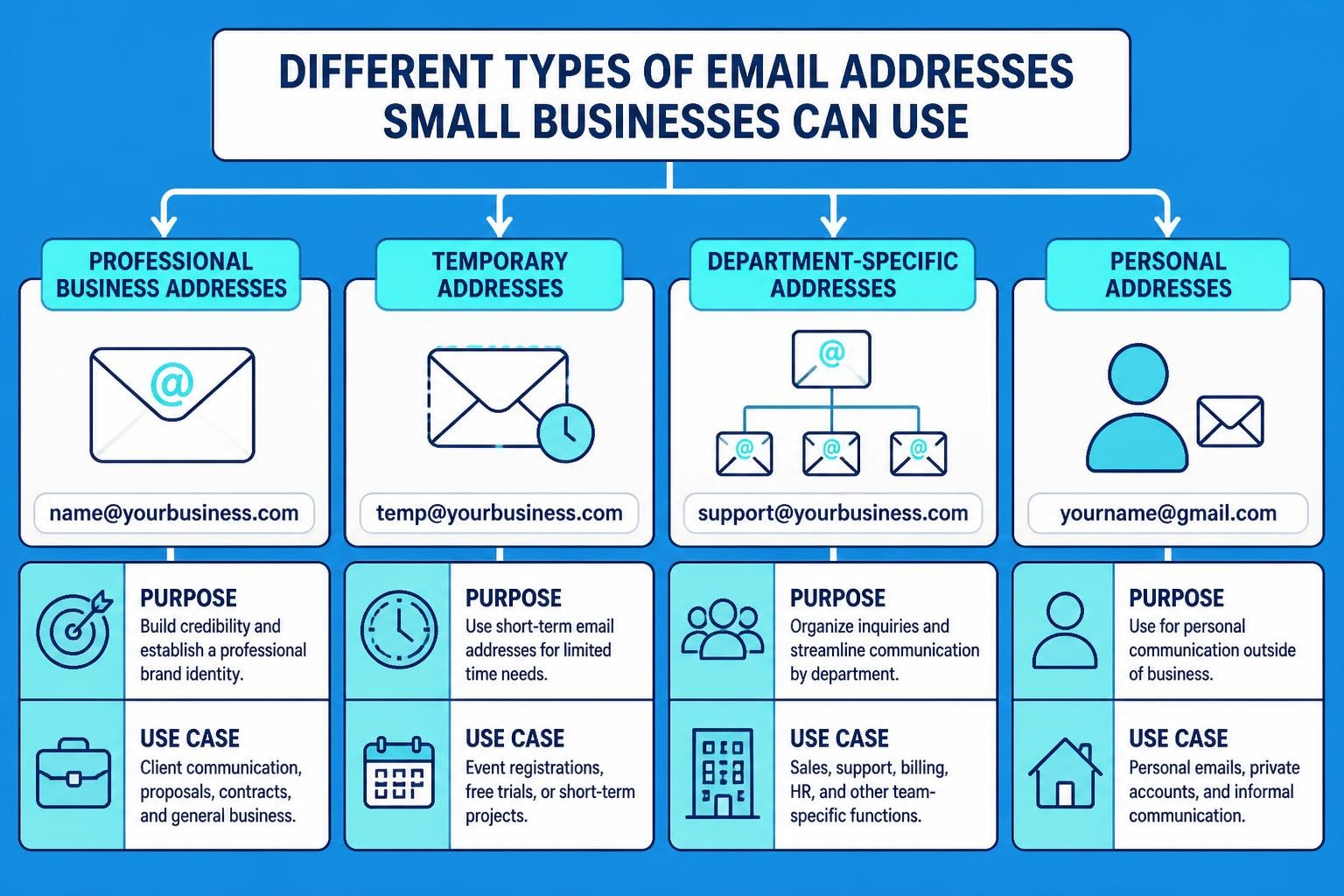
Finding the right email address i can use for your specific needs can significantly impact your communication effectiveness, whether you're running a small business, managing marketing campaigns, or simply organizing your personal correspondence. In 2026, the email landscape offers numerous options, from professional business addresses to temporary solutions, each designed to serve different purposes. Understanding which email address formats and types work best for your situation helps you maintain professionalism, protect your privacy, and optimize your digital communications strategy. This comprehensive guide explores every aspect of email addresses you can use today, providing practical insights tailored for small business owners and marketing professionals.
Understanding Email Address Formats and Structure
Before selecting an email address i can use, it's essential to understand how email addresses work. Every email address follows a standard structure that ensures deliverability and compatibility across different email systems worldwide.
The Basic Anatomy of Email Addresses
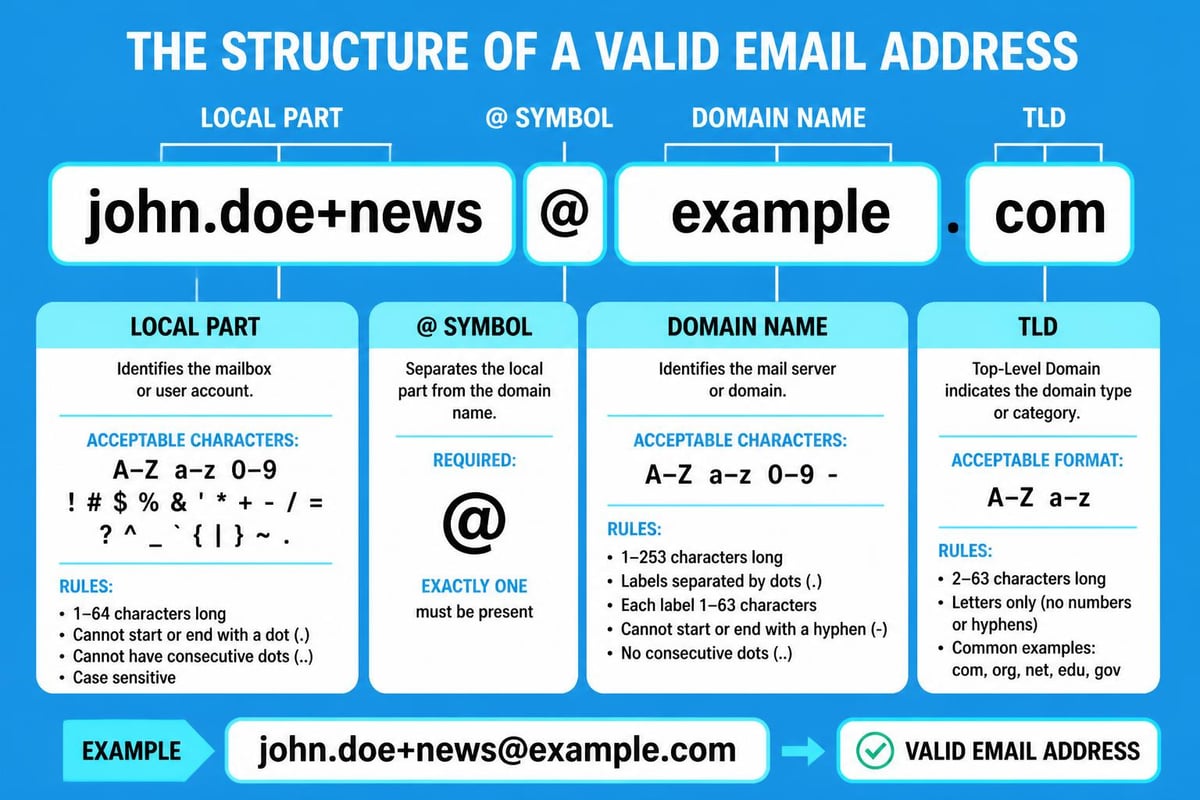
The fundamental structure consists of two main components separated by the @ symbol. The anatomy of an email address includes the local part (username) before the @ symbol and the domain part after it. For instance, in [email protected], "contact" represents the local part whilst "astonishemail.com" serves as the domain.
Understanding proper email address formats prevents common mistakes that lead to bounce rates and delivery failures. The local part can contain letters, numbers, and certain special characters, but specific rules govern their usage. These rules ensure your chosen email address functions reliably across all platforms and email clients.
The domain portion must include a valid domain name followed by a top-level domain (TLD) such as .com, .co.uk, or .org. Modern TLDs have expanded significantly, offering businesses more branding opportunities through industry-specific extensions.
Valid Characters and Formatting Rules
When considering an email address i can use, you must adhere to specific character restrictions. The local part accepts alphanumeric characters (A-Z, a-z, 0-9) and special characters including periods (.), hyphens (-), and underscores (_). However, valid email address format guidelines specify that these special characters cannot appear at the beginning or end of the local part.
Key formatting requirements include:
- Maximum length of 64 characters for the local part
- Maximum length of 255 characters for the domain part
- Total maximum length of 320 characters for the complete address
- No consecutive periods in the local part
- Case insensitivity ([email protected] equals [email protected])
Understanding these technical specifications helps you create functional addresses that work seamlessly with your email marketing campaigns. For small businesses using platforms like Astonish Email, choosing properly formatted addresses ensures reliable delivery and professional presentation.
Professional Business Email Addresses You Can Use
For small businesses, selecting the right professional email address directly impacts brand credibility and customer trust. The email address i can use for business purposes should reflect your company's professionalism whilst remaining memorable and accessible.
Standard Business Email Formats
Most businesses adopt standard naming conventions that balance personalization with professionalism. Common professional email address formats include:
| Format Type | Example | Best Used For |
|---|---|---|
| First name | [email protected] | Small teams, personal touch |
| First.Last | [email protected] | Larger organizations, clarity |
| FirstInitialLast | [email protected] | Space-conscious, professional |
| Departmental | [email protected] | Team inboxes, specific functions |
| Role-based | [email protected] | Position continuity, shared access |
Selecting appropriate formats depends on your business size, industry, and communication needs. Small businesses often benefit from personalized formats that build stronger customer relationships, whilst maintaining business email standards that project professionalism.
Department-Specific Email Addresses
Creating department-specific addresses provides organizational clarity and streamlines customer communications. These functional addresses serve as the email address i can use when customers need to contact specific teams without knowing individual names.
Common department addresses include:
- [email protected] for general enquiries
- [email protected] for customer service
- [email protected] for commercial enquiries
- [email protected] for partnership opportunities
- [email protected] for financial matters
These addresses can be managed as shared inboxes, allowing multiple team members to access and respond to messages efficiently. When setting up business email, consider which departmental addresses align with your customer journey and support requirements.
Role-based addresses also provide continuity when staff members change positions. Customers can always reach the right department without needing to update contact information when personnel transitions occur.
Temporary and Disposable Email Addresses
Sometimes you need an email address i can use temporarily without committing to a permanent inbox. Temporary email addresses serve specific purposes, from testing email campaigns to protecting your primary address from potential spam.
When to Use Temporary Email Solutions
Temporary addresses prove valuable for various scenarios that small business owners encounter regularly. Testing email deliverability before launching campaigns requires addresses that won't clutter your primary inbox. When signing up for online services, trials, or downloading resources, temporary addresses protect your main business communications.
Understanding the use of special characters in email addresses helps create temporary variations of existing addresses. Many email providers support "plus addressing" where you can add "+tag" before the @ symbol (e.g., [email protected]), creating unlimited temporary variations that route to your primary inbox.
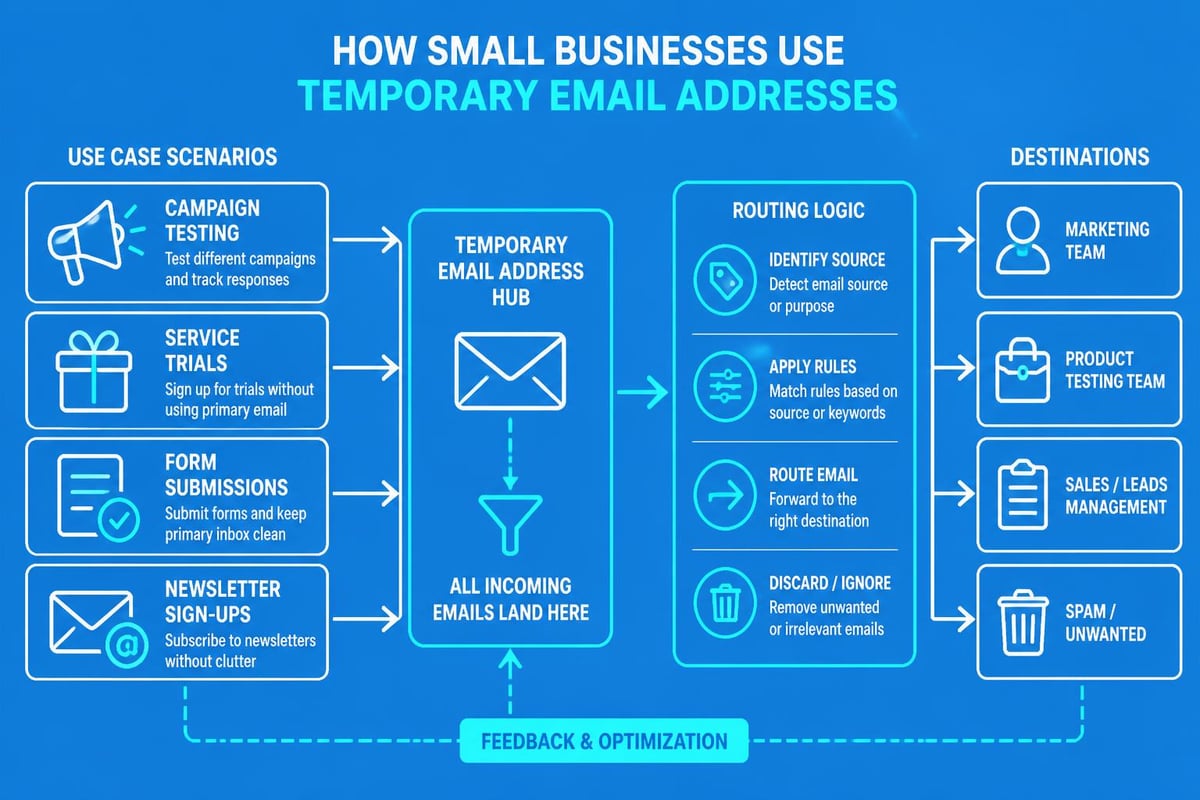
For more structured testing, businesses might explore one-time email solutions that allow controlled testing without affecting deliverability metrics or sender reputation. These addresses expire after a set period, automatically cleaning up your email environment.
Creating Test Email Addresses
When developing email marketing campaigns, having dedicated test addresses ensures quality assurance without impacting real subscribers. The email address i can use for testing should mirror your actual recipient characteristics whilst remaining separate from production data.
Best practices for test addresses:
- Create multiple addresses across different providers (Gmail, Outlook, Yahoo)
- Use variations that test name formatting and special characters
- Set up addresses on both desktop and mobile clients
- Include international domain extensions if serving global markets
- Maintain a spreadsheet tracking test address purposes and passwords
Small businesses leveraging email marketing platforms benefit from systematic testing protocols. Before sending campaigns to thousands of contacts, validating formatting, links, and rendering across different email clients prevents costly mistakes and maintains sender reputation.
Personal Email Addresses for Business Use
Many entrepreneurs and small business owners wonder whether their personal email qualifies as an email address i can use for business purposes. Whilst technically functional, mixing personal and professional communications creates several challenges.
Limitations of Personal Email Providers
Free email providers like Gmail, Yahoo, and Outlook offer convenient personal addresses but lack professional credibility for business communications. When customers receive emails from [email protected] rather than [email protected], trust and brand perception suffer immediately.
Professional business email addresses using your domain name cost relatively little but provide substantial benefits. They signal legitimacy, enhance brand recognition, and separate business communications from personal messages. This separation proves crucial for maintaining work-life boundaries and ensuring important business emails don't get lost among personal correspondence.
Additionally, free providers impose sending limits that restrict marketing capabilities. Small businesses conducting email campaigns quickly exceed these thresholds, requiring professional solutions with higher sending capacities and advanced features.
Transitioning from Personal to Professional
If you've been using a personal email address for business, transitioning to a professional address requires careful planning. The email address i can use moving forward should maintain continuity with existing contacts whilst establishing your professional presence.
Transition steps include:
- Register your business domain name
- Set up professional email hosting
- Create your new business email address
- Configure email forwarding from old to new addresses
- Update email signatures with both addresses during transition
- Notify key contacts and clients about the change
- Update business listings, websites, and marketing materials
- Gradually phase out the old address over 3-6 months
Platforms supporting small business email needs simplify this transition by offering migration tools and guidance. The investment in professional email infrastructure pays dividends through improved deliverability, enhanced credibility, and better organizational capabilities.
Email Address Selection for Marketing Campaigns
Choosing the optimal email address i can use as your sender address significantly impacts email campaign performance. Deliverability, open rates, and subscriber trust all depend partly on your sender address selection.
Sender Address Best Practices
Your sender address serves as the first impression recipients receive, even before reading your subject line. Understanding how email addresses work in the context of email marketing helps optimize this critical element.
Effective sender addresses demonstrate:
- Recognizable brand identity (using your business domain)
- Personal connection when appropriate (firstname@domain rather than noreply@domain)
- Consistency across campaigns (avoiding frequent sender changes)
- Authenticity through proper authentication (SPF, DKIM, DMARC records)
- Accessibility (avoiding no-reply addresses that prevent responses)
Many successful small businesses use formats like "Sarah from Astonish Email" or "Astonish Email Team" that combine personal warmth with brand recognition. When sending marketing emails, this approach generates higher engagement than impersonal corporate addresses.
Reply-To Configuration Strategies
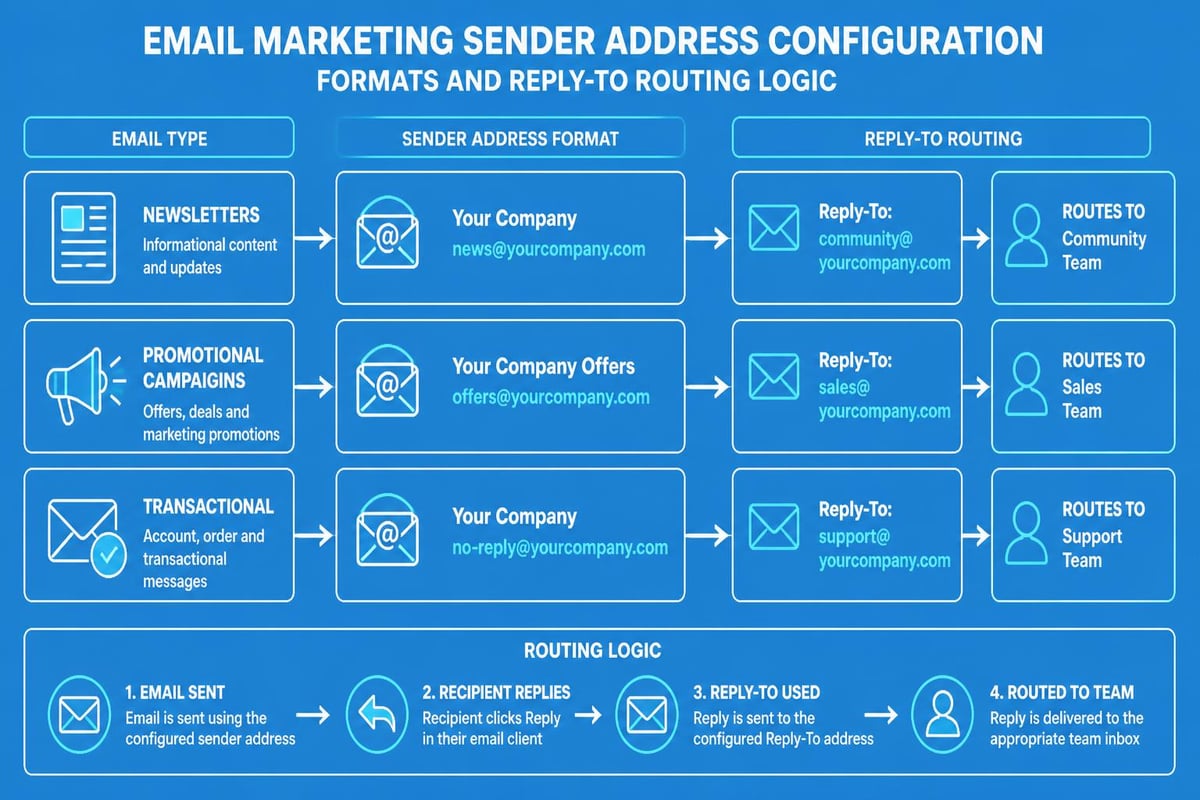
Even if your sender address uses a branded format, configuring appropriate reply-to addresses ensures customer responses reach the right destination. The email address i can use for replies might differ from the sending address based on campaign objectives.
| Campaign Type | Recommended Reply-To | Reasoning |
|---|---|---|
| Newsletter | [email protected] | Encourages engagement, routes to team |
| Promotional | [email protected] | Captures purchase intent immediately |
| Transactional | [email protected] | Directs queries to customer service |
| Survey/Feedback | [email protected] | Organizes responses by category |
| Personal Outreach | [email protected] | Maintains authentic conversation |
Properly configured reply-to addresses improve customer experience by routing responses appropriately without manual intervention. When planning your email sending strategy, consider how different address configurations support your business objectives and customer service capabilities.
Technical Considerations for Email Address Usage
Beyond choosing an email address i can use, technical implementation determines whether your emails actually reach recipient inboxes. Small businesses must understand authentication, deliverability, and reputation management to maximize email effectiveness.
Email Authentication Protocols
Modern email systems require proper authentication to verify sender legitimacy and prevent spoofing. The email address format and syntax provides the foundation, but authentication protocols ensure deliverability.
Essential authentication methods include:
- SPF (Sender Policy Framework): Authorizes specific mail servers to send from your domain
- DKIM (DomainKeys Identified Mail): Adds encrypted signatures verifying message integrity
- DMARC (Domain-based Message Authentication): Specifies how receivers should handle authentication failures
- BIMI (Brand Indicators for Message Identification): Displays your logo in supported email clients
Implementing these protocols prevents your legitimate emails from being flagged as spam whilst protecting your domain from unauthorized use. Small businesses using professional email marketing solutions often receive automated authentication setup, eliminating technical complexity.
Managing Multiple Email Addresses
As your business grows, managing multiple email addresses efficiently becomes essential. The various email address i can use options serve different purposes, requiring organizational systems that prevent confusion and missed messages.
Organization strategies include:
- Email client filtering and folder automation
- Unified inbox solutions that consolidate multiple addresses
- Team collaboration tools with shared inbox access
- Clear documentation of which addresses serve which purposes
- Regular auditing to eliminate unused or redundant addresses
Consider implementing naming conventions that immediately identify address purposes. For example, [email protected] instantly clarifies both the person and their role. When managing business communications, systematic organization prevents important messages from falling through cracks whilst maintaining professional responsiveness.
International Email Address Considerations
For businesses serving international markets, understanding global email address conventions ensures your chosen email address i can use resonates across different cultures and technical environments.
Domain Extensions and Localization
Country-code top-level domains (ccTLDs) like .co.uk, .de, or .fr signal local presence and build trust with regional audiences. Small businesses expanding internationally often create localized addresses such as [email protected] or [email protected] to serve specific markets.
International address strategies:
- Maintain consistent local parts across different domain extensions
- Use language-appropriate formatting in display names
- Consider internationalized domain names (IDNs) for non-Latin alphabets
- Research local email provider preferences and popularity
- Adapt business email approaches to regional expectations
Testing email deliverability across international providers proves crucial, as spam filtering algorithms vary by region and provider. What works perfectly for UK recipients might encounter issues in Asian or European markets.
Character Set Compatibility
Whilst modern email supports international characters through Unicode, ensuring compatibility requires careful consideration. The email address i can use should work reliably across all systems your recipients might employ.
Some older email systems still struggle with international characters in the local part of email addresses. For maximum compatibility, consider ASCII-only characters in the address itself whilst using UTF-8 encoding in display names for international character support.
When serving global markets, test your email addresses with recipients using diverse email clients, devices, and languages. This proactive approach prevents communication barriers that could cost you international opportunities.
Security and Privacy Considerations
Selecting an email address i can use safely requires understanding security implications and privacy protection strategies. Email addresses serve as digital identities vulnerable to various threats from spam to sophisticated phishing attacks.
Protecting Your Primary Business Address
Your main business email address represents a valuable asset requiring protection from compromise and overexposure. Publishing email addresses openly on websites invites spam bots that harvest addresses for malicious purposes.
Protection strategies include:
- Using contact forms instead of displaying addresses directly
- Implementing CAPTCHA verification on email-revealing pages
- Creating alias addresses for different marketing channels
- Monitoring for unauthorized use across the web
- Employing email security solutions that filter threats
When you must display addresses publicly, consider obfuscation techniques like replacing @ with [at] or using JavaScript to render addresses dynamically. These methods reduce automated harvesting whilst remaining accessible to legitimate humans.
Creating Purpose-Specific Addresses
Rather than using a single email address i can use for everything, creating purpose-specific addresses enhances both security and analytics. Different addresses for website forms, social media profiles, and marketing materials help track where spam originates and which channels generate legitimate enquiries.
This strategy also compartmentalizes potential security breaches. If one address becomes compromised, you can disable it without affecting your entire email infrastructure. Small businesses benefit from this layered approach to email address management, balancing convenience with security.
Choosing Email Providers and Hosting Solutions
The platform hosting your email address i can use impacts functionality, reliability, and professional capabilities. Small businesses face numerous options, from free providers to premium business email solutions.
Comparing Email Hosting Options
| Provider Type | Pros | Cons | Best For |
|---|---|---|---|
| Free Personal (Gmail, etc.) | No cost, familiar interface | Limited features, no custom domain | Sole traders, initial testing |
| Domain Registrar Email | Convenient bundling, basic features | Limited storage, basic tools | Simple email needs |
| Business Email Platforms | Professional features, reliability | Monthly cost, learning curve | Growing businesses |
| Integrated Marketing Platforms | Combined email marketing tools | Higher investment | Marketing-focused businesses |
Professional email hosting typically includes larger mailboxes, enhanced security features, and integration capabilities that free providers cannot match. For businesses serious about email marketing effectiveness, investing in proper infrastructure proves worthwhile.
Integration with Business Tools
Modern business email extends beyond simple messaging to integrate with customer relationship management (CRM) systems, marketing automation platforms, and collaboration tools. The email address i can use should connect seamlessly with your broader business technology stack.
Consider these integration requirements when selecting email providers:
- CRM synchronization for contact management
- Calendar and scheduling integration
- Document sharing and collaboration features
- Mobile device compatibility and apps
- API access for custom integrations
Platforms designed specifically for small business email marketing often include these integrations natively, eliminating complex technical setup whilst providing cohesive business communication capabilities.
Email Address Maintenance and Hygiene
Maintaining the email address i can use effectively requires ongoing attention to deliverability, reputation, and list hygiene. Neglecting these elements gradually degrades email performance regardless of how well you initially configured your addresses.
Monitoring Sender Reputation
Your email address builds reputation over time based on engagement rates, complaint rates, and technical factors. Internet service providers (ISPs) track sender reputation to determine whether emails reach inboxes or spam folders.
Reputation monitoring includes:
- Tracking bounce rates and identifying problematic addresses
- Monitoring spam complaint rates and responding promptly
- Maintaining consistent sending volumes and patterns
- Removing inactive subscribers regularly
- Authenticating all outbound email properly
Sudden changes in sending behaviour trigger ISP scrutiny. If you typically send 500 emails weekly and suddenly send 5,000, spam filters may flag your messages. When scaling your email marketing efforts, gradually increase volumes to maintain positive reputation signals.
Regular List Cleaning and Validation
Even the best email address i can use cannot overcome poor list quality. Regular list cleaning removes invalid addresses, reduces bounce rates, and improves overall campaign performance.
Implement quarterly list hygiene practices including:
- Remove hard bounces immediately
- Re-engage inactive subscribers with targeted campaigns
- Validate email addresses using verification services
- Update changed addresses through preference centres
- Segment lists by engagement levels
Professional email platforms often include built-in validation tools that identify problematic addresses before sending. This proactive approach protects sender reputation whilst improving marketing ROI through better targeting.
Selecting the right email address formats, understanding technical requirements, and implementing proper maintenance practices ensures your business communications remain effective and professional. Whether you need permanent business addresses, temporary testing solutions, or specialized campaign senders, applying these principles maximizes deliverability and engagement. Small businesses seeking to optimize their email communications can leverage comprehensive solutions from Astonish Email, which provides the tools, infrastructure, and support needed to execute professional email marketing campaigns that drive real business results.