Send Us an Email: Best Practices for Contact Forms
May 13, 2026
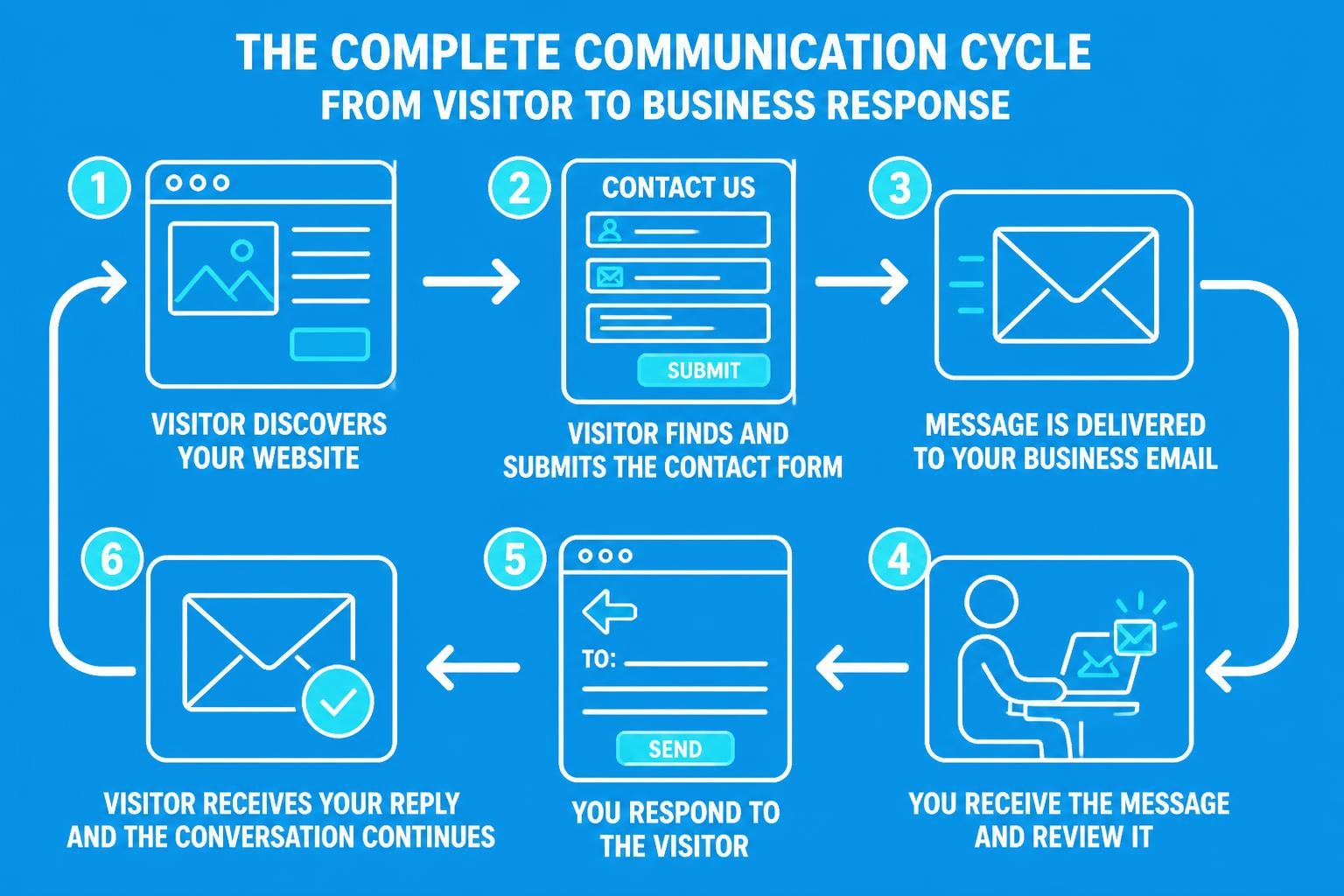
When customers want to reach your business, the simple invitation to "send us an email" can either open the door to valuable conversations or create frustrating barriers. For small businesses managing email marketing and customer communications, understanding how to optimise this touchpoint is essential for building relationships and converting enquiries into loyal customers. The way you invite, receive, and respond to email contact can significantly impact your business reputation and bottom line.
Why "Send Us an Email" Matters for Small Businesses
The phrase "send us an email" represents more than just a contact method. It's a critical conversion point where interested visitors decide whether to engage with your business or move on to competitors.
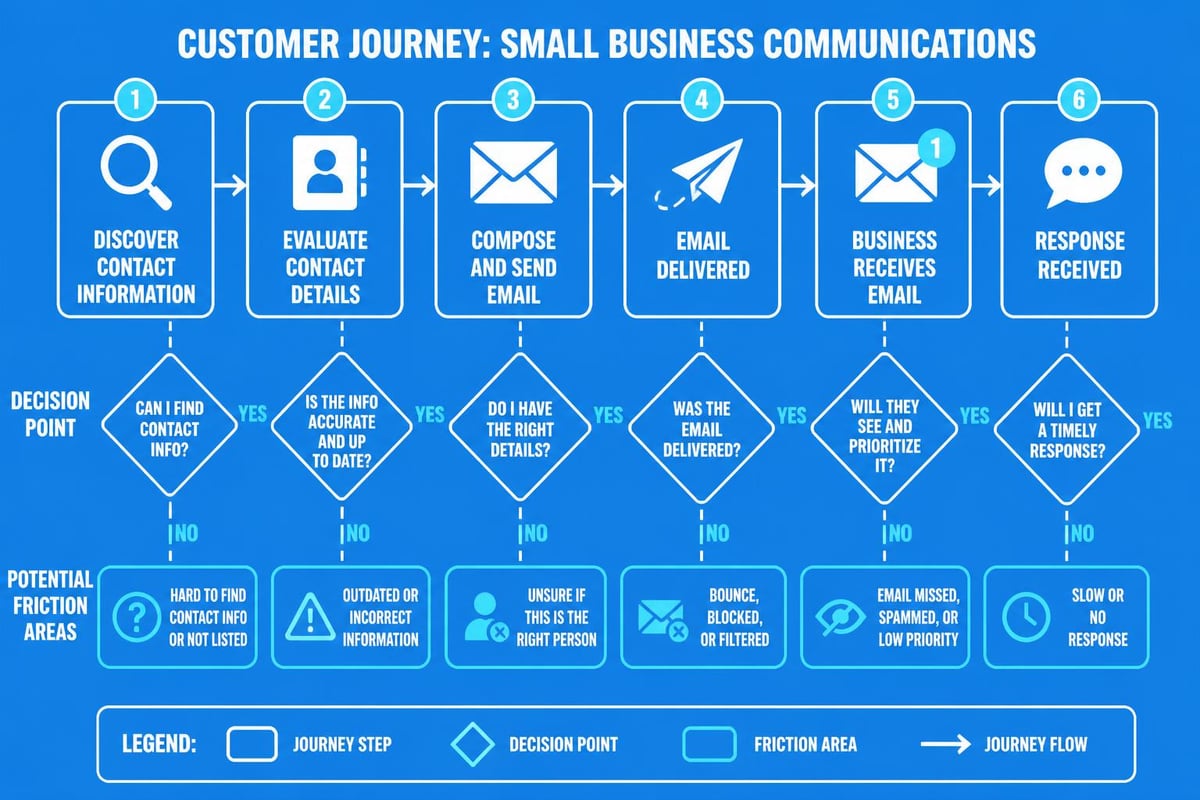
Research into email response behaviours reveals that people make rapid judgements about whether to respond to email communications based on trust signals and ease of use. For small businesses, every contact opportunity counts, making it vital to remove friction from the process.
Key benefits of optimising email contact include:
- Reduced bounce rates from contact pages
- Higher quality lead information
- Improved customer satisfaction scores
- Better response tracking and follow-up
- Enhanced professional reputation
When you properly structure your email contact methods, you create a seamless path for customers to send us an email without confusion or technical barriers.
Contact Forms Versus Direct Email Links
Small businesses face an important decision when implementing "send us an email" functionality. Should you use a simple mailto link or implement a dedicated contact form?
The Case for Contact Forms
Contact forms offer significant advantages for businesses that need structured information from enquiries. According to best practices for email forms, forms are preferable when you need to control what information visitors send or when allowing anonymous submissions.
| Feature | Contact Form | Mailto Link |
|---|---|---|
| Information Control | High - specify required fields | Low - free text only |
| Spam Protection | Excellent with CAPTCHA | Minimal |
| Mobile Experience | Can be optimised | Depends on device settings |
| Analytics Tracking | Full tracking possible | Limited |
| Professional Appearance | High | Moderate |
Forms integrated into your website create a professional impression and ensure you collect the information needed to send effective business emails in response.
When Mailto Links Still Work
Direct email links have their place, particularly for businesses with established relationships. They're quick to implement and familiar to users. However, they expose your email address to spam bots and rely on users having properly configured email clients.
For small businesses building customer databases, the structured approach of forms typically delivers better results than asking people to simply send us an email through their own email client.
Designing Contact Forms That Convert
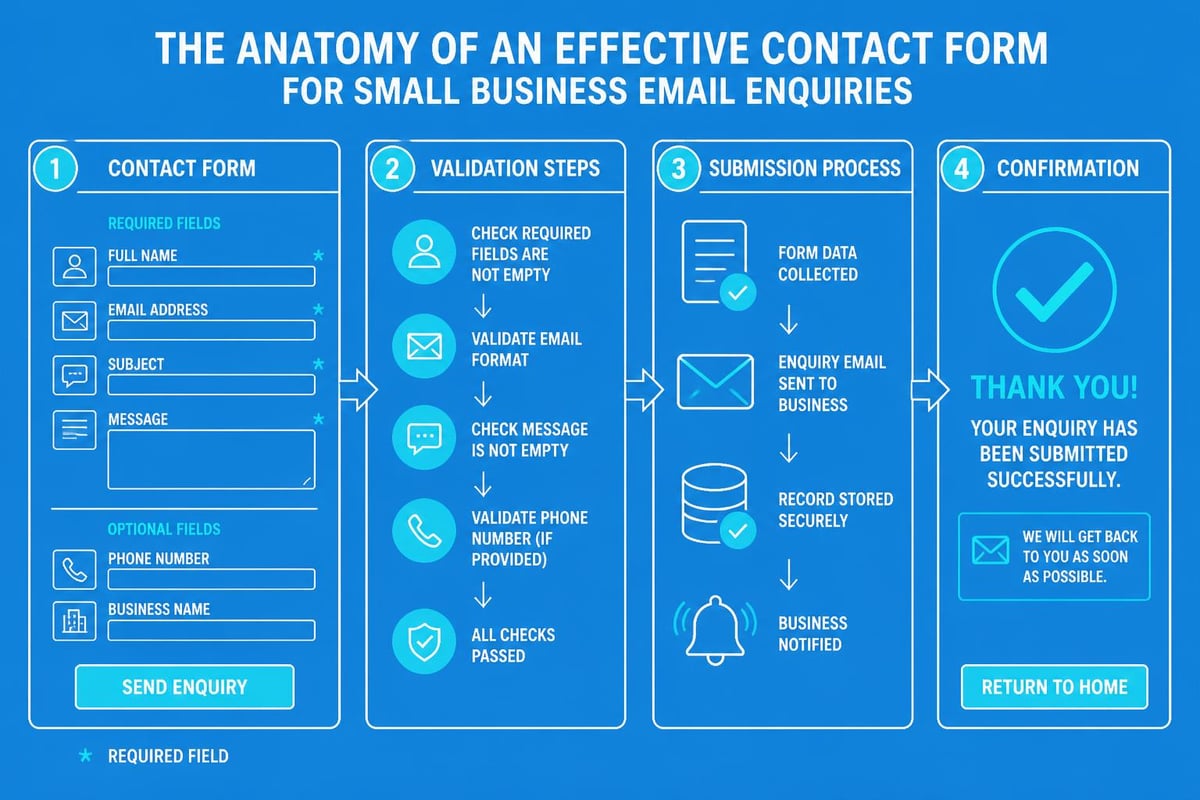
Creating an effective contact form requires balancing information gathering with user convenience. The best practices for contact form design emphasise keeping forms short whilst capturing essential details.
Essential Form Fields
Start with the minimum viable information:
- Name - Full name or just first name depending on formality
- Email address - For follow-up communications
- Subject or enquiry type - Helps with routing
- Message - The core of their communication
Additional fields should be carefully considered. Every extra field you add increases abandonment risk, yet insufficient information hampers your ability to respond effectively.
Mobile Optimisation
With over 60% of business enquiries now originating from mobile devices, your contact form must work flawlessly on smaller screens. This includes:
- Single-column layouts
- Large touch-friendly buttons
- Appropriate input types (email keyboard for email fields)
- Clear error messaging
- Minimal typing required
When mobile users can easily send us an email through your optimised form, conversion rates increase dramatically.
Writing Effective Contact Page Copy
The words surrounding your contact form significantly influence whether visitors will send us an email. Effective contact page design combines clear messaging with trust signals.
Crafting Your Call to Action
Rather than generic "Contact Us" headings, use specific, benefit-oriented language:
- "Get Your Free Consultation - Send Us an Email"
- "Questions About Pricing? We're Here to Help"
- "Start Your Project - Tell Us About Your Needs"
These approaches set clear expectations about response times and outcomes. For email marketing businesses like Astonish Email, specificity builds confidence in prospects considering your services.
Setting Response Expectations
Transparency about when people can expect replies reduces anxiety and follow-up enquiries. Include clear statements such as:
"We typically respond within 24 hours on working days. For urgent matters, please call [number]."
This manages expectations whilst encouraging people to send us an email for non-urgent matters, keeping your phone lines clear for critical issues.
Technical Implementation Considerations
Behind every smooth "send us an email" experience lies solid technical infrastructure. Small businesses must ensure their contact systems are reliable and secure.
Email Delivery and Reliability
When someone submits a contact form, the email must reach your inbox reliably. This requires:
- Proper SPF, DKIM, and DMARC records
- Redundant email routing
- Notification systems for failed deliveries
- Regular testing of form functionality
Businesses using professional email systems benefit from built-in reliability features that ensure contact enquiries never disappear into the void.
Spam Protection Without Friction
Protecting your inbox from spam whilst maintaining user experience is delicate. Modern approaches include:
| Method | Effectiveness | User Impact |
|---|---|---|
| Honeypot Fields | High | None (invisible) |
| reCAPTCHA v3 | Very High | None (background) |
| Time-based Validation | Moderate | None |
| Traditional CAPTCHA | High | Moderate (requires action) |
The best approach combines invisible protection methods with occasional challenges only when suspicious patterns emerge, ensuring legitimate users can easily send us an email whilst bots are blocked.
Data Protection Compliance
UK businesses must comply with GDPR when collecting contact information. Essential compliance elements include:
- Clear privacy notices explaining data use
- Explicit consent for marketing communications
- Secure data storage and transmission
- Rights to access and deletion
- Data retention policies
Your privacy and data handling policies should be easily accessible from contact forms, building trust whilst meeting legal requirements.
Response Management and Follow-Up
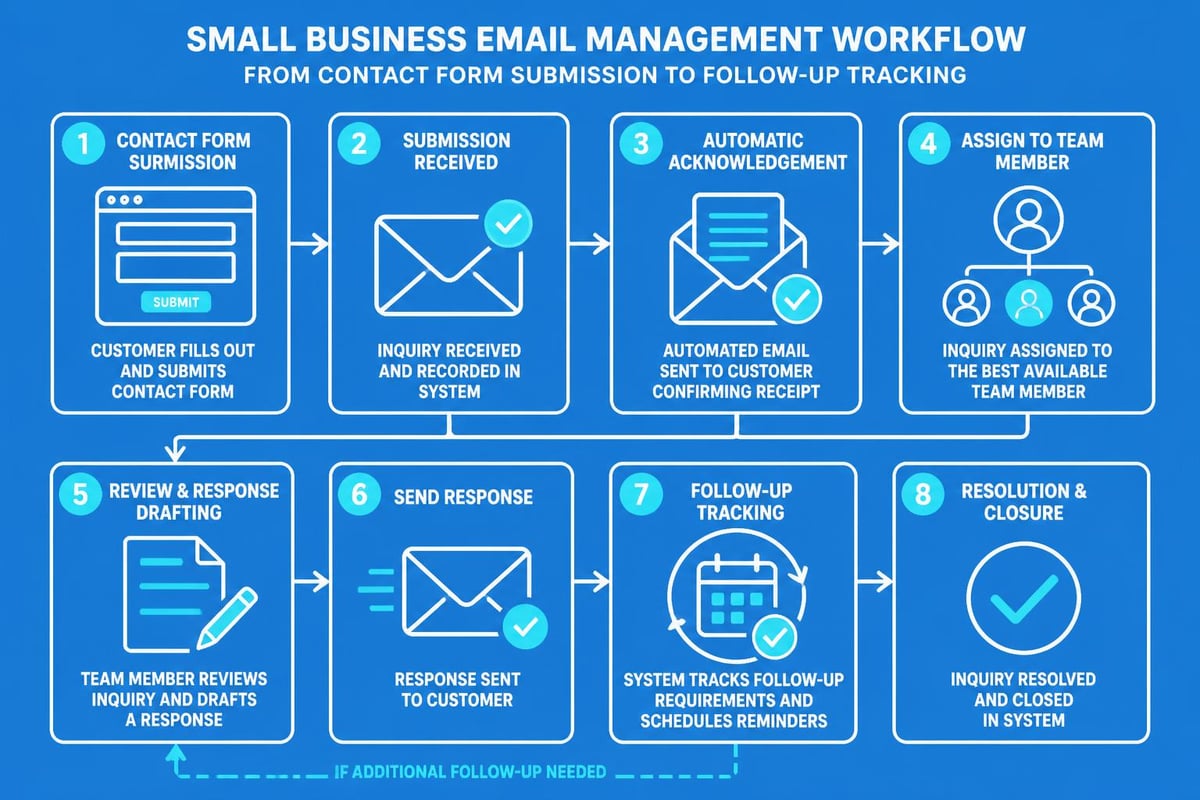
Collecting enquiries is only half the equation. Your processes for managing and responding to emails determine whether contacts convert to customers.
Acknowledgement Automation
Immediate automated acknowledgements reassure senders that their message was received. These should:
- Confirm receipt within seconds
- Restate expected response timeframes
- Provide alternative contact methods
- Include tracking reference numbers
This immediate feedback is particularly important for small businesses where customers might otherwise send us an email repeatedly, unsure if the first message arrived.
Routing and Assignment
Larger small businesses benefit from routing enquiries to appropriate team members based on subject or enquiry type. This ensures:
- Faster response times through specialisation
- Higher quality answers from knowledgeable staff
- Reduced internal forwarding and confusion
- Better tracking of departmental workload
Even sole traders can use rules and folders to prioritise different types of enquiries effectively.
Response Quality Standards
When you finally respond to someone who took time to send us an email, quality matters enormously. Good business email practices include:
- Addressing the person by name
- Answering all questions asked
- Providing clear next steps
- Maintaining brand voice consistency
- Including relevant resources or links
The quality of your response often matters more than speed, though both are important.
Alternative Contact Methods and Integration
Whilst email remains crucial, modern contact strategies integrate multiple channels. However, the invitation to send us an email should remain prominent alongside alternatives.
Multi-Channel Contact Options
Offering choice improves accessibility:
- Live chat for immediate questions
- Phone for complex or urgent issues
- Social media for casual engagement
- Email for detailed enquiries and documentation
Each channel serves different needs, but email provides the best balance of convenience, documentation, and thoughtful communication for most business enquiries.
Integration with CRM Systems
Contact form submissions should flow directly into your customer relationship management system, creating a complete record of interactions. This enables:
- Automated follow-up sequences
- Sales pipeline tracking
- Customer history visibility
- Performance analytics
- Team collaboration
When someone takes time to send us an email, that initial contact should become part of a managed relationship, not an isolated interaction.
Measuring and Optimising Contact Form Performance
Continuous improvement of your "send us an email" touchpoints requires measurement and testing. Small businesses should track several key metrics to understand performance.
Essential Metrics to Monitor
| Metric | What It Reveals | Target Range |
|---|---|---|
| Form Completion Rate | Percentage who submit after starting | 60-80% |
| Time to First Response | How quickly you reply | <24 hours |
| Resolution Rate | Enquiries successfully resolved | >85% |
| Conversion Rate | Enquiries becoming customers | Varies by industry |
Regular monitoring reveals bottlenecks and opportunities. If completion rates are low, your form may be too complex. If conversion rates lag, response quality or follow-up processes need improvement.
A/B Testing Opportunities
Systematic testing improves results over time. Consider testing:
- Form field combinations (fewer versus more detailed)
- Call-to-action wording and placement
- Page layout and visual hierarchy
- Confirmation message content
- Automated response timing and content
Even small improvements compound when you consider that each optimisation affects every visitor who might send us an email through your website.
Common Mistakes That Reduce Engagement
Many small businesses inadvertently create barriers that discourage potential customers from reaching out. Avoiding these pitfalls improves contact rates significantly.
Overcomplicated Forms
Requesting excessive information before someone can send us an email creates abandonment. Unless absolutely necessary for your initial response, defer detailed questions until after first contact.
According to contact page design research, each additional field beyond the essential four reduces submission rates by approximately 10-20%.
Hidden Contact Information
Burying your contact form deep in navigation or requiring multiple clicks to reach it suggests you don't actually want to hear from customers. Contact information should be:
- Accessible from every page (header or footer link)
- Featured prominently on service and product pages
- Available in site search results
- Listed in business directories
When people search for ways to send us an email, they should find clear paths immediately.
Poor Mobile Experience
Forms that don't work properly on mobile devices lose over half of potential enquiries. Common mobile issues include:
- Buttons too small to tap accurately
- Fields requiring horizontal scrolling
- Inappropriate keyboard types
- Validation errors that aren't visible
- Slow loading times
Testing your contact form on multiple devices and screen sizes is non-negotiable in 2026.
Slow or Missing Responses
Perhaps the worst mistake is encouraging people to send us an email then failing to respond promptly. This damages reputation more severely than having no contact form at all, as it actively wastes the prospect's time and creates negative associations.
Effective contact pages set realistic expectations then exceed them, building trust through reliable follow-through.
Security and Trust Considerations
In an era of increasing cyber threats and privacy concerns, visitors need assurance that it's safe to send us an email with their contact details.
Visual Trust Signals
Include these elements near your contact form:
- SSL certificate indicators (padlock icon)
- Privacy policy links
- Security badges from recognised organisations
- Professional design and branding
- Testimonials or trust marks
These signals subconsciously communicate that sharing information is safe, increasing form submission rates.
Transparent Data Handling
Explain clearly what happens to submitted information:
- How you'll use their email address
- Whether you'll share data with third parties
- How long you retain information
- Their rights regarding their data
Transparency builds confidence whilst meeting legal obligations under UK data protection law.
Integrating Email Contact with Marketing Strategy
For businesses focused on email marketing, contact form submissions represent high-value prospects. Integrating these touchpoints with broader marketing creates powerful opportunities.
Segmentation and Personalisation
When someone takes time to send us an email through your contact form, they've identified themselves as genuinely interested. This warrants special treatment in your email marketing campaigns:
- Immediate addition to appropriate email segments
- Personalised welcome sequences
- Priority access to new features or offers
- Exclusive content based on their enquiry type
This strategic approach transforms cold enquiries into warm leads through thoughtful nurturing.
Content Strategy Insights
Contact form data reveals what prospects care about. Common questions and themes should inform:
- Blog content addressing frequent concerns
- FAQ sections answering common queries
- Product descriptions clarifying confusion points
- Marketing messaging emphasising valued benefits
When patterns emerge in what people ask when they send us an email, your content strategy has clear direction.
Future Trends in Email Contact Systems
The basic functionality of contact forms remains stable, but emerging technologies are enhancing the "send us an email" experience.
AI-Powered Response Suggestions
Artificial intelligence increasingly assists with:
- Categorising enquiries automatically
- Suggesting response templates
- Identifying urgent requests
- Predicting customer intent
- Personalising acknowledgements
These tools help small businesses compete with larger organisations in response quality and speed.
Conversational Interfaces
Modern contact experiences blur lines between forms, chatbots, and email. Conversational interfaces guide visitors through structured information gathering whilst feeling natural and friendly.
This evolution maintains the documentation benefits of email whilst providing the immediacy of chat, creating optimal experiences for visitors who want to send us an email about complex topics.
Progressive Profiling
Rather than requesting all information upfront, progressive profiling gradually builds customer profiles across multiple interactions. Initial contact forms remain simple, with additional details collected during follow-up or through behavioural tracking.
This approach balances the need for information with user convenience, ensuring people can quickly send us an email whilst you still gather necessary context over time.
Optimising how customers can send us an email to your business represents a fundamental element of professional communications and marketing strategy. By implementing thoughtful contact forms, maintaining responsive follow-up processes, and continuously measuring performance, small businesses create competitive advantages through superior customer engagement. Astonish Email provides the reliable email marketing infrastructure small businesses need to transform contact enquiries into lasting customer relationships, ensuring every message receives the attention it deserves.