Create Free Business Email Address: Complete Guide 2026
May 14, 2026
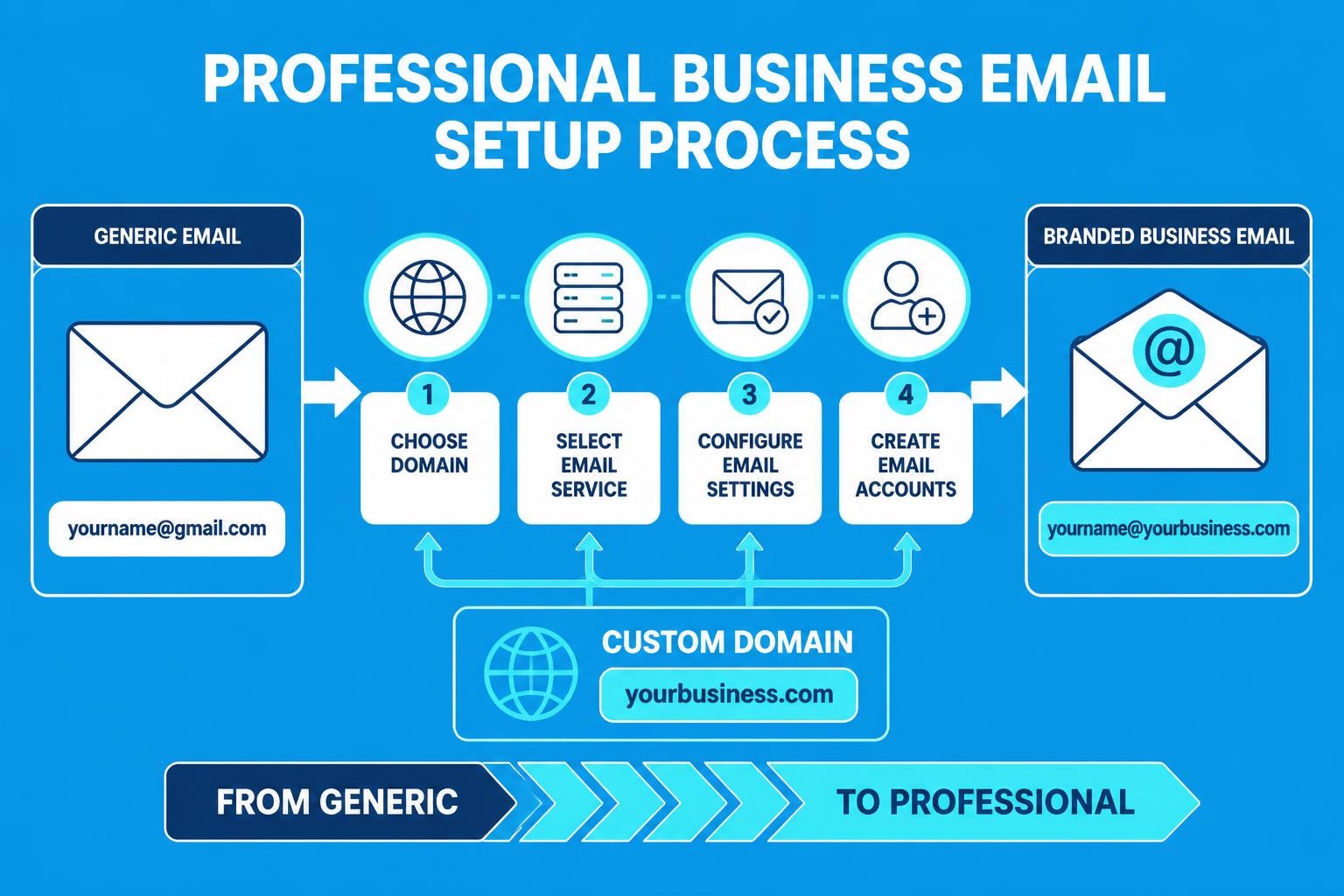
Small business owners face a persistent challenge: establishing professional credibility without breaking the bank. One of the most cost-effective ways to achieve this is through a proper email address that represents your brand rather than relying on generic consumer platforms. When you create free business email address solutions, you're investing in your company's image while keeping operational costs minimal. This comprehensive guide explores the various methods, platforms, and strategies available in 2026 to help you establish a professional email presence without spending a penny.
Understanding the Value of Professional Email Addresses
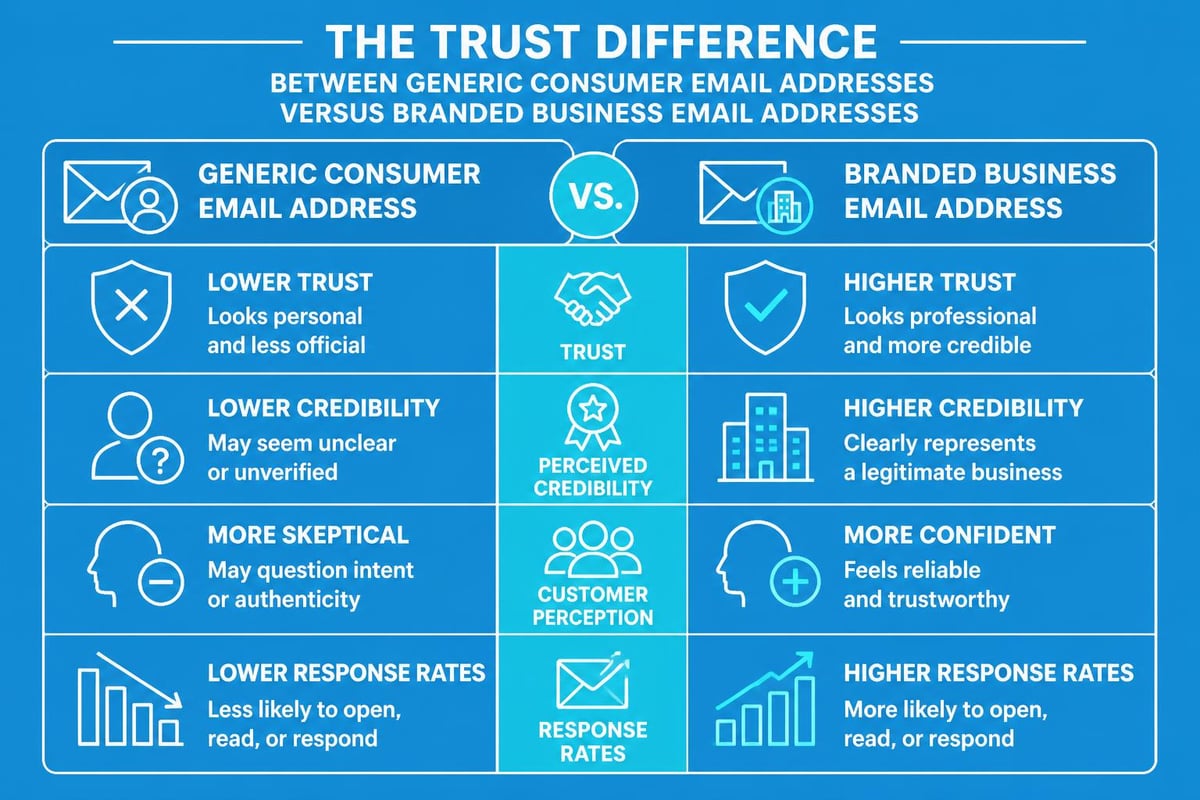
Generic email addresses like [email protected] or [email protected] immediately signal to potential clients that your business might not be established or serious about its operations. Research consistently shows that customers trust businesses with branded email addresses significantly more than those using free consumer platforms.
A professional email address following the format [email protected] demonstrates several key attributes:
- Credibility and trustworthiness in customer communications
- Brand consistency across all touchpoints
- Enhanced security through domain-specific authentication
- Professional appearance in proposals and contracts
- Better deliverability rates for marketing communications
When you get a free business email, you're not just changing your email signature. You're fundamentally shifting how customers perceive your entire operation. The difference between generic and professional email addresses can directly impact conversion rates, with studies suggesting up to 27% higher response rates from professionally branded addresses.
Free Business Email Creation Methods
Creating a professional business email address without financial investment requires choosing between several distinct approaches. Each method offers unique advantages depending on your technical expertise, time availability, and long-term business goals.
Gmail for Business Approach
Google provides pathways to create free business email address solutions through Gmail, though with certain limitations. The standard Gmail interface allows custom "send as" configurations, enabling you to send emails that appear to come from your domain whilst receiving them in your Gmail inbox.
Setup requirements include:
- Ownership of a domain name
- Access to domain DNS settings
- Configuration of MX records
- SMTP authentication setup
Gmail remains reliable for businesses seeking familiar interfaces, though the free tier lacks some advanced features. This approach works particularly well for solopreneurs and very small teams who already use Google's ecosystem extensively.
Email Hosting Providers with Free Tiers
Several platforms specifically cater to businesses needing professional email without upfront costs. GeeksforGeeks highlights various free business email options that have emerged as viable alternatives to paid services.
| Provider | Free Accounts | Storage | Custom Domain |
|---|---|---|---|
| Zoho Mail | Up to 5 | 5GB per user | Yes |
| Proton Mail | 1 | 500MB | Limited |
| Yandex.Mail | Unlimited | 10GB per user | Yes |
| ImprovMX | Unlimited | Forwarding only | Yes |
These providers offer legitimate ways to create free business email address configurations with varying feature sets. Zoho Mail particularly stands out for small teams, offering robust functionality without requiring payment during the initial growth phase.
Setting Up Your Custom Domain Email
The technical process of establishing your business email varies based on your chosen platform, but fundamental steps remain consistent across most providers.
Domain Acquisition and Configuration
Before you can create free business email address solutions, you need a domain name. Whilst domains aren't entirely free, they're remarkably affordable at £8-15 annually. Some web hosting providers include free domains with hosting packages, which Tom's Guide evaluates comprehensively.
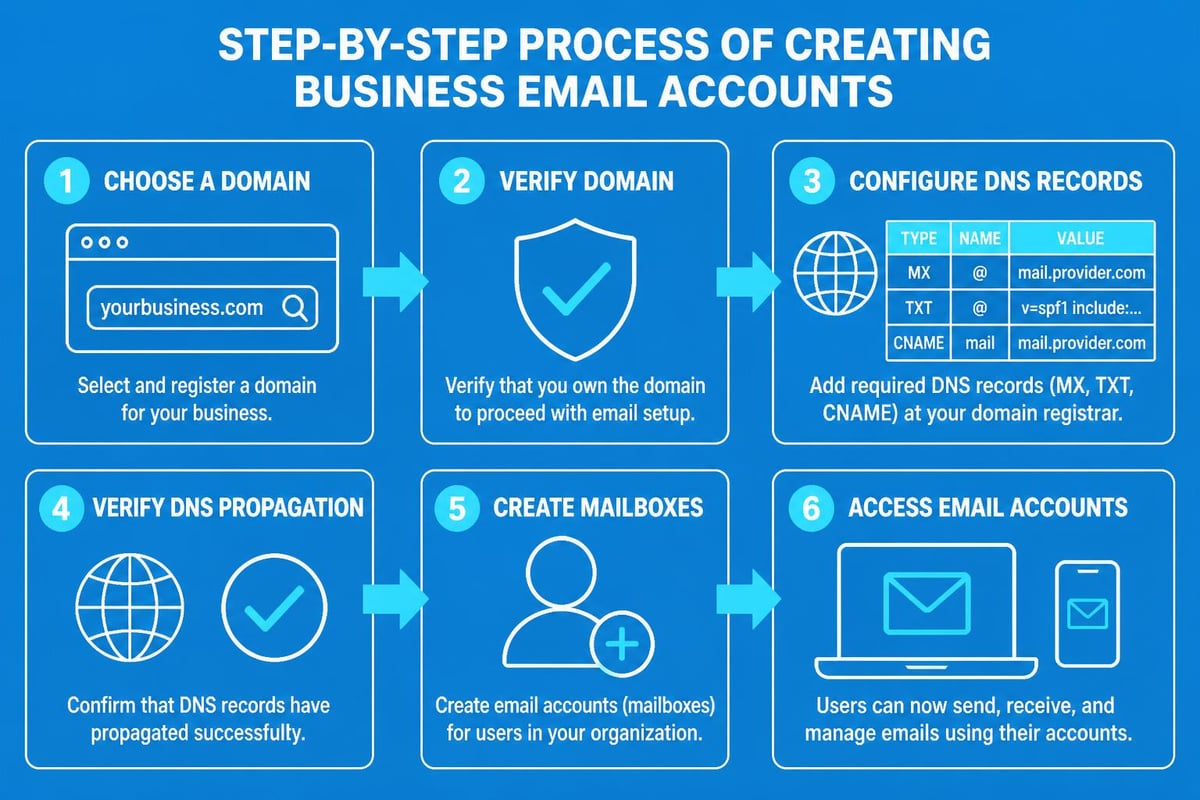
Domain setup involves:
- Registering your business domain through a registrar
- Accessing your domain's DNS management panel
- Adding MX records provided by your email service
- Configuring SPF and DKIM records for authentication
- Verifying domain ownership through TXT records
The verification process typically takes 24-48 hours for DNS propagation, though changes can appear within minutes in some cases. During this period, patience is essential as records update across global DNS servers.
Email Account Creation Process
Once your domain is verified, creating individual email accounts becomes straightforward. Most platforms offer intuitive dashboards where you can add team members, set permissions, and configure forwarding rules.
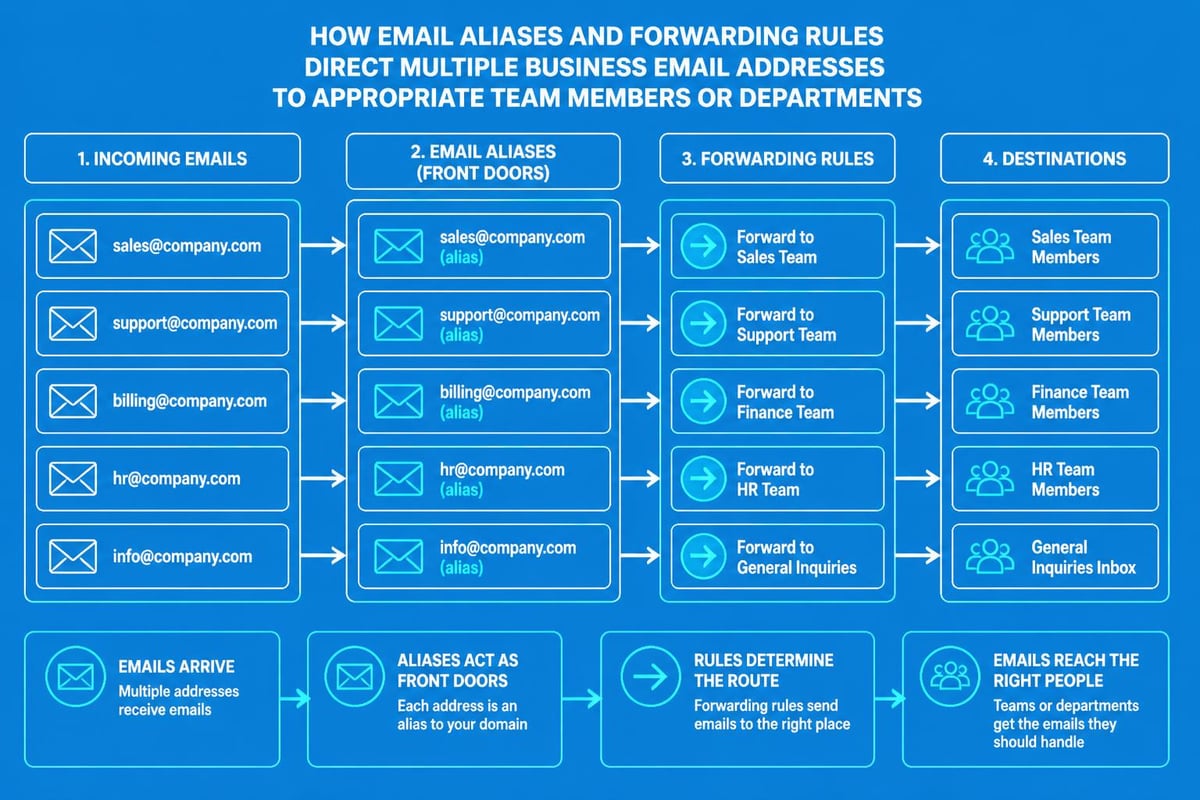
When you create a business email account, consider establishing these standard addresses immediately:
- [email protected] for general enquiries
- [email protected] for customer service
- [email protected] for commercial contacts
- [email protected] for internal administration
This structure ensures customers know exactly where to direct their communications whilst maintaining organisational clarity internally.
Privacy-Focused Free Email Options
Security-conscious businesses increasingly prioritise encrypted communication channels. Proton Mail offers end-to-end encryption as a standard feature, making it attractive for businesses handling sensitive information.
When you create free business email address accounts with privacy-first providers, you gain:
- End-to-end encryption protecting message content
- Zero-access encryption ensuring providers cannot read your emails
- Swiss privacy laws protecting data from broad surveillance
- No tracking or profiling of user behaviour
- Open-source code allowing independent security audits
The trade-off typically involves reduced storage capacity and fewer integration options compared to mainstream providers. For consultancies, legal practices, healthcare providers, and financial services, this compromise often proves worthwhile. Detailed instructions on creating secure accounts walk users through the privacy-focused setup process.
Integrating Business Email with Marketing Tools
Professional email addresses serve dual purposes: daily communication and marketing operations. Small businesses must consider how their email infrastructure supports customer relationship management and campaign delivery.
Email Marketing Platform Connections
When you get a business email address, connecting it with marketing automation tools amplifies its value. Platforms like Mailchimp, MailerLite, and Brevo offer free tiers that complement free business email accounts.
Integration benefits include:
- Centralised contact management across communication channels
- Automated follow-up sequences from your business domain
- Campaign analytics tied to your professional address
- Improved deliverability through proper sender authentication
- Consistent branding in transactional and marketing emails
The best business email setup incorporates both operational and marketing considerations from the outset. This holistic approach prevents future migration headaches as your business scales.
Authentication and Deliverability Configuration
Creating free business email addresses means nothing if your messages land in spam folders. Proper authentication protocols have become non-negotiable in 2026.
| Protocol | Purpose | Difficulty | Impact |
|---|---|---|---|
| SPF | Authorises sending servers | Easy | High |
| DKIM | Cryptographically signs messages | Moderate | High |
| DMARC | Defines handling policies | Moderate | Very High |
| BIMI | Displays brand logo | Advanced | Medium |
Implementing these standards when you create free business email address configurations significantly improves inbox placement rates. Most modern email providers offer guided setup wizards that simplify the technical implementation process.
Managing Multiple Business Email Accounts
As your small business grows, managing numerous email accounts becomes crucial for maintaining responsiveness whilst preserving work-life boundaries.
Email Client Configuration
Professional email management requires reliable client software. Free options include:
- Thunderbird for desktop power users
- Outlook.com for Microsoft ecosystem integration
- Native mobile apps from your email provider
- Unified inbox solutions consolidating multiple accounts
When you set up a business email across multiple devices, IMAP synchronisation ensures consistent message access. This protocol maintains identical inbox states across computers, tablets, and smartphones, preventing the confusion of missing or duplicated messages.
Forwarding and Alias Strategies
Smart businesses create free business email address configurations that route messages efficiently without creating overwhelming inbox volumes. Email aliases allow multiple addresses to deliver to a single mailbox.
Common alias structures include:
- Department-based forwarding (sales@, support@, info@ all to owner)
- Project-specific addresses routing to relevant team members
- Time-limited campaign addresses tracking marketing responses
- Role-based addresses surviving employee turnover
This approach maximises your free account limits whilst maintaining professional appearance. A single mailbox can serve dozens of aliases, creating the impression of a larger operation than actually exists.
Limitations and Upgrade Considerations
Whilst free options provide legitimate value, understanding their constraints helps businesses plan appropriate growth paths. Every platform that lets you create free business email address solutions imposes certain restrictions.
Storage and Feature Restrictions
Free tier limitations typically include:
- Reduced storage capacity (500MB to 10GB versus unlimited paid tiers)
- Attachment size limits (often 10-25MB maximum)
- Limited support options (community forums instead of priority tickets)
- Fewer integration possibilities with third-party tools
- Branding or advertisements in some interfaces
For bootstrapped startups, these constraints rarely prove problematic. However, businesses sending large files, managing extensive email archives, or requiring guaranteed uptime should budget for eventual upgrades.
Scaling Thresholds
The point at which you should transition from free to paid email services varies by business model. Consider upgrading when:
- Your team exceeds the free user limit
- Storage constraints force deletion of important messages
- Customer service demands require dedicated support
- Advanced features become business-critical
- Your professional image demands premium positioning
Many businesses successfully operate on free tiers for years, particularly service-based operations with minimal file-sharing requirements. The key is understanding your actual needs rather than perceived enterprise expectations.
Security Best Practices for Free Business Email
Cost-free doesn't mean careless. When you create free business email address accounts, implementing robust security measures protects both your business and customers.
Essential Security Configurations
Implement these protections immediately:
- Two-factor authentication on all accounts
- Strong, unique passwords stored in password managers
- Regular security audit logs review
- Mobile device encryption for email access
- Automatic logout policies on shared computers
The professional email standard in 2026 includes mandatory multi-factor authentication. Businesses without this protection face significantly higher breach risks, with studies showing MFA blocking 99.9% of automated attacks.
Backup and Recovery Planning
Free email providers rarely guarantee data preservation. Establishing your own backup systems prevents catastrophic losses from account issues or service discontinuation.
Simple backup approaches include:
- Regular IMAP downloads to local storage
- Email archiving to cloud storage services
- Automated forwarding to secondary accounts
- Periodic export of critical communications
When you create professional email addresses, building redundancy into your workflow ensures business continuity regardless of provider stability.
Maximising Free Email Account Value
Strategic use of free business email resources delivers returns far exceeding their zero-pound cost. Small businesses can compete with larger competitors through smart implementation.
Professional Communication Templates
Standardising your email communications projects consistency and saves time. Create templates for:
- Initial customer contact responses
- Quotation delivery formats
- Meeting confirmation messages
- Follow-up sequences after proposals
- Support ticket acknowledgements
These templates, sent from your professional business address, create reliable customer experiences that build trust through predictability. The email for small business free approach doesn't mean amateur communication standards.
Signature and Branding Elements
Your email signature represents valuable marketing real estate appearing in every message. Professional signatures when you create free business email address accounts should include:
| Element | Purpose | Example |
|---|---|---|
| Full name | Personal identification | Sarah Mitchell |
| Job title | Authority context | Founder & Lead Consultant |
| Company name | Brand reinforcement | Mitchell Advisory Services |
| Phone number | Alternative contact | +44 20 1234 5678 |
| Website link | Traffic generation | www.mitchelladvisory.co.uk |
| Social proof | Credibility building | "Featured in Forbes" |
Adding professional headshots, company logos, and social media icons further enhances signature effectiveness, though file size constraints on free accounts may limit graphic elements.
Alternative Approaches to Business Email
Beyond traditional email providers, innovative solutions allow businesses to create free business email address functionality through unconventional methods.
Email Forwarding Services
Services like ImprovMX, ForwardEmail, and others provide free email forwarding from your custom domain to existing personal accounts. This approach offers the appearance of professional email without separate inbox management.
Advantages include:
- Instant setup with minimal technical knowledge
- Unlimited forwarding addresses
- Consolidated inbox management
- Zero ongoing costs
- Simple DNS configuration
The primary limitation involves sending capabilities. Replies from your personal account may not display your business domain unless configured correctly, potentially confusing recipients.
Temporary and Disposable Email Solutions
For specific use cases like event registrations, partnership enquiries, or campaign tracking, one-time email addresses serve valuable purposes without cluttering your primary inbox.
These approaches work well for:
- Testing service sign-ups before committing business email
- Segregating marketing subscriptions from operational communications
- Creating campaign-specific tracking addresses
- Protecting primary email from potential spam sources
Whilst not suitable for ongoing customer relationships, these tools complement rather than replace your primary business email infrastructure.
Compliance and Legal Considerations
When you create free business email address systems, understanding regulatory requirements prevents costly violations. Email communications fall under various legal frameworks depending on your location and industry.
Data Protection Requirements
UK GDPR and data protection regulations impose obligations on business email usage:
- Lawful basis for storing customer email addresses
- Consent mechanisms for marketing communications
- Right to deletion processing procedures
- Data breach notification protocols within 72 hours
- Privacy policy disclosures about email data handling
Free email providers typically include basic compliance tools, though businesses remain ultimately responsible for proper implementation. The simple business email must still meet complex regulatory standards.
Record Retention Policies
Different industries face varying email retention requirements. Financial services, healthcare, and legal sectors often mandate preservation of communications for specific periods. When selecting free business email platforms, verify they support required retention capabilities or implement supplementary archiving solutions.
Establishing professional email communications doesn't require significant financial investment when you leverage the robust free options available in 2026. From privacy-focused encrypted platforms to business-oriented providers with generous free tiers, small businesses can project credibility whilst controlling costs. The key lies in understanding your specific requirements, implementing proper security measures, and planning appropriate scaling paths as your operation grows. Once you've established your professional email presence, connecting it with comprehensive marketing tools amplifies its value exponentially. Astonish Email specialises in helping small businesses maximise their email marketing potential, offering intuitive platforms that integrate seamlessly with your professional business email address to drive customer engagement and growth.