Create Test Email: Essential Guide for Small Businesses
June 8, 2026
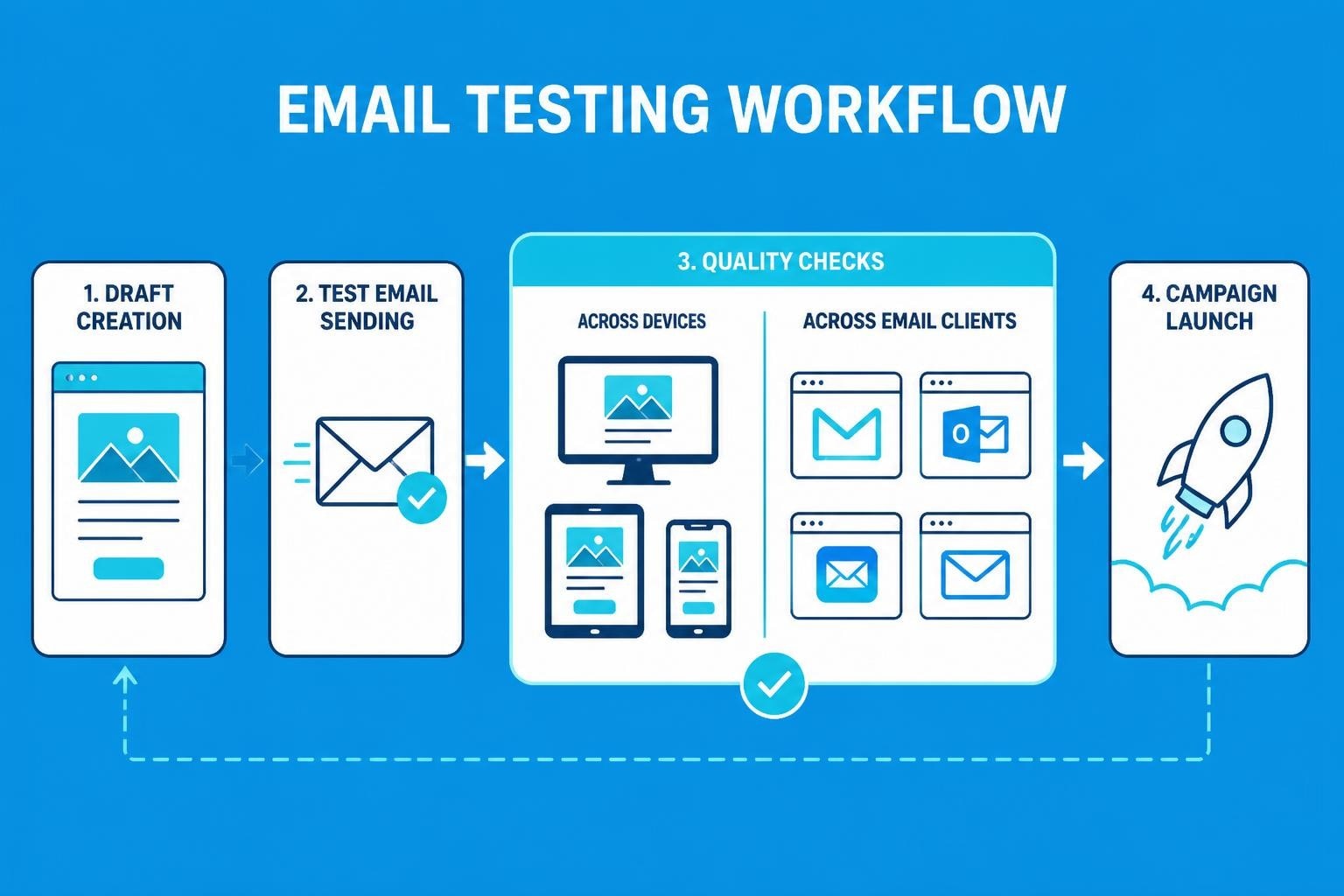
Email marketing remains one of the most powerful tools for small businesses to connect with customers, but sending campaigns without proper testing can damage your brand reputation and waste marketing resources. Before you launch any email campaign, understanding how to create test email messages that reveal potential issues is essential for achieving professional results. This comprehensive guide walks you through every aspect of test email creation, from initial setup to final quality assurance checks, ensuring your campaigns perform flawlessly when they reach your subscribers' inboxes.
Why Test Emails Matter for Your Business Success
Email testing serves as your safety net against costly mistakes that could undermine customer trust. When you create test email versions of your campaigns, you protect your business from broken links, rendering issues, and embarrassing typos that slip through initial drafts.
The financial impact of untested emails extends beyond immediate campaign performance. A single poorly tested email can result in unsubscribes, spam complaints, and damage to your sender reputation that affects future deliverability. Small businesses particularly cannot afford these setbacks, as each subscriber represents valuable revenue potential.
Consider these critical benefits of thorough email testing:
- Improved deliverability rates through proper formatting and content verification
- Enhanced user experience across different devices and email clients
- Higher conversion rates from properly functioning calls-to-action
- Professional brand image maintained through error-free communications
- Reduced unsubscribe rates resulting from better-quality content
When small businesses invest time to create test email campaigns, they demonstrate respect for their audience whilst protecting their marketing investment. According to comprehensive email testing strategies, businesses that implement systematic testing protocols experience significantly better campaign performance.
Understanding Different Types of Email Testing
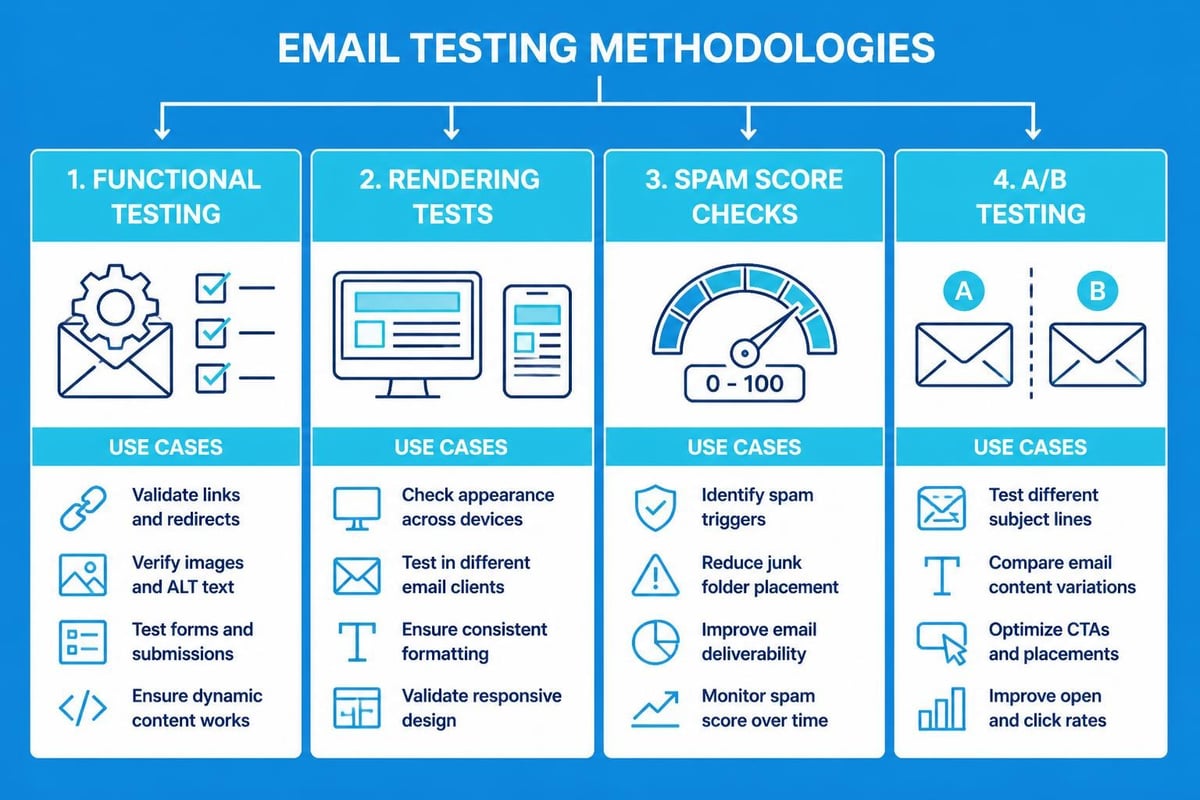
Email testing encompasses multiple methodologies, each serving distinct purposes in your quality assurance process. Knowing which approach fits your specific needs helps you create test email workflows that catch issues before they reach customers.
Functional Testing
Functional testing verifies that every interactive element within your email operates correctly. When you create test email messages for functional testing, you examine links, buttons, forms, and dynamic content to ensure seamless user interactions.
This testing phase should include:
- Clicking every hyperlink to verify correct destinations
- Testing form submissions and data capture mechanisms
- Verifying personalization tokens display proper information
- Checking image loading and alternative text functionality
- Confirming unsubscribe links function properly
Rendering and Display Testing
Different email clients interpret HTML and CSS differently, making rendering tests essential. Your beautifully designed template might appear perfect in Gmail but break completely in Outlook 2019.
| Email Client | Market Share | Common Issues |
|---|---|---|
| Apple Mail | 58% | Image blocking, dark mode variations |
| Gmail | 28% | CSS limitations, responsive design |
| Outlook | 8% | Table rendering, font substitutions |
| Yahoo Mail | 3% | Background images, button styling |
When you create test email versions for rendering tests, examine how your message appears across these major platforms. The industry best practices for email testing emphasize checking emails on both desktop and mobile devices to capture all potential display variations.
Spam Filter Testing
Even perfectly designed emails can land in spam folders if they trigger filtering algorithms. Testing your content against spam filters before sending helps ensure inbox placement. Elements like excessive capitalization, certain trigger words, or poor sender authentication can all contribute to spam classification.
Setting Up Your Test Email Infrastructure
Establishing a reliable testing environment requires both technical setup and procedural planning. Many small businesses rush this foundational step, but proper infrastructure saves countless hours of troubleshooting later.
Creating dedicated test email accounts forms the cornerstone of effective testing. Rather than using personal email addresses, establish accounts across major email providers specifically for testing purposes. This approach, detailed in comprehensive testing account guidance, allows you to maintain consistent testing conditions whilst protecting production data.
Your test infrastructure should include:
- Gmail account for Google Workspace testing
- Outlook.com account for Microsoft environment testing
- Yahoo Mail account for alternative provider testing
- Apple Mail access via iOS device or macOS
- Mobile email app on both iOS and Android devices
Beyond basic accounts, consider implementing test email aliases that help organize different testing scenarios. Using email address generation techniques, you can create multiple test addresses without maintaining separate accounts.
Step-by-Step Process to Create Test Email Campaigns
The actual process to create test email messages follows a systematic approach that builds quality into every stage. Following these steps consistently helps establish reliable testing habits that protect your email marketing effectiveness.
Preparation Phase
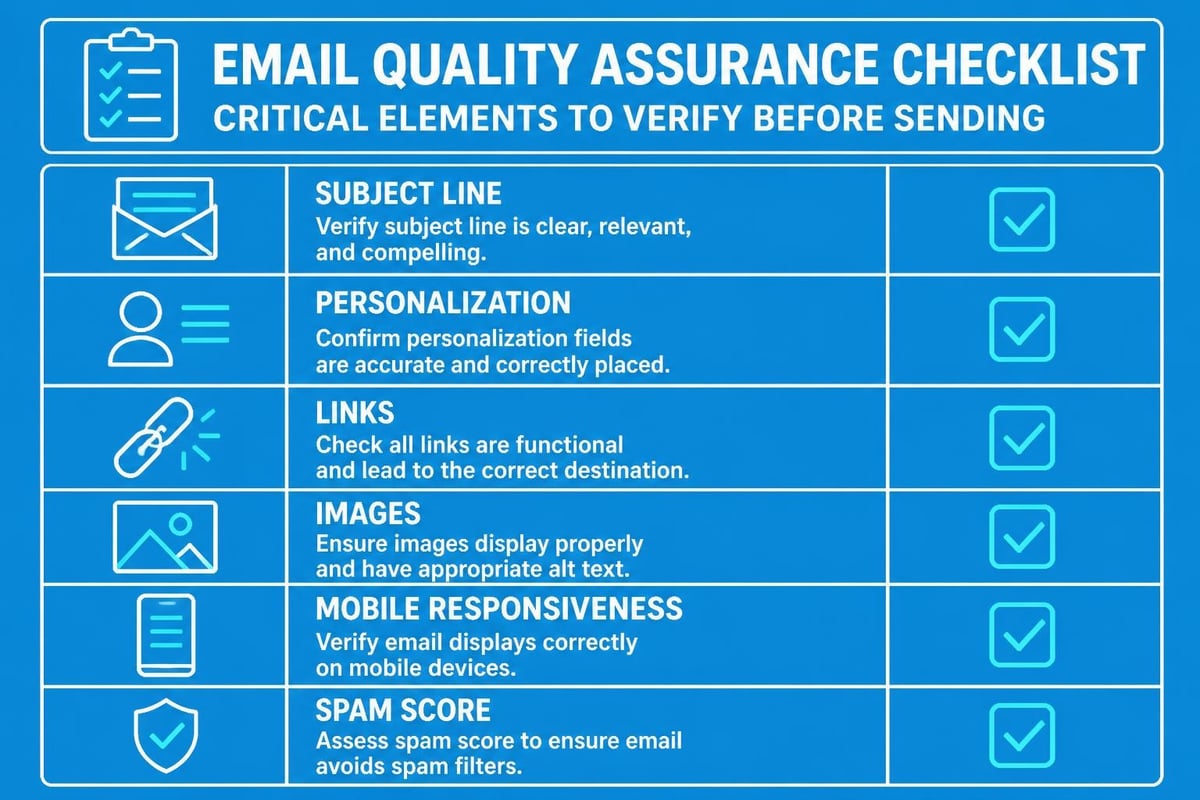
Before sending any test emails, prepare your testing checklist and environment. Review your campaign objectives, identify critical elements requiring verification, and ensure your test accounts are accessible.
Document the specific aspects you need to verify:
- Subject line clarity and appeal
- Preview text optimization
- Header and hero image display
- Body content formatting and readability
- Call-to-action button functionality
- Footer information and compliance links
Sending Your First Test Email
Most email marketing platforms, including those designed for small businesses, provide built-in functionality to create test email sends. Access your campaign draft and locate the test email option, typically found near the send button or in campaign settings.
When you create test email sends, input multiple test addresses to cover different email clients. Send to at least three different providers simultaneously to catch platform-specific issues quickly. Oracle's email testing documentation provides detailed technical guidance for enterprise platforms, though the principles apply universally.
Wait several minutes after sending before checking results. Email delivery isn't instantaneous, and checking too quickly can create false urgency or missed observations.
Comprehensive Review Process
Open each test email in its respective client and methodically work through your checklist. Don't simply glance at the message; actively interact with every element.
| Element | Desktop Check | Mobile Check |
|---|---|---|
| Subject Line | Truncation point | Character limit display |
| Images | Loading speed, sizing | Responsive scaling |
| Text Content | Readability, spacing | Font size, line breaks |
| Buttons/Links | Hover states, clicks | Touch target size |
| Layout | Column alignment | Single-column rendering |
Take screenshots of any issues discovered during testing. Visual documentation helps your team understand problems and verify fixes. When testing reveals significant issues, implement corrections and create test email sends again before proceeding.
Advanced Testing Techniques for Better Results
Once you master basic test email creation, advanced techniques help you refine campaigns for optimal performance. These methods require additional investment but deliver measurable improvements in engagement and conversion.
A/B Testing Integration
While different from functional testing, A/B testing should complement your quality assurance process. When you create test email variants for split testing, you gather data about subscriber preferences that inform future campaigns.
According to email A/B testing best practices, effective split tests isolate single variables such as subject lines, send times, or call-to-action wording. Small businesses benefit particularly from testing subject lines and preview text, as these elements significantly impact open rates.
Develop clear hypotheses before conducting A/B tests:
- Hypothesis: Emoji in subject lines will increase open rates for our retail audience
- Test: Subject line with emoji versus text-only subject line
- Metric: Open rate measured over 24 hours
- Sample size: 1,000 subscribers per variant
Seed List Testing
Professional marketers maintain seed lists containing numerous email addresses across different providers and inbox types. These lists allow you to create test email distributions that simulate real campaign sends whilst maintaining control over recipients.
Building an effective seed list involves recruiting team members, trusted partners, or creating multiple test accounts yourself. Distribute these addresses across promotional tabs, spam folders, and primary inboxes to understand how different configurations affect delivery.
Device and Client Matrix Testing
Comprehensive testing requires checking emails across multiple device and client combinations. The number of possible combinations can seem overwhelming, but prioritizing based on your audience analytics makes this manageable.
Review your email analytics to identify which email clients and devices your subscribers use most frequently. Focus your testing efforts on the top three to five combinations that represent 80% or more of your audience.
Common Mistakes When Creating Test Emails
Even experienced marketers fall into testing traps that undermine campaign effectiveness. Recognizing these common errors helps you avoid them whilst building better testing protocols.
The single biggest mistake is skipping test emails entirely. Time pressure or overconfidence leads some small businesses to send campaigns without testing, gambling that everything will work properly. This approach inevitably results in problems that could have been easily prevented.
Additional common mistakes include:
- Testing only in your primary email client without checking others
- Reviewing test emails exclusively on desktop whilst ignoring mobile
- Failing to click through every link to verify destinations
- Overlooking personalization token testing with sample data
- Ignoring spam score assessments before sending
- Not documenting issues discovered during testing
- Sending tests to the same address repeatedly without variation
When you create test email workflows, build safeguards against these mistakes. The comprehensive testing guide for flawless campaigns emphasizes sending to real inboxes across various devices to catch issues that only appear in actual delivery scenarios.
Another critical mistake involves testing personalization inadequately. Dynamic content and merge tags can fail in unexpected ways, displaying raw code or incorrect data. Always create test email sends using actual subscriber data samples to verify personalization works correctly.
Tools and Resources for Efficient Email Testing
Modern email marketing platforms provide built-in testing capabilities, but specialized tools offer enhanced functionality for comprehensive quality assurance. Selecting appropriate resources depends on your testing requirements, budget, and technical expertise.
Email Marketing Platform Features
Most reputable email marketing platforms, including solutions designed specifically for email marketing for small businesses, include native test email functionality. These features typically allow you to create test email sends with a few clicks, entering recipient addresses directly within your campaign builder.
Platform-integrated testing offers several advantages:
- Seamless workflow without switching between applications
- Accurate rendering since tests use the same sending infrastructure
- Personalization testing using actual subscriber data
- Quick iteration between testing and editing
Dedicated Testing Tools
For businesses requiring advanced testing capabilities, dedicated tools provide comprehensive rendering previews, spam score analysis, and accessibility checking. According to the 2026 email testing tools overview, specialized platforms can test emails across 90+ email clients and devices simultaneously.
| Tool Category | Primary Use | Best For |
|---|---|---|
| Rendering Checkers | Visual preview across clients | Design-heavy campaigns |
| Spam Analyzers | Deliverability prediction | Cold outreach emails |
| Link Validators | Broken link detection | Content-rich newsletters |
| Accessibility Tools | ADA compliance checking | Inclusive marketing |
Browser Developer Tools
Technical marketers can leverage browser developer tools to inspect email HTML and troubleshoot rendering issues. While more advanced, these free tools provide detailed insights into how email clients interpret your code.
Building a Sustainable Test Email Routine
Consistency transforms email testing from occasional practice into reliable quality assurance. Small businesses benefit enormously from establishing testing routines that become second nature, ensuring every campaign meets professional standards.
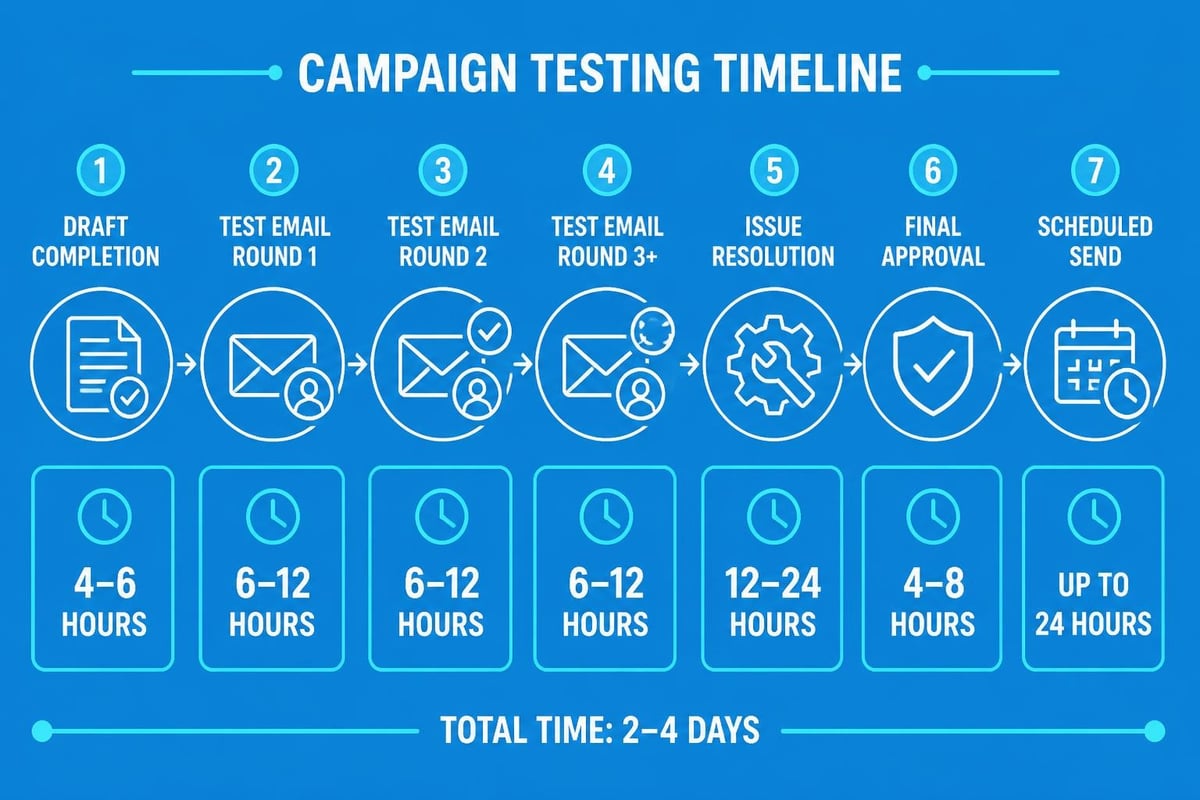
Schedule dedicated testing time before every campaign send. Rather than treating testing as an afterthought, block calendar time specifically for quality assurance. A typical testing session for a standard newsletter might require 30-45 minutes, whilst complex promotional campaigns may need several hours across multiple days.
Create standardized testing checklists customized to your business needs. While comprehensive checklists ensure thoroughness, overly complex processes create friction that tempts teams to skip steps. Balance completeness with practicality, focusing on elements that historically caused issues for your campaigns.
Document your testing findings in a shared location accessible to your entire team. This knowledge base helps new team members understand testing requirements whilst providing historical context for recurring issues. When you create test email workflows, reference previous problems to ensure similar mistakes don't repeat.
Consider implementing a two-person review process for critical campaigns. Having fresh eyes examine test emails catches issues that the original creator might overlook due to familiarity with the content. This practice, common in professional email marketing services, significantly reduces error rates.
Optimizing Test Emails for Mobile Devices
Mobile email opens now exceed desktop opens for most industries, making mobile optimization crucial for campaign success. When you create test email campaigns, mobile testing deserves equal or greater attention than desktop verification.
Mobile-Specific Testing Considerations
Mobile devices present unique challenges that desktop testing cannot reveal. Screen size limitations, touch interface requirements, and varying email client implementations all affect how subscribers experience your messages.
Focus on these mobile-specific elements:
- Subject line length: Mobile displays truncate subject lines earlier than desktop
- Touch target sizing: Buttons and links need adequate spacing for finger taps
- Single-column layouts: Multi-column designs often break on small screens
- Image file sizes: Large images slow loading on cellular connections
- Font readability: Small text becomes illegible on mobile screens
Testing on Actual Devices
While desktop email clients offer mobile preview modes, nothing replaces testing on actual smartphones and tablets. Emulators approximate mobile rendering but miss platform-specific quirks that affect real-world performance.
Maintain access to both iOS and Android devices for testing. Borrow devices from team members if purchasing dedicated test devices isn't feasible. Send test emails to accounts configured on these devices and review them as your subscribers would.
Pay particular attention to dark mode rendering, as both iOS and Android support automatic theme switching. Your carefully designed light-background template might become unreadable when displayed with dark mode active.
Measuring and Improving Your Testing Process
Effective testing evolves based on results and feedback. Track which issues your testing discovers and monitor whether similar problems recur across campaigns. This data-driven approach helps you refine testing protocols for maximum efficiency.
Maintain a testing issue log that categorizes problems by type and frequency. After several campaigns, patterns emerge revealing your team's common weak points. Perhaps personalization tokens frequently contain errors, or certain link types consistently break. Identifying these patterns allows you to implement preventative measures rather than repeatedly catching the same mistakes.
Calculate the time investment required for testing and compare it against the problems prevented. While comprehensive testing demands resources, the alternative-sending flawed campaigns-costs far more in subscriber trust, revenue, and reputation.
Gather feedback from your testing team about process efficiency. Are certain checklist items redundant? Do specific testing steps consume disproportionate time relative to their value? Regular process reviews help streamline testing without sacrificing quality.
Consider the correlation between testing thoroughness and campaign performance metrics. Campaigns that undergo rigorous testing should demonstrate better engagement rates, fewer unsubscribes, and higher conversions. Tracking these relationships validates your testing investment and motivates continued diligence.
Integrating Testing into Your Email Marketing Workflow
Testing works best when seamlessly integrated into your overall email marketing process rather than treated as a separate activity. Design workflows that make testing automatic and unavoidable, removing the temptation to skip quality assurance steps.
Many successful email marketers implement a campaign approval workflow that requires documented testing before proceeding to schedule. When you create test email protocols as mandatory checkpoints, testing becomes part of your standard operating procedure rather than an optional step.
Configure your email marketing platform to enforce testing requirements. Some systems allow administrators to restrict campaign scheduling until test sends have been completed. While this might seem heavy-handed, it prevents accidental sends whilst campaigns still contain errors.
Build testing time into your campaign timeline planning. If your newsletter sends every Wednesday morning, establish a Tuesday afternoon testing window that allows sufficient time to identify and correct issues. Rushing testing due to tight deadlines inevitably results in overlooked problems.
Train all team members who create emails on proper testing procedures. Testing shouldn't fall solely on one person; everyone involved in campaign creation should understand how to create test email sends and interpret results. This distributed knowledge prevents bottlenecks and ensures consistent quality regardless of who builds campaigns.
Mastering the ability to create test email campaigns transforms your email marketing from uncertain experimentation into reliable, professional communication. By implementing systematic testing protocols, maintaining appropriate tools, and building testing into your standard workflow, you protect your brand reputation whilst maximizing campaign effectiveness. Small businesses particularly benefit from thorough testing, as each email represents a valuable touchpoint with customers who expect professional, error-free communications. Astonish Email provides the tools and support small businesses need to implement professional email testing workflows without enterprise complexity, helping you send campaigns with confidence every time.