Use a Professional Email Address for Business Success
June 9, 2026
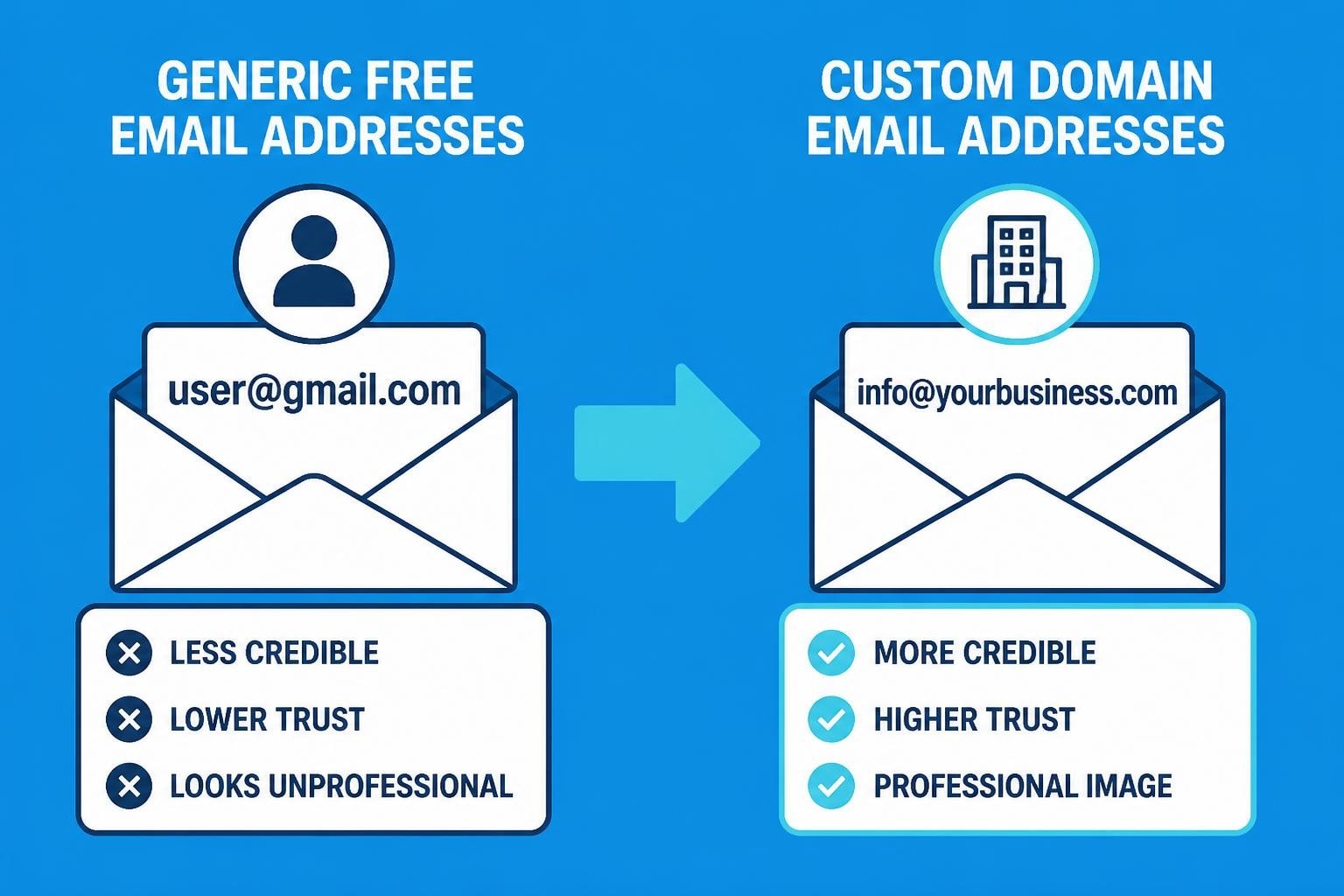
Your email address is often the first impression you make in business communications. Whether you're reaching out to a potential client, networking with industry peers, or following up on a sales lead, the email address you use speaks volumes about your professionalism and credibility. For small business owners, the decision to use a professional email address can be the difference between landing a contract and being dismissed as unprofessional. This comprehensive guide explores why professional email addresses matter, how to create one that represents your brand effectively, and the tangible benefits they bring to your business communications.
Why Professional Email Addresses Matter for Small Businesses
First impressions in the digital age are formed in milliseconds. When a potential customer receives an email from "[email protected]" versus "[email protected]", they immediately form different perceptions about the sender's legitimacy and professionalism. The former signals an established business with proper infrastructure, while the latter suggests either a startup operating on a shoestring budget or, worse, a potential scammer.
Trust is the foundation of business relationships, and your email address plays a crucial role in establishing that trust. A custom domain email address reinforces your brand with every message you send. When recipients see your company name in your email address, they're constantly reminded of your brand identity, creating consistency across all touchpoints.
The Cost of Unprofessional Email Addresses
Research consistently shows that businesses using free email providers like Gmail, Yahoo, or Hotmail for business communications experience lower response rates and decreased trust levels. Clients and partners expect legitimate businesses to invest in proper email infrastructure, and failing to do so raises red flags.
Consider these real-world implications:
- Lost opportunities: Many B2B decision-makers automatically filter or ignore emails from free email providers
- Spam folder placement: Email servers are more likely to flag messages from generic providers as potential spam
- Brand dilution: Every email is a missed branding opportunity when your domain name doesn't appear in your address
- Security concerns: Free email addresses are perceived as less secure and more vulnerable to phishing attempts
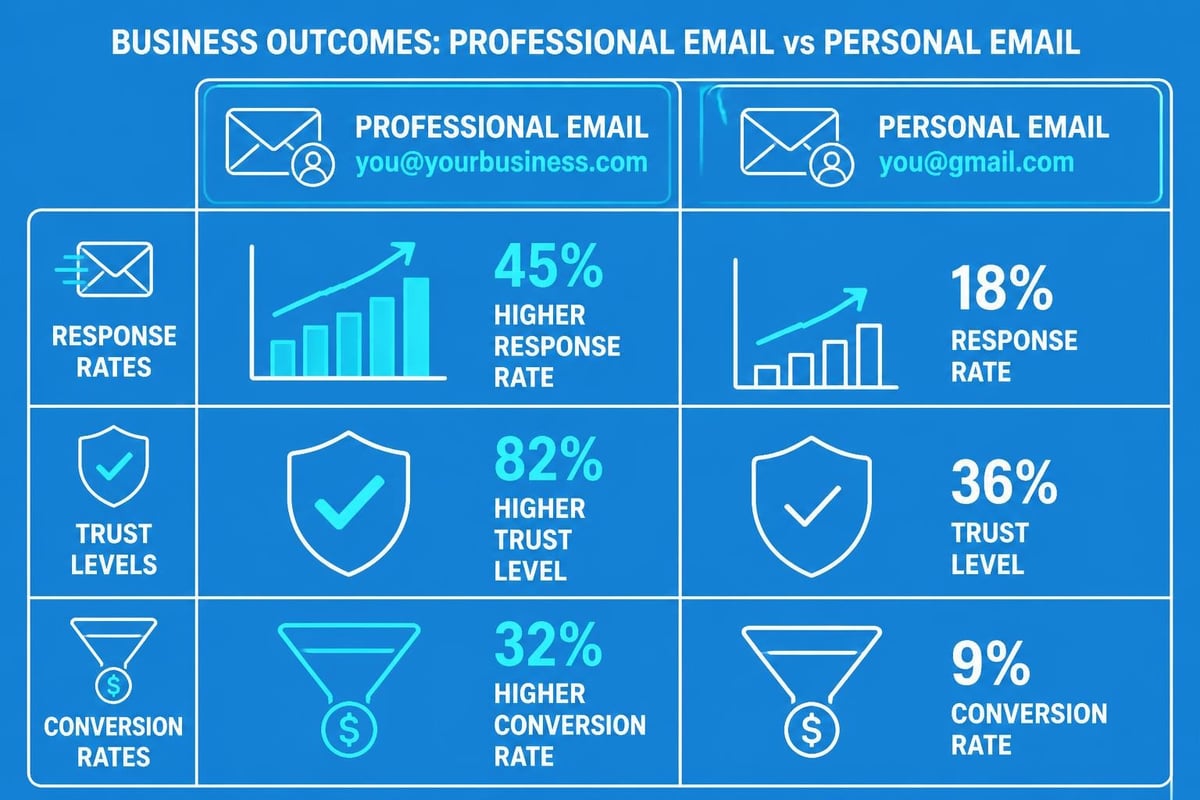
Components of a Professional Email Address
Understanding what makes an email address professional is essential before creating one. A professional email address consists of several key components that work together to project credibility and facilitate easy communication. The proper email structure combines clarity with brand representation to create maximum impact.
Domain Name Selection
Your domain name is the portion that appears after the @ symbol, and it should match your business name or website. This creates instant recognition and reinforces brand consistency across all communications. For businesses operating in the UK, choosing a .co.uk domain can establish local credibility, though .com remains universally acceptable.
The username portion (everything before the @ symbol) should follow these guidelines:
- Use your actual name for personal business communications
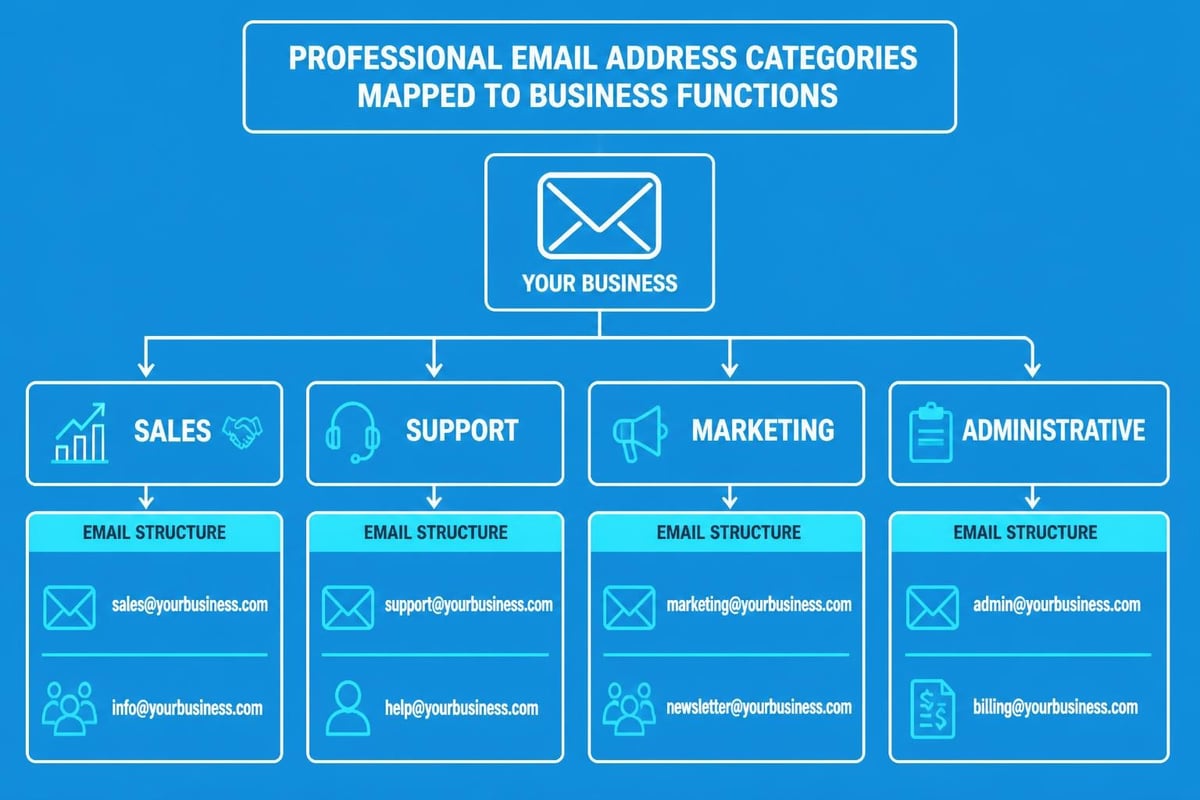
- Employ department names for team inboxes (sales@, support@, info@)
- Keep it simple and easy to spell
- Avoid numbers, underscores, or special characters unless absolutely necessary
- Maintain consistency across team members
| Email Format | Use Case | Professionalism Level |
|---|---|---|
| [email protected] | Individual communications | High |
| [email protected] | Smaller businesses, personal brand | High |
| [email protected] | Team communications | High |
| [email protected] | Personal use only | Low |
| [email protected] | Not recommended for business | Very Low |
Best Practices for Creating Your Professional Email
When you use a professional email address, you're making a statement about how seriously you take your business. The creation process involves several strategic decisions that will affect your communications for years to come. Selecting the right format requires careful consideration of both current needs and future growth.
Formatting Standards to Follow
Consistency is paramount when establishing your professional email system. If you're a solo entrepreneur or small business owner, your email should reflect your role and make it easy for recipients to remember and contact you. Here are proven formats:
For individual professionals:
For departments and teams:
- [email protected] (friendly, approachable)
- [email protected] (formal, traditional)
- [email protected] (informational queries)
- [email protected] (sales enquiries)
- [email protected] (customer service)
When setting up multiple email addresses for your small business, maintaining a consistent naming convention across all accounts creates a professional appearance and makes it easier for customers to guess the correct contact for their needs.
Common Mistakes to Avoid
Even when businesses decide to use a professional email address, they often make critical errors that undermine their efforts. Here's what to avoid:
Using numbers: Unless numbers are part of your business name, avoid them entirely. "[email protected]" suggests you weren't the first John Smith, damaging credibility.
Excessive length: Keep email addresses concise. "[email protected]" is cumbersome and prone to typos.
Unclear abbreviations: "[email protected]" might save characters, but it's difficult to remember and doesn't clearly identify the sender.
Generic terms only: Using only "info@" or "contact@" without providing named contacts can seem impersonal for relationship-based businesses.
If you're looking to establish a small business email address that stands out, focus on clarity and memorability rather than creativity.
Setting Up Your Professional Email Infrastructure
Once you've selected the perfect format, the technical setup process begins. While this might seem daunting, modern email hosting services have streamlined the process significantly. Most small businesses have several options for hosting their professional email accounts, each with distinct advantages.
Choosing Your Email Provider
Your choice of email provider affects deliverability, storage capacity, security features, and integration capabilities. Consider these factors:
Cloud-based email suites like Google Workspace or Microsoft 365 offer robust features including generous storage, calendar integration, video conferencing, and collaborative tools. These solutions typically cost between £4-£10 per user monthly but provide enterprise-level functionality.
Web hosting packages often include email hosting as part of their service. If you already have a website host, check whether email accounts are included in your package. This can be the most cost-effective option for small businesses.
Dedicated email marketing platforms might offer professional email sending addresses but aren't typically suitable for day-to-day business communications. However, when you're ready to create email campaigns, having a separate system for marketing versus operations makes sense.
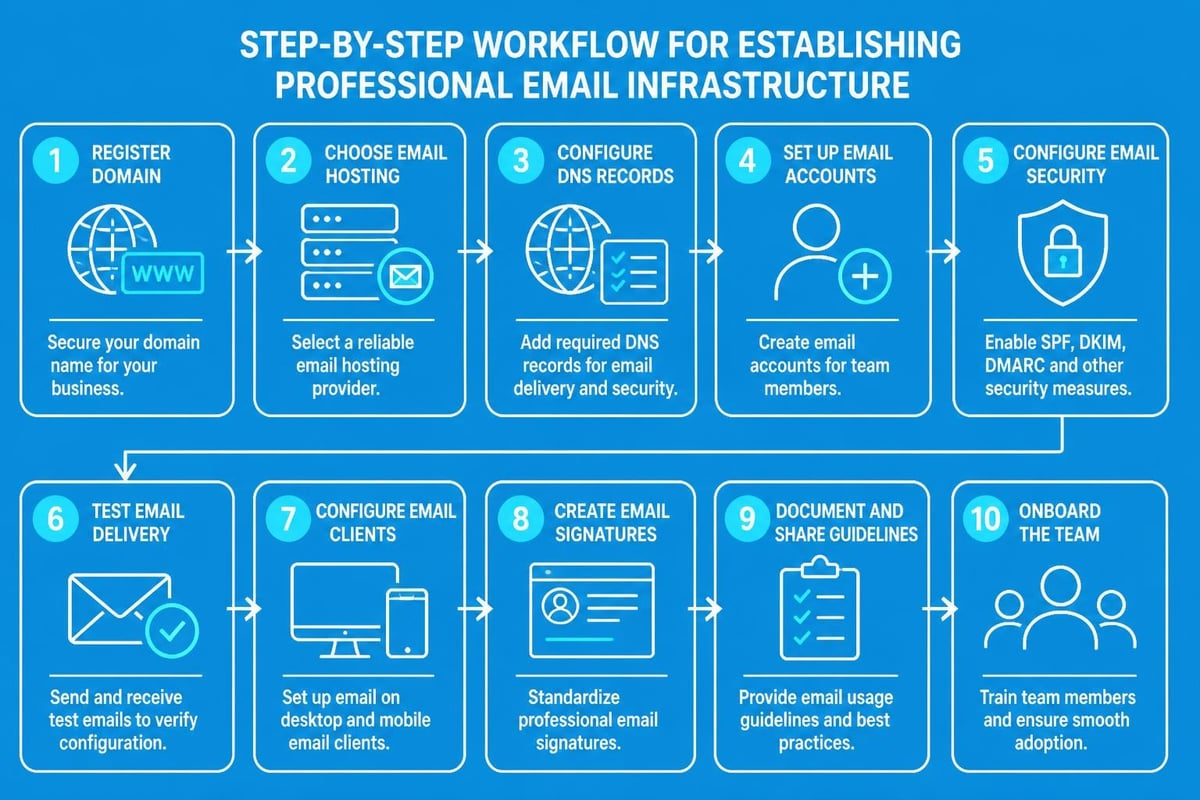
Email Etiquette and Professional Communication
Having a professional email address is only the first step; how you use it matters equally. When you use a professional email address, you're committing to maintaining professional standards in all your communications. Proper email etiquette rules ensure your messages are well-received and action-oriented.
Essential Email Communication Standards
Professional email communication extends beyond your address to encompass your entire message structure. Your signature should include your full name, job title, company name, and contact information. Including your website URL and social media handles (when appropriate) provides recipients with multiple ways to engage with your business.
Subject lines deserve particular attention. A clear, specific subject line increases open rates and helps recipients prioritize their inbox. Avoid generic subjects like "Quick question" or "Following up" in favour of descriptive alternatives like "Proposal for Q2 marketing campaign" or "Invoice #1234 payment confirmation".
Writing Effective Business Emails
The body of your professional emails should be concise, well-structured, and purposeful. Crafting the perfect email requires balancing professionalism with personality. Start with an appropriate greeting, get to the point quickly, and include a clear call to action.
Key elements of effective business emails:
- Clear opening: State your purpose in the first sentence
- Scannable format: Use short paragraphs, bullet points, and white space
- Professional tone: Match your audience's formality level
- Specific requests: Make it easy for recipients to respond or take action
- Proper closing: Use appropriate sign-offs and complete signatures
When managing email campaigns for your small business, platforms like Astonish Email streamline the process whilst maintaining professional standards. The key is ensuring every email, whether one-to-one or broadcast, reflects your brand's professionalism.
Professional Email Addresses for Different Business Scenarios
Different business contexts require different email strategies. Understanding when and how to use a professional email address in various scenarios ensures you're always presenting your best face to clients, partners, and prospects. Small businesses often need multiple email addresses serving different functions within their organisation.
Sales and Client Communications
Your sales team's email addresses should clearly identify both the individual and their role. This transparency builds trust and makes it easier for prospects to direct future enquiries appropriately. Consider these approaches:
Individual sales representatives: [email protected] allows for personal relationship building whilst maintaining brand association. When a sales representative leaves, their email can be forwarded to their replacement, ensuring continuity.
General sales enquiries: [email protected] provides a catch-all for inbound leads. This address should be monitored by your entire sales team or routed through a CRM system to ensure prompt responses.
For businesses exploring the best business email options, remember that your sales team's responsiveness often determines whether prospects become customers.
Customer Support and Service
Customer service communications require a delicate balance between professionalism and approachability. Support email addresses should be easily memorable and clearly indicate their purpose. Common effective formats include:
Many small businesses make the mistake of using only a personal email address for support enquiries. This creates bottlenecks when that individual is unavailable and makes it difficult to scale as the business grows. Team inboxes allow multiple staff members to monitor and respond to customer needs efficiently.
Marketing and Newsletter Communications
When sending marketing emails, newsletters, or promotional content, you'll want to use a professional email address that's specifically designated for this purpose. This serves several important functions:
- Segregates marketing from operational emails: Keeps your primary business email clean and focused
- Improves deliverability: Email servers can better categorise and deliver your messages appropriately
- Provides clear unsubscribe paths: Compliance with marketing regulations becomes easier to manage
- Enables better tracking: Marketing-specific addresses can integrate with analytics tools more effectively
Common marketing email addresses include marketing@, news@, or [email protected]. These addresses should still use your professional domain to maintain brand consistency and trust. If you're ready to establish your email marketing system, ensure it integrates seamlessly with your other business communications.
Regional Considerations for UK Businesses
For small businesses operating in the United Kingdom, certain conventions and expectations apply to professional email addresses. Understanding these nuances helps you better connect with your local market whilst maintaining international appeal.
Domain Extensions and Local Credibility
UK businesses have several domain options, each carrying different connotations. The .co.uk extension is the most recognised and trusted domain for British businesses, immediately signalling to recipients that they're dealing with a UK-based company. This can be advantageous when building local trust and credibility.
Alternatively, .uk domains (without the "co") offer a shorter, more modern alternative that's gaining popularity. International businesses operating in the UK might opt for .com domains to signal their global reach, though this can sometimes reduce local trust markers.
When you're establishing a UK business email address, consider your primary market and expansion plans. If you primarily serve UK customers, .co.uk provides the strongest local credibility signal.
Compliance and Data Protection
UK businesses must comply with GDPR and UK data protection regulations when collecting and storing email addresses. This extends to how you use a professional email address for marketing purposes. Ensure your email practices include:
- Clear consent mechanisms: Obtain explicit permission before adding contacts to marketing lists
- Easy unsubscribe options: Every marketing email must include a simple opt-out method
- Proper data storage: Email communications containing personal data must be stored securely
- Retention policies: Implement clear email retention and deletion policies
Understanding your data retention policy obligations ensures your professional email practices remain compliant whilst building customer trust.
Transitioning from Personal to Professional Email
Many small business owners begin their ventures using personal email addresses before realising the need to upgrade. Transitioning to a professional email system requires planning to avoid communication disruptions and maintain customer relationships.
Migration Strategies
The transition process involves several critical steps:
- Set up your new professional email address at least two weeks before announcing the change
- Configure email forwarding from your old address to your new one to catch any messages sent to the previous address
- Update your email signature to include both addresses during the transition period
- Notify key contacts about the change through a dedicated announcement email
- Update all online profiles including your website, social media accounts, business directories, and professional networks
- Maintain dual monitoring of both addresses for at least 3-6 months to ensure nothing falls through the cracks
Communication Templates
When announcing your new professional email address, craft a message that frames the change positively:
Subject: Updated Contact Information - [Your Business Name]
Body: "We're excited to announce that as part of our continued growth and commitment to professional service, we've updated our email communications. Please update your records with our new email address: [[email protected]]. This change allows us to serve you better with improved response times and enhanced security. For the next three months, emails to our previous address will still reach us, but we encourage you to update your contacts at your earliest convenience."
This approach positions the change as an improvement rather than an inconvenience, maintaining positive customer relationships throughout the transition.
Measuring the Impact of Professional Email
Once you use a professional email address consistently, you should track the tangible benefits it brings to your business communications. While some advantages are immediately apparent, others require measurement over time to fully appreciate.
Key Performance Indicators
Monitor these metrics to assess your professional email's effectiveness:
| Metric | What It Measures | Expected Improvement |
|---|---|---|
| Email open rates | Recipient trust and engagement | 15-30% increase |
| Response rates | Message effectiveness | 20-40% increase |
| Spam folder placement | Email deliverability | 50-70% reduction |
| Brand mention frequency | Brand awareness | Gradual increase |
| Professional credibility rating | Customer perception | Qualitative improvement |
Response time tracking becomes easier with professional email systems that often include analytics and reporting features. You can monitor how quickly your team responds to enquiries, identify bottlenecks, and improve customer service standards.
Customer feedback provides qualitative insights into how your professional email affects perception. Include questions about communication preferences in customer surveys to gauge whether your email professionalism contributes to overall satisfaction.
Long-term Business Benefits
The cumulative effect of using a professional email address extends far beyond individual messages. Over time, you'll notice:
- Increased referral rates: Satisfied clients are more likely to recommend businesses that appear established and professional
- Higher conversion rates: Prospects move through your sales funnel more smoothly when trust isn't questioned
- Improved team collaboration: Professional email systems often include shared calendars, document collaboration, and integrated communication tools
- Better talent attraction: Job seekers view companies with professional email infrastructure as more established and desirable employers
For growing businesses, these benefits compound significantly. When you're ready to scale your email communications, having professional infrastructure already in place eliminates one major obstacle to growth.
Advanced Professional Email Strategies
Once your basic professional email infrastructure is established, several advanced strategies can further enhance your business communications. These techniques separate businesses that simply use professional emails from those who leverage them strategically.
Email Alias Management
Email aliases allow multiple email addresses to funnel into a single inbox, providing flexibility without complexity. For example, you might create info@, sales@, and contact@ addresses that all deliver to the same primary inbox. This gives customers options whilst keeping your email management simple.
Strategic alias use includes:
- Product-specific addresses: Different products or services can have dedicated contact points
- Campaign tracking: Create unique addresses for different marketing campaigns to track source effectiveness
- Event management: Temporary aliases for conferences, webinars, or special promotions
- Department routing: As your business grows, aliases can later be converted to dedicated inboxes
Email Authentication and Security
Professional email addresses should be protected with robust security measures. Implementing these protocols protects both your business and your recipients:
SPF (Sender Policy Framework) records verify that emails sent from your domain are authorised, reducing the likelihood of your domain being used for spam or phishing.
DKIM (DomainKeys Identified Mail) adds a digital signature to your emails, proving they haven't been altered in transit and confirming they genuinely come from your domain.
DMARC (Domain-based Message Authentication) builds on SPF and DKIM to provide comprehensive email authentication, significantly improving deliverability rates and protecting your brand reputation.
These technical implementations might sound complex, but most professional email providers configure them automatically or provide simple setup wizards. The investment of time pays dividends in improved deliverability and security.
Integration with Business Systems
Modern professional email addresses should integrate seamlessly with your broader business technology stack. This connectivity multiplies the value you derive from your email infrastructure whilst streamlining operations.
CRM and Customer Management
Integrating your professional email with customer relationship management (CRM) systems creates powerful synergies. When you use a professional email address connected to your CRM:
- Automatic logging: All email communications are automatically recorded against customer records
- Context preservation: Sales teams can see complete communication histories when engaging prospects
- Task automation: Emails can trigger workflows, reminders, and follow-up sequences
- Reporting enhancement: Email metrics contribute to comprehensive customer engagement analytics
Popular CRM platforms like Salesforce, HubSpot, and Zoho integrate directly with professional email systems, eliminating manual data entry and reducing errors.
Project Management Tools
For service-based businesses and creative agencies, integrating email with project management platforms creates seamless workflows. Tools like Asana, Monday.com, and Trello can convert emails into tasks, link communications to projects, and ensure nothing falls through the cracks.
When seeking professionals to build these integrations, platforms connecting businesses with skilled developers like FreelanceDEV can help you find the right technical expertise for your specific needs.
Email Marketing Platform Integration
Your operational email addresses should work harmoniously with your email marketing systems. While you wouldn't typically send mass marketing emails from your personal professional address, integration ensures consistency in:
- Sender reputation: Your domain's overall email reputation affects both marketing and operational deliverability
- Brand consistency: Marketing emails should use professional addresses within your domain (like [email protected])
- Compliance tracking: Unsubscribe requests and preferences should sync across all systems
Platforms specialising in email marketing for small businesses understand these integration needs and build them into their core functionality.
Building Your Professional Email Strategy
Success with professional email requires more than just setting up addresses; it demands a comprehensive strategy that aligns with your business goals. When you use a professional email address as part of a broader communication strategy, you maximise its impact.
Team Training and Guidelines
As your business grows and more team members gain access to professional email addresses, consistent standards become crucial. Develop email guidelines covering:
- Response time expectations: Set clear standards for how quickly different email types should receive replies
- Tone and voice: Ensure all team members understand your brand's communication style
- Signature requirements: Standardise email signatures across the organisation for professional consistency
- Security protocols: Train staff on recognising phishing attempts and protecting sensitive information
- Escalation procedures: Define when and how to escalate email enquiries to management
Create a simple reference document that team members can consult when uncertain about email best practices. Regular training sessions ensure everyone stays aligned as your business evolves.
Monitoring and Continuous Improvement
Professional email effectiveness should be reviewed regularly. Schedule quarterly reviews examining:
- Volume trends: Are enquiries increasing, suggesting growing brand awareness?
- Response quality: Are customer satisfaction scores related to email communications improving?
- Deliverability issues: Are any emails being flagged as spam or bouncing?
- Team efficiency: Are response times meeting your established standards?
For businesses exploring opportunities in competitive job markets, ensuring your email communications stand out professionally is essential. If you're hiring talent in regions like Germany, platforms such as Fuchsjobs can connect you with professionals who understand the importance of business communication standards.
Professional Email for Remote and Distributed Teams
The rise of remote work has made professional email infrastructure even more critical. When team members work across different locations and time zones, email often becomes the primary asynchronous communication channel.
Establishing Clear Communication Channels
Remote teams benefit from clearly defined email purposes and channels:
- Individual addresses: Team members should have their own professional addresses for external communications
- Department addresses: Shared inboxes ensure coverage when individuals are unavailable
- Project-specific addresses: Temporary addresses for major projects keep communications organised
- Internal versus external: Consider whether internal team communications should use the same addresses as external client communications
Time zone considerations become important for distributed teams. Email signatures should include time zones, and auto-responders can set expectations about response times when team members are offline.
Collaboration Tools Integration
Professional email systems for remote teams should integrate with collaboration platforms like Slack, Microsoft Teams, or Google Chat. This allows team members to:
- Quickly share important emails with relevant colleagues
- Convert emails into tasks or discussion threads
- Maintain context across communication channels
- Reduce email overload by moving appropriate discussions to chat platforms
The goal is ensuring that when you use a professional email address, it serves as one component of a comprehensive communication ecosystem rather than operating in isolation.
Establishing and maintaining a professional email address is foundational to small business success in 2026. The credibility, trust, and brand consistency it provides directly impact customer relationships, conversion rates, and long-term growth potential. By following the best practices outlined here – from selecting the right format and provider to implementing security measures and integration strategies – you position your business for professional recognition and customer confidence. Whether you're just starting out or transitioning from personal email addresses, making this change signals your commitment to business excellence. When you're ready to complement your professional email infrastructure with powerful, easy-to-use email marketing capabilities, Astonish Email provides the perfect solution for small businesses looking to grow their audience and strengthen customer relationships through strategic email communications.